
New
Dec 21, 2021 11:37 AM
#7301

Shishio-kun said: triplepsycho said: Shishio-kun said: triplepsycho said: Shishio-kun said: triplepsycho said: Hi, I'm trying to use the Grid Style 4 here: https://myanimelist.net/forum/?topicid=1640096&show=0 but it seems like only imgur links work, and I'm unable to create an imgur account. Is there any way to use links from other similar websites? Thanks! Try postimage.org instead I tried that and a few other sites, could it have something to do with image size instead? Maybe, if it was a huge GIF or PNG. What part of the code are you trying to change and can you link to the image at all? Alright, so I was able to finally create an Imgur account, but it still doesn't work. I tried these: https://imgur.com/m0IpaXn https://imgur.com/BNZicCj https://imgur.com/cVIuna4 The first one is a PNG file, and the other two are JPG files. What part of the code are you trying to change, like post the lines of code /*ALL ANIME/MANGA BANNER BACKGROUND*/ .list-unit.all_anime .list-status-title:after { background-image: url(http://i.imgur.com/W6iKnWb.png); background-size: cover !important; height: 500px !important; } This is the code I was trying to change, though I've also tried it with other parts of the code without any success. |
  "Truth is always a cruel thing." |
Dec 21, 2021 11:49 AM
#7302

triplepsycho said: Shishio-kun said: triplepsycho said: Shishio-kun said: triplepsycho said: Shishio-kun said: triplepsycho said: Hi, I'm trying to use the Grid Style 4 here: https://myanimelist.net/forum/?topicid=1640096&show=0 but it seems like only imgur links work, and I'm unable to create an imgur account. Is there any way to use links from other similar websites? Thanks! Try postimage.org instead I tried that and a few other sites, could it have something to do with image size instead? Maybe, if it was a huge GIF or PNG. What part of the code are you trying to change and can you link to the image at all? Alright, so I was able to finally create an Imgur account, but it still doesn't work. I tried these: https://imgur.com/m0IpaXn https://imgur.com/BNZicCj https://imgur.com/cVIuna4 The first one is a PNG file, and the other two are JPG files. What part of the code are you trying to change, like post the lines of code /*ALL ANIME/MANGA BANNER BACKGROUND*/ .list-unit.all_anime .list-status-title:after { background-image: url(http://i.imgur.com/W6iKnWb.png); background-size: cover !important; height: 500px !important; } This is the code I was trying to change, though I've also tried it with other parts of the code without any success. You don't have a custom layout, you said you were using Grid Style 4 but its not on either list so the codes probably won't work for the default Anyways you need to change the background codes as I do in the video after you install the layout https://myanimelist.net/forum/?topicid=1640096 see the video, install the layout fresh, it'll show up on your list, then change the background image as I did in the video. And those type of image links also don't work. You need to use the image links as I do in the video https://imgur.com/m0IpaXn.png etc, not https://imgur.com/m0IpaXn |
 |
Dec 21, 2021 11:52 AM
#7303
Shishio-kun said: triplepsycho said: Shishio-kun said: triplepsycho said: Shishio-kun said: triplepsycho said: Shishio-kun said: triplepsycho said: Hi, I'm trying to use the Grid Style 4 here: https://myanimelist.net/forum/?topicid=1640096&show=0 but it seems like only imgur links work, and I'm unable to create an imgur account. Is there any way to use links from other similar websites? Thanks! Try postimage.org instead I tried that and a few other sites, could it have something to do with image size instead? Maybe, if it was a huge GIF or PNG. What part of the code are you trying to change and can you link to the image at all? Alright, so I was able to finally create an Imgur account, but it still doesn't work. I tried these: https://imgur.com/m0IpaXn https://imgur.com/BNZicCj https://imgur.com/cVIuna4 The first one is a PNG file, and the other two are JPG files. What part of the code are you trying to change, like post the lines of code /*ALL ANIME/MANGA BANNER BACKGROUND*/ .list-unit.all_anime .list-status-title:after { background-image: url(http://i.imgur.com/W6iKnWb.png); background-size: cover !important; height: 500px !important; } This is the code I was trying to change, though I've also tried it with other parts of the code without any success. You don't have a custom layout, you said you were using Grid Style 4 but its not on either list so the codes probably won't work for the default Anyways you need to change the background codes as I do in the video after you install the layout https://myanimelist.net/forum/?topicid=1640096 see the video, install the layout fresh, it'll show up on your list, then change the background image as I did in the video. And those type of image links also don't work. You need to use the image links as I do in the video https://imgur.com/m0IpaXn.png etc, not https://imgur.com/m0IpaXn Adding .png to the end of the link solved the problem, thank you :D |
"Truth is always a cruel thing." |
Dec 23, 2021 11:47 PM
#7304

| How to get rid of the PV/video icon in the anime list? I'm using this code .icon-watch, .icon-watch-pv { display: none !important;} and it's not working anymore. It looks like that the problem occur just today because yesterday everything was still ok. Maybe, some bug? |
真姫ちゃん! 何が好き? トマト よりも あ・な・た♡  |
Dec 24, 2021 12:21 AM
#7305

AkeZZZ said: How to get rid of the PV/video icon in the anime list? I'm using this code .icon-watch, .icon-watch-pv { display: none !important;} and it's not working anymore. It looks like that the problem occur just today because yesterday everything was still ok. Maybe, some bug? it's not a bug, inspecting the element shows that the selector name is different now, so they are just updating code and changing an icon again. .malicon, .icon-watch2 {
display:none !important;
} |
ShaggyZEDec 24, 2021 12:39 AM
   My Userscripts - Themes - Userstyles - Extensions (Chrome/Firefox) [API CSS] MAL-Scraper-API Cover/CSS Generator |
Dec 24, 2021 12:55 AM
#7306
ShaggyZE said: AkeZZZ said: How to get rid of the PV/video icon in the anime list? I'm using this code .icon-watch, .icon-watch-pv { display: none !important;} and it's not working anymore. It looks like that the problem occur just today because yesterday everything was still ok. Maybe, some bug? it's not a bug, inspecting the element shows that the selector name is different now, so they are just updating code and changing an icon again. .malicon, .icon-watch2 {
display:none !important;
}Thanks a lot, yeah... the icon seemed to be different than before. |
真姫ちゃん! 何が好き? トマト よりも あ・な・た♡ |
Dec 24, 2021 8:13 AM
#7307
I saw a my friend's list that showed scores and synopsis like this when hovered over and I found it very helpful. Can you show me the code to make like this.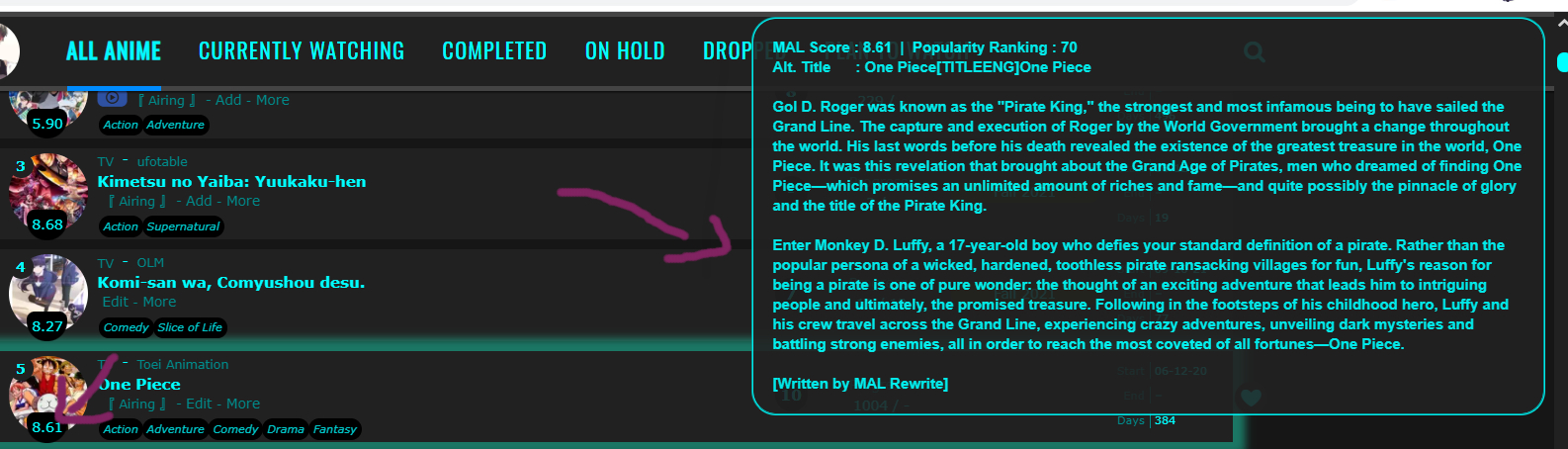 |
Dec 24, 2021 8:54 AM
#7308
Nyannnn said: I saw a my friend's list that showed scores and synopsis like this when hovered over and I found it very helpful. Can you show me the code to make like this. Depends on the layout, but probably from the bottom of this post (all topics on customization on this page) https://myanimelist.net/forum/?topicid=1499059#msg63378290 |
|
Dec 24, 2021 10:19 AM
#7309
Nyannnn said: I saw a my friend's list that showed scores and synopsis like this when hovered over and I found it very helpful. Can you show me the code to make like this. that's the clarity layout, and they custom made that particular mal score + alt title + pop rank + synopsis as it doesn't look like any of the examples we've made for clarity or the tools for generating them, but you can use V.L/BurtJelly's bookmarklet to create the css file https://myanimelist.net/forum/?topicid=1905478 or my scraper https://myanimelist.net/forum/?topicid=1938559 but if you want that particular one you'll need to view their source code to find the hover code that's going to look similar to this .list-table .list-table-data:hover .data.tags:after or share what their username is so we can share it with you. Edit: nevermind you only had 7 friends so was easy to see it was jery_js you'd just need to create 4 file's for (technically it can all be put into one, but I won't go into that) Anime/Managa Synopsis and Score css files since your lists aren't identical obviously, he used V.L's/BurntJelly's and you can use the same Template with it or my program, whatever works best for you. (though mine does rank and the actual popularity rank) @\import "https://jeryjs.github.io/Hosting/Anime-Synopsis.css";
@\import "https://jeryjs.github.io/Hosting/Anime-Score.css";
/*------------------------------*\
| Anime/Manga-Score |
\*------------------------------*/
.data.image a:after {
z-index: 5;
color: var(--text) !important;
position: absolute;
padding: 4px !important;
border-radius: 40px 40px 100px 100px !important;
background: black;
margin-left: 100px;
left: -85px;
top: 46px;
visibility: hidden;
opacity: 1 !important;
height: auto !important;
width: auto !important;
font: inherit !important;
}
/*------------------------------*\
| Anime/Manga-Synopsis |
\*------------------------------*/
.list-table .list-table-data:hover .data.title .link:before{
background-position: top right;
background-size: contain;
background-repeat: no-repeat;
position: fixed;
color: var(--text);
text-shadow: none !important;
right: 0.5%;
width: 40%;
height: auto;
top: 0.5%;
white-space: pre-wrap;
overflow: auto;
font-family: arial !important;
font-size: 12px;
border: var(--text) 2px groove;
border-radius: 20px;
padding: 1%;
background-color: var(--bg);
opacity: 0.9;
z-index:100;
transition: all .3s ease-in-out !important;
}
.list-table .list-table-data:hover .data.title .link:hover{z-index:101;} |
ShaggyZEDec 24, 2021 11:47 AM
| My Userscripts - Themes - Userstyles - Extensions (Chrome/Firefox) [API CSS] MAL-Scraper-API Cover/CSS Generator |
Dec 25, 2021 6:18 AM
#7310
Nyannnn said: I saw a my friend's list that showed scores and synopsis like this when hovered over and I found it very helpful. Can you show me the code to make like this. that's the clarity layout, and they custom made that particular mal score + alt title + pop rank + synopsis as it doesn't look like any of the examples we've made for clarity or the tools for generating them, but you can use V.L/BurtJelly's bookmarklet to create the css file https://myanimelist.net/forum/?topicid=1905478 or my scraper https://myanimelist.net/forum/?topicid=1938559 but if you want that particular one you'll need to view their source code to find the hover code that's going to look similar to this .list-table .list-table-data:hover .data.tags:after or share what their username is so we can share it with you. Edit: nevermind you only had 7 friends so was easy to see it was jery_js you'd just need to create 4 file's for (technically it can all be put into one, but I won't go into that) Anime/Managa Synopsis and Score css files since your lists aren't identical obviously, he used V.L's/BurntJelly's and you can use the same Template with it or my program, whatever works best for you. (though mine does rank and the actual popularity rank) @\import "https://jeryjs.github.io/Hosting/Anime-Synopsis.css";
@\import "https://jeryjs.github.io/Hosting/Anime-Score.css";
/*------------------------------*\
| Anime/Manga-Score |
\*------------------------------*/
.data.image a:after {
z-index: 5;
color: var(--text) !important;
position: absolute;
padding: 4px !important;
border-radius: 40px 40px 100px 100px !important;
background: black;
margin-left: 100px;
left: -85px;
top: 46px;
visibility: hidden;
opacity: 1 !important;
height: auto !important;
width: auto !important;
font: inherit !important;
}
/*------------------------------*\
| Anime/Manga-Synopsis |
\*------------------------------*/
.list-table .list-table-data:hover .data.title .link:before{
background-position: top right;
background-size: contain;
background-repeat: no-repeat;
position: fixed;
color: var(--text);
text-shadow: none !important;
right: 0.5%;
width: 40%;
height: auto;
top: 0.5%;
white-space: pre-wrap;
overflow: auto;
font-family: arial !important;
font-size: 12px;
border: var(--text) 2px groove;
border-radius: 20px;
padding: 1%;
background-color: var(--bg);
opacity: 0.9;
z-index:100;
transition: all .3s ease-in-out !important;
}
.list-table .list-table-data:hover .data.title .link:hover{z-index:101;}Thanks for your help.I was able to make it show mal score and popularity rank. Summary not showing up maybe because my english is not good so I missed something but now i don't need it anymore. |
Dec 29, 2021 8:11 PM
#7311

| I'm working on a javascript/jquery script that will auto scroll back and forth the favs rows in profiles when they have 11 or more favs in a row. Ok, so so far I've tried multiple numbers and none of them really worked, as I could not really find a pattern to do a specific math calculus that would always work for any amount of favorites in the profile favorites rows.
document.querySelectorAll('div.fav-slide-outer').forEach(function(el){
el.style.overflow = 'hidden';
})
Basically this works perfectly for rows with 20 favs on it $("div.fav-slide-outer").animate({ scrollLeft: 756 }, 5000); //go right
$("div.fav-slide-outer").animate({ scrollLeft: -756 }, 5000); //go back to leftThe problem is for users with like only 11 favs, the script goes way too far to the right, showing a lot of... nothing... just a huge white space. At first I thought that MAL did not code the profile favorites right, since the pixels for css width is all over the place and non really sense making... Although after studying it for a while I think they probably did not commit any mistakes, they just coded it in a weird way. Anyway... I've already tried to do a foreach loop and calculate the length of total "ul >li" elements on each row, and from that do a calculus, since every 11 fav half of it is shown upon profile loading, I only need to change 756 to 50 and that works perfectly for a row with only 11 favs, and basically for every other fav I have to run the same script again but change 50 to 80, so technically I always need to run the script once with the value 50, then run it again a couple times with the value of 80 (or something around 80).
var TotalRows = $("#anime_favorites > div.fav-slide-outer > ul > li")
if (TotalRows.length === 11)
{
var Num = 0;
}
else
{
Num = 70
}
var Counter = (TotalRows.length-10)*Num+50;
console.log(Counter)
TotalRows.parent().parent().animate({ scrollLeft: Counter }, 500);
var TotalRows = $("#character_favorites > div.fav-slide-outer > ul > li")
if (TotalRows.length === 11)
{
var Num = 0;
}
else
{
Num = 70
}
var Counter = (TotalRows.length-10)*Num+50;
console.log(Counter)
TotalRows.parent().parent().animate({ scrollLeft: Counter }, 500);
var TotalRows = $("#person_favorites > div.fav-slide-outer > ul > li")
if (TotalRows.length === 11)
{
var Num = 0;
}
else
{
Num = 70
}
var Counter = (TotalRows.length-10)*Num+50;
console.log(Counter)
TotalRows.parent().parent().animate({ scrollLeft: Counter }, 500);
I could not find any smart and really practical and short way to auto scroll the profile favs (when they have more than 10 favs) anywhere on the internet. I think I might have to use a switch case or something like it, to make it work, but I would like to make this part of my script as short as possible, and a switch case stament with the proper scrollLeft values for 11,12,13,14,15,16,17,18,19,20 favs in the row will be much more than 40 lines of JS/Jquery code. Here are a couple profiles that I've been testing this script on https://myanimelist.net/profile/dipItFoo https://myanimelist.net/profile/Atmogenic https://myanimelist.net/profile/VSMEGA https://myanimelist.net/profile/Jzcob https://myanimelist.net/profile/CareBear https://myanimelist.net/profile/Kunii https://myanimelist.net/profile/anime-prime If you want to find profiles with specific amount of favs in any favs row, use this simple google dork I've made, just change the number 12 to other number "Anime (12)" site:myanimelist.net/profile/ |
hacker09Dec 29, 2021 8:17 PM
| Click here to see My Tampermonkey Scripts For MAL If you like my work, please consider supporting it! Cryptos / Patreon / Ko-Fi / BuyMeaCoffee https://cyber-sec0.github.io |
Jan 1, 2022 8:13 AM
#7312

| This is not exactly a broken layout/layout not working issue, i need help with changing something about the layout itself... I have the one i want to change active as my list right now, so you can check it from my profile. On the banners that appear when you take each status i have included the title of the status on the image, but the layout has also listed them as text(all anime, completed, etc.), i was wondering if someone could tell me how to remove this text... |
  Only the ones ready to die should kill. |
Jan 3, 2022 2:27 AM
#7313

Ph5YCh0 said: This is not exactly a broken layout/layout not working issue, i need help with changing something about the layout itself... I have the one i want to change active as my list right now, so you can check it from my profile. On the banners that appear when you take each status i have included the title of the status on the image, but the layout has also listed them as text(all anime, completed, etc.), i was wondering if someone could tell me how to remove this text... I believe this could be solved by following the Inspect Element tutorial. All you need to do is add "font-size: 0;" to the relevant areas. But basically this is the code you would need, for both the small preview images and the larger banner images: /* Large banner images */
.list-unit .list-status-title .text {
font-size: 0;
}
/* Small preview images */
.status-menu-container .status-menu .status-button {
font-size :0;
} |
Jan 3, 2022 4:51 AM
#7314
Hello! I want to move the "content-status" element next to the "data.type" element. By only changing the position of the "content-status" element, when the "data.type" element differs from "TV", the "content_status" element overlaps with the "data.type" element, like this: (if it's hard to see, the dash is overlapping with the "A" in "ONA".) If i just move the "content-status" element left, I'm going to have a bit of space inbetween of the two elements, and i don't like that. How can i make it so the "content-status" element's position is always a set amount of pixels left from the end of the "data.type" element? Thanks in advance! I'm using Google Chrome. Here is all of my custom CSS: /* MAIN THEME */
@import "https://valeriolyndon.github.io/MAL-Public-List-Designs/Clarity%20Theme/Theme%20-%20Compressed.css";
/* DARK MODE */
@import "https://valeriolyndon.github.io/MAL-Public-List-Designs/Clarity%20Theme/Mod%20-%20Dark%20Mode%20Compressed.css";
/* LARGE COVERS */
@import "https://malscraper.azurewebsites.net/covers/anime/ThatAlphaPigeon/presets/dataimagelinkbefore";
@import "https://malscraper.azurewebsites.net/covers/manga/ThatAlphaPigeon/presets/dataimagelinkbefore";
@import "https://valeriolyndon.github.io/MAL-Public-List-Designs/Clarity%20Theme/Mod%20-%20Hover%20Image%20Compressed.css";
/* ====================
Dark Mode Filter Fix */
body[data-owner="1"] #fancybox-frame { filter: none; }
/*-S-T-A-R-T--------------------*
| Theme Colours |
*------------------------------*/
:root {
/* Generic Colours */
--pbg: #161616;
--bg: #212121;
--bg-dark: #444;
--text: #ababab;
--text-h: #416abe;
--text-dim: #777;
--text-dim-h: #999;
--text-dark: #ababab;
--icon: #959595;
--accent: #416abe;
--banner-text: #f6f5ff;
--banner-text-shadow: #e4bef4;
/* Button Colours */
--btn-bg: #191919;
--btn-bg-h: #191919;
--btn-head-bg-h: #416abe;
--btn-text-h: #416abe;
/* Header Colours */
--text-head: #9b9b9b;
--text-head-h: #ababab;
/* Status Colours */
--watching: #2db039;
--completed: #26448f;;
--onhold: #f1c83e;
--dropped: #a12f31;
--plantowatch: #c3c3c3;
/* Single-Use Colours */
--cover-bg: #090909;
--edit-btn: #323232;
--checkmark: #416abe;
}
/* SORT BUTTON WHITE FIX */
.list-table > tbody:first-of-type:hover:after {
background: var(--btn-head-bg-h) !important;
color: #ededed !important;
}
/* SORT SUB-BUTTONS WHITE FIX */
.list-table .list-table-header .header-title .link.sort:hover {
display: block;
width: 13px;
height: 26px;
border-radius: 13px 0 0 13px;
margin-left: -13px;
overflow: hidden;
box-sizing: border-box;
color: #ededed !important;
font: 11px/26px var(--font-2);
text-align: center;
text-indent: -9px;
white-space: normal;
opacity: 0;
}
/* RIGHT NAVIGATION BUTTONS WHITE FIX */
.stats a:hover
{
width: 100px !important;
background: var(--btn-head-bg-h) !important;
color: #d6d6d6 !important;
}
/* LEFT NAVIGATION BUTTONS WHITE FIX */
.list-menu-float .icon-menu:hover .text {
color: #d6d6d6 !important;
}
.list-menu-float .icon-menu:hover svg.icon { fill: #d6d6d6 !important; }
/* QUICK ADD BUTTON WHITE FIX */
.icon-menu.quick-add:hover:before {
color: #d6d6d6 !important;
}
/* SETTINGS BUTTON WHITE FIX */
.icon-menu.setting .text a
{
position: absolute !important;
top: 2px !important;
left: 13px !important;
width: 0 !important;
height: 26px !important;
background: var(--btn-bg) !important;
border: none !important;
border-radius: 0 13px 13px 0;
overflow: hidden;
color: #416abe !important;
font: 14px/26px var(--font-1) !important;
text-indent: 9px;
text-align: center;
white-space: nowrap;
opacity: 0 !important;
}
.icon-menu.setting .text a:hover {color:#d6d6d6 !important; background: var(--btn-head-bg-h) !important; }
/* HOME BUTTON WHITE FIX */
.header .header-title:hover:before {
color: #d6d6d6 !important;
}
.header .header-title:after {
content: "Home";
display: inline-block;
height: 26px !important;
width: 26px !important;
font: 14px/26px var(--font-1);
color: #d6d6d6 !important;
}
.header .header-title:hover:after {
color: #d6d6d6;
}
#search-button i {
color: var(--text-head) !important;
font-size: 18px;
line-height: 26px;
}
#search-button:hover i {
color: #416abe !important;
font-size: 18px;
line-height: 26px;
}
.list-table .list-table-data .title .add-edit-more a:hover { color: var(--btn-text-h) !important; }
/*------------------------E-N-D-*/
.content-status, .rewatching, .rereading {
position:absolute;
top:0;
left:25px;
color: var(--text-dim) !important;
font-size: 10px !important;
}
.content-status:before, .rewatching:before, .rereading:before { content: "- " }
.content-status:after, .rewatching:after, .rereading:after { content: " " }
/* WATCH ICON FIX */
.icon-watch2 { display: none !important; }
/* SEARCH BAR RESIZE */
#search-box.open {
width: 240px !important;
background: var(--btn-bg);
border: 2px solid var(--bg-dark);
}
#search-box.open:after {
width: 240px;
opacity: 1;
}
.status-menu-container .search-container {
top: 19px;
right: -175px;
z-index: 1;
}
body { --avatar: url(https://cdn.discordapp.com/attachments/773574248433451038/919555148961951744/Megumin.jpg); }
body { --banner: url(https://cdn.discordapp.com/attachments/697881213175857153/920802806951194674/amogis.png); }
body { --character: none; }
/*-S-T-A-R-T--------------------*
| Favourite Hearts (Right) R0.4 |
*------------------------------*/
.data.tags span{padding:0}.data.tags span a{margin:1px 0}.data.tags span a[href*="=Favorite"],.data.tags span a[href*="=Favourite"]{position:absolute;left:580px;top:calc(50% - 19px);width:26px;height:26px;padding:0;background:#191919;border-radius:50%;color:#9914db!important;font-size:0!important;line-height:23px;overflow:hidden;box-shadow:0 1px 2px rgba(0,0,0,.2)}.data.tags span a[href*="=Favorite"]:before,.data.tags span a[href*="=Favourite"]:before{content:"♥";font-size:26px}
data.tags span a[href*="=Favorite"]:hover,.data.tags span a[href*="=Favourite"]:hover
{color:#ff65ad!important;}
/*------------------------E-N-D-*/
/*-S-T-A-R-T--------------------*
| Horizontal Tags R0.3 |
*------------------------------*/
.list-table-data{padding-bottom:11px}.data.tags{position:absolute;left:0;top:0;z-index:2;display:flex!important;width:0;height:100%;padding:0!important;align-items:flex-end}.data.tags div{max-width:980px;margin:0 0 4px 80px;font-size:0;white-space:nowrap}.data.tags span{display:inline-block;padding:0}.data.tags span a{padding:1px 8px!important;margin:0 4px 0 0;white-space:nowrap}.data.tags span a[href*="=Favo"]{padding:0!important}.data.tags a.edit{right:-1060px}.data.tags textarea{right:-1060px}
/*------------------------E-N-D-*/
/*-S-T-A-R-T--------------------*
| CatCol Header Text R0.0 |
*------------------------------*/
.status-menu .status-button{transition:color .3s ease}.status-menu .status-button.on:nth-of-type(1),.status-menu .status-button:nth-of-type(1):hover{color:#763dd9!important}
.status-button.all_anime:after { background: #763dd9 !important; }
.status-menu .status-button.on:nth-of-type(2),.status-menu .status-button:nth-of-type(2):hover{color:var(--watching)!important}.status-menu .status-button.on:nth-of-type(3),.status-menu .status-button:nth-of-type(3):hover{color:#243b9e!important}
.status-button.completed:after { background: #243b9e !important; }
.status-menu .status-button.on:nth-of-type(4),.status-menu .status-button:nth-of-type(4):hover{color:var(--onhold)!important}.status-menu .status-button.on:nth-of-type(5),.status-menu .status-button:nth-of-type(5):hover{color:var(--dropped)!important}.status-menu .status-button.on:nth-of-type(6),.status-menu .status-button:nth-of-type(6):hover{color:var(--plantowatch)!important}
/*------------------------E-N-D-*/
/*-S-T-A-R-T--------------------*
| Change Banner Height |
*------------------------------*/
/*Change number here*/
:root { --banner-height: 500px; }
.cover-block { height: var(--banner-height); }
.header { margin-top: calc(var(--banner-height) - 36px); }
.list-stats { top: calc(var(--banner-height) + 98px); }
/*------------------------E-N-D-*/
/*-S-T-A-R-T--------------------*
| Change Status Bar Width |
*------------------------------*/
.data.status { width: 5px !important; }
.list-table-data { padding-left: 0px; }
/*------------------------E-N-D-*/ |
Jan 3, 2022 7:43 AM
#7315
| My GRID-STYLE LAYOUTS is taking too long to load. I don't know how to change "SpaceCowboy" and "DateYutaka" to your MyAnimeList |
Jan 3, 2022 2:51 PM
#7316
ThatAlphaPigeon said: Hello! I want to move the "content-status" element next to the "data.type" element. By only changing the position of the "content-status" element, when the "data.type" element differs from "TV", the "content_status" element overlaps with the "data.type" element, like this: (if it's hard to see, the dash is overlapping with the "A" in "ONA".) If i just move the "content-status" element left, I'm going to have a bit of space inbetween of the two elements, and i don't like that. How can i make it so the "content-status" element's position is always a set amount of pixels left from the end of the "data.type" element? Thanks in advance! I'm using Google Chrome. you could compromise and just make the gab bigger so it's less noticeable .content-status, .rewatching, .rereading {
position:absolute;
top:0;
left:75px;
color: var(--text-dim) !important;
font-size: 10px !important;
}
.content-status:before, .rewatching:before, .rereading:before { content: "[" }
.content-status:after, .rewatching:after, .rereading:after { content: "]" }@MonstroSemNome sure you do, you're just a little confused about what that means, just change @\import "https://malscraper.azurewebsites.net/covers/anime/SpaceCowboy/presets/dataimagelinkbefore"; @\import "https://malscraper.azurewebsites.net/covers/manga/DateYutaka/presets/dataimagelinkbefore"; or whatever it looks like on your layout to (i can't tell since you switched back to default) @\import "https://malscraper.azurewebsites.net/covers/anime/MonstroSemNome/presets/dataimagelinkbefore"; @\import "https://malscraper.azurewebsites.net/covers/manga/MonstroSemNome/presets/dataimagelinkbefore"; you're literally just changing the username and you can use auto as well. it could also be your background images slowing it down so you could use ezgif.com to optimize your images. |
ShaggyZEJan 4, 2022 11:25 AM
| My Userscripts - Themes - Userstyles - Extensions (Chrome/Firefox) [API CSS] MAL-Scraper-API Cover/CSS Generator |
Jan 4, 2022 6:46 AM
#7317
Valerio_Lyndon said: Ph5YCh0 said: This is not exactly a broken layout/layout not working issue, i need help with changing something about the layout itself... I have the one i want to change active as my list right now, so you can check it from my profile. On the banners that appear when you take each status i have included the title of the status on the image, but the layout has also listed them as text(all anime, completed, etc.), i was wondering if someone could tell me how to remove this text... I believe this could be solved by following the Inspect Element tutorial. All you need to do is add "font-size: 0;" to the relevant areas. But basically this is the code you would need, for both the small preview images and the larger banner images: /* Large banner images */
.list-unit .list-status-title .text {
font-size: 0;
}
/* Small preview images */
.status-menu-container .status-menu .status-button {
font-size :0;
}Thanks, it worked out! |
| Only the ones ready to die should kill. |
Jan 4, 2022 5:56 PM
#7318
Hello i was customizing my anime list and tried to put two kaguya renders on each side i want them on top of everything and follow u when u scroll down. 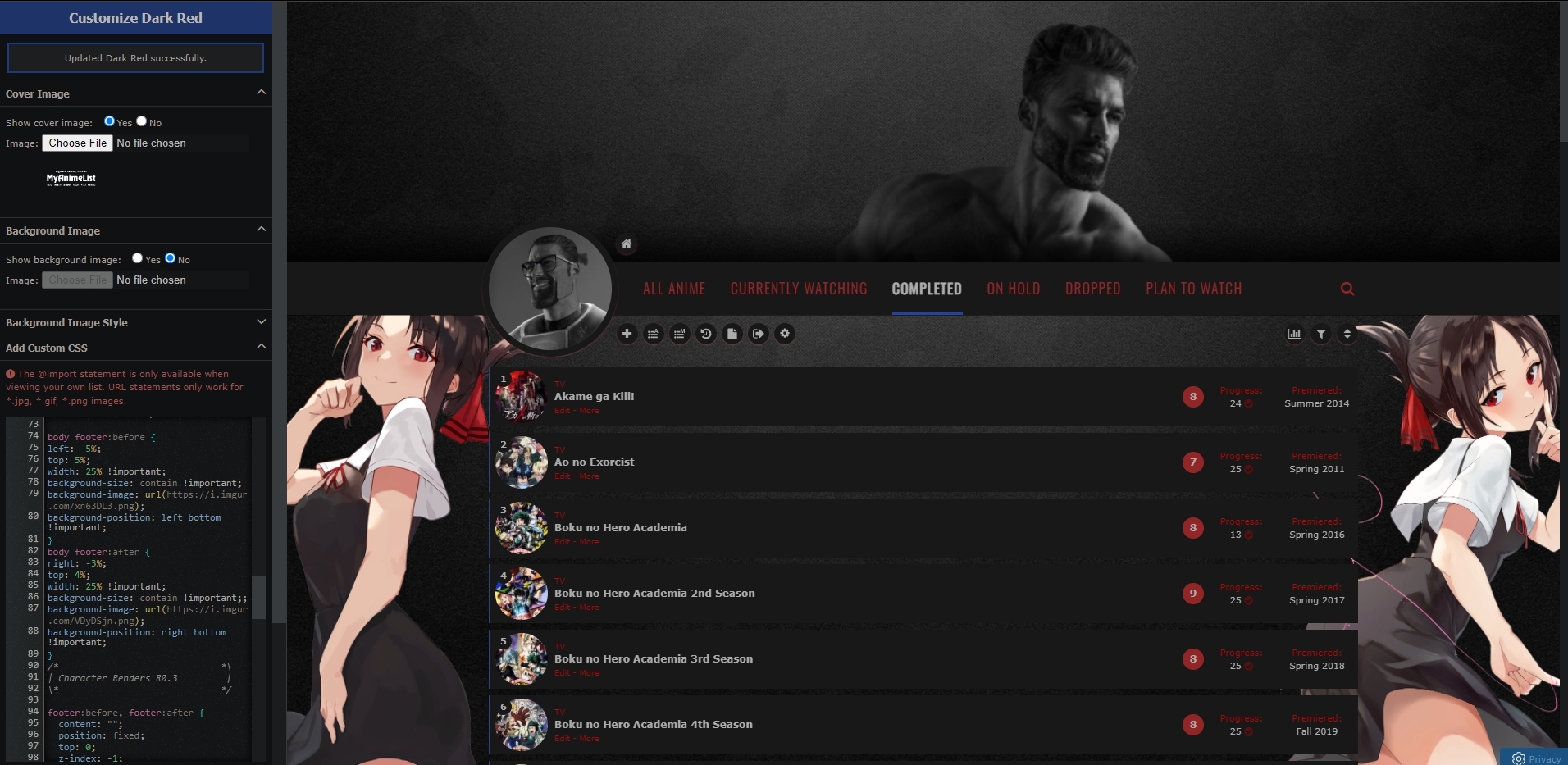 this is what i want (code to the left) 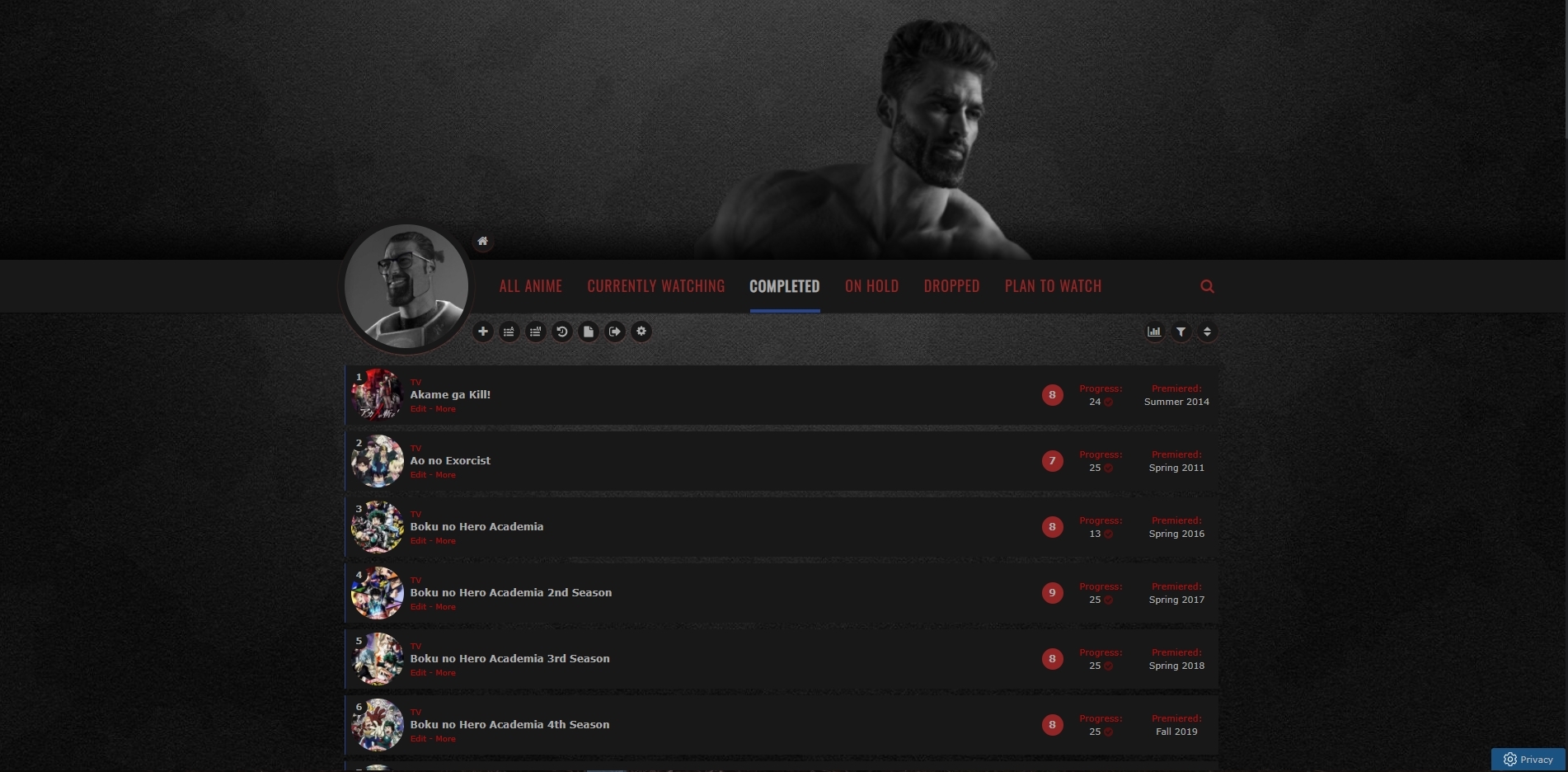 this is how it looks like, no kaguya renders :( 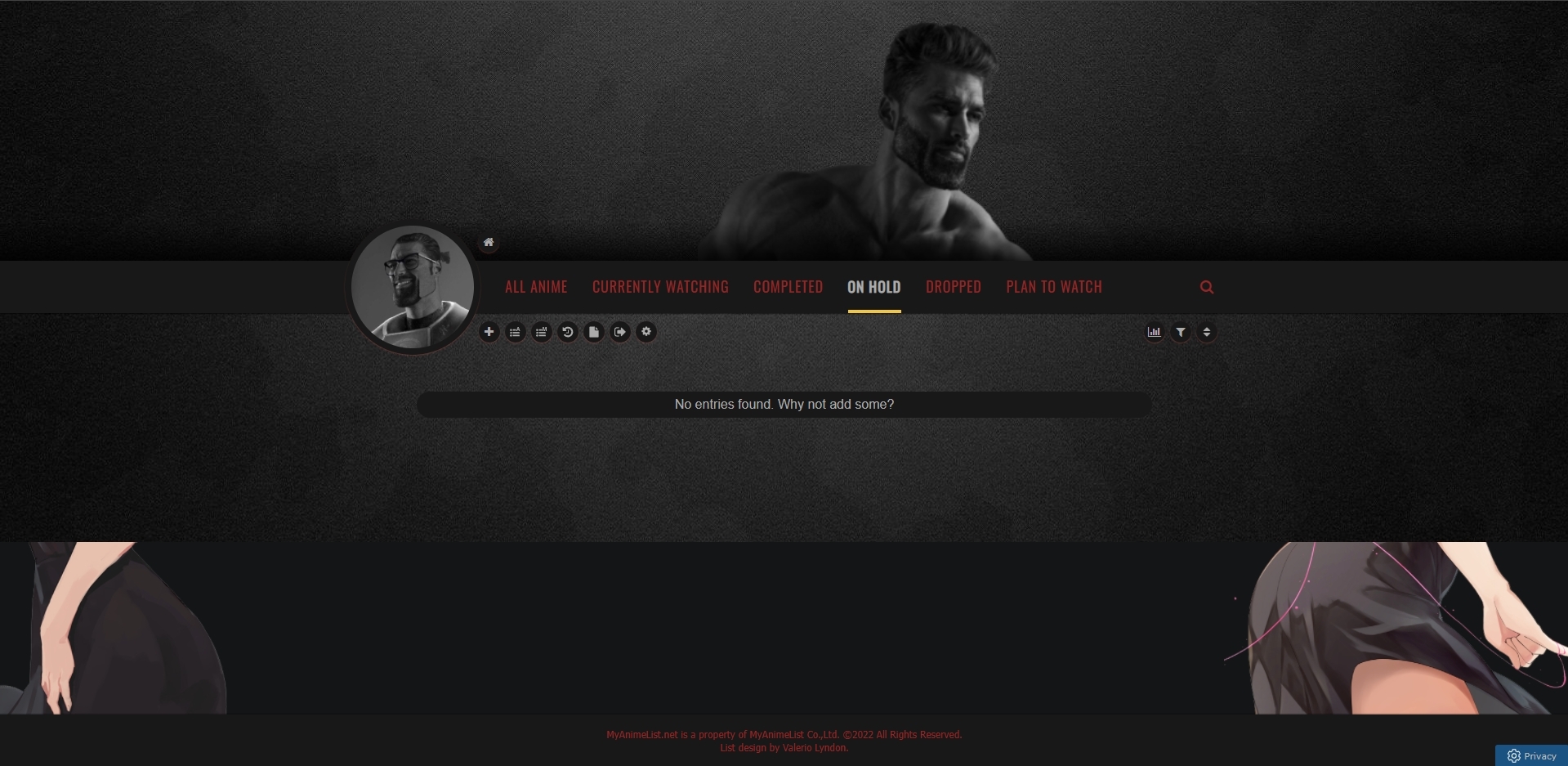 only place i see the renders is on the on hold section at the very bottom ---------------------------------------------------------------------------------------------------- so how do i fix this and have the render show up on top all the time and follow when u scroll down? |
Jan 8, 2022 7:34 AM
#7319

| Hello! I have a question regarding changing the colour of a studio tag Currently it looks like this: /* ========== Colored tags /* Studios/Producers */ .data.studio a:link { background: #C82536; color: black !important } However some studios like Doga Kobo and Kyoto Animation do not get their colour background changed. How do I fix this? |

Jan 8, 2022 9:11 AM
#7320

| Hello! I need help fixing cover photos on my anime list. It's been broken for a while now, even before the whole classic/modern list change, so I couldn't tell you what caused it to break or when exactly it happened. I also have very little CSS knowledge so I can't diagnose exactly what's wrong with the code. It used to work like this. I would hover over the flower image and the cover would pop up on the left side, where it's blank now 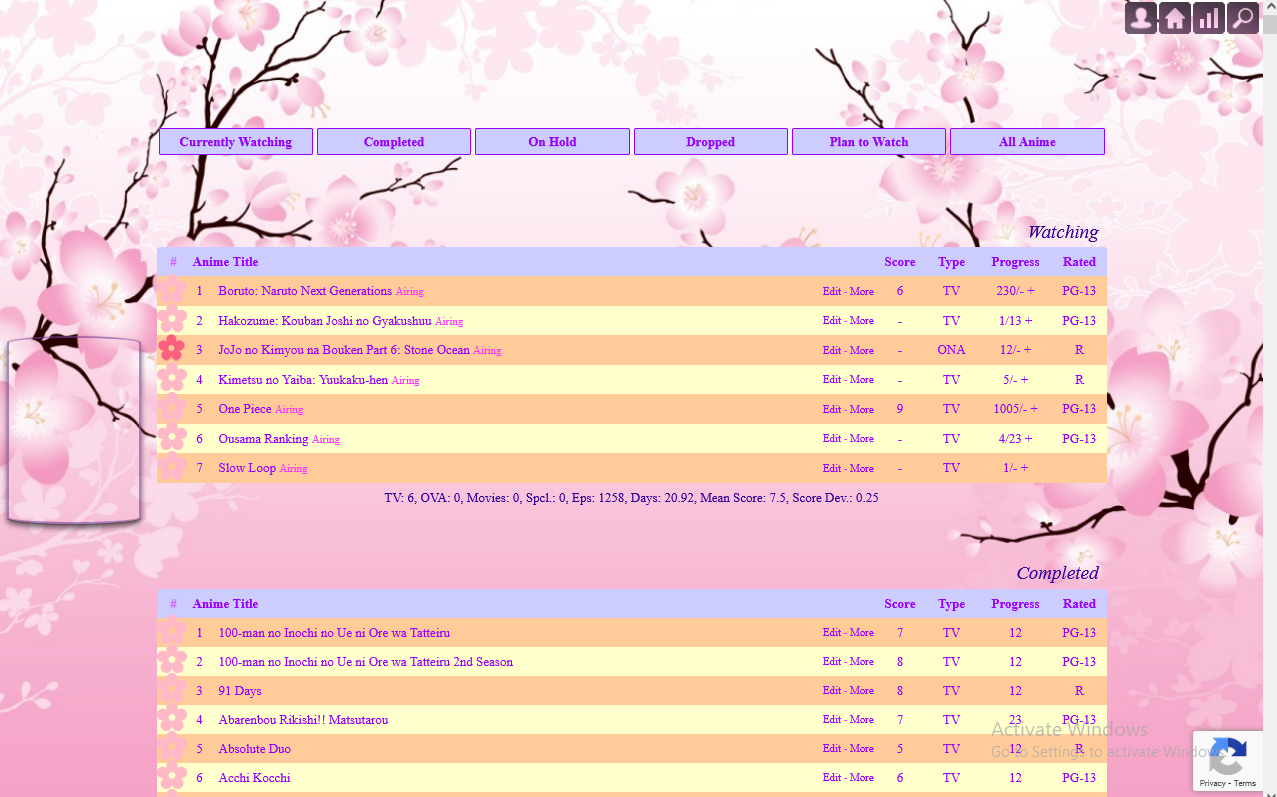 I tried solutions from sticky threads, but none of them worked, or maybe I didn't apply them correctly. I tried every import that was suggested and the ones from classic lists "worked" but not as intended. They showed images, but they would pop up in wrong place, like over the title 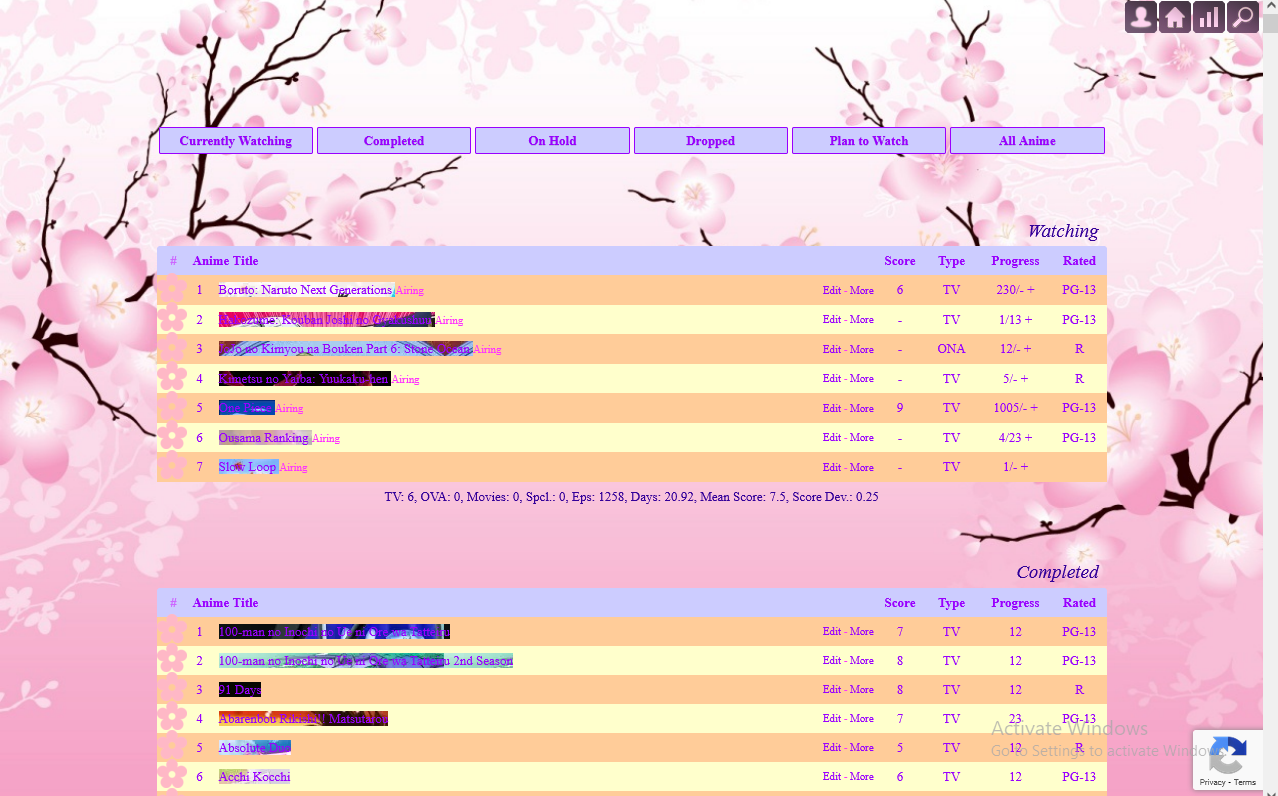 I'm currently using @import "https://malscraper.azurewebsites.net/covers/auto/presets/animetitlebefore"; But it's not showing anything when I hover over. However I don't know if the problem is with import or the whole hover feature, since it's something I used to mess around with ages ago and probably broke. Help would be appreciated. Thanks in advance! |
 |


Jan 10, 2022 4:37 PM
#7322
.malicon, .icon-watch2 {
    display:none !important;
} |
| My Userscripts - Themes - Userstyles - Extensions (Chrome/Firefox) [API CSS] MAL-Scraper-API Cover/CSS Generator |
Jan 11, 2022 2:27 AM
#7323
| ayye, thx mate. any other new recent additions i should be aware of? |
 |
Jan 11, 2022 2:47 AM
#7324
Mladen said: Hello! I need help fixing cover photos on my anime list. It's been broken for a while now, even before the whole classic/modern list change, so I couldn't tell you what caused it to break or when exactly it happened. I also have very little CSS knowledge so I can't diagnose exactly what's wrong with the code. It used to work like this. I would hover over the flower image and the cover would pop up on the left side, where it's blank now I tried solutions from sticky threads, but none of them worked, or maybe I didn't apply them correctly. I tried every import that was suggested and the ones from classic lists "worked" but not as intended. They showed images, but they would pop up in wrong place, like over the title I'm currently using @import "https://malscraper.azurewebsites.net/covers/auto/presets/animetitlebefore"; But it's not showing anything when I hover over. However I don't know if the problem is with import or the whole hover feature, since it's something I used to mess around with ages ago and probably broke. Help would be appreciated. Thanks in advance! That layout is using more:before type CSS for covers, which was rarely used if at all in this group, and the cover imports and Malscraper doesn't use this type today, anyways this is an example: #more48583:before {background-image:url(https://cdn.myanimelist.net/images/anime/1988/119437.webp)} But here's a two part solution (1) You could generate a CSS with more type from the layout repair topic like you tried before (part B solution 1), this link should make a new one every 24 hours based on your list: https://malscraper.azurewebsites.net/covers/anime/Mladen/presets/more (2) and then use Notepad+ and mass-edit it (use the replace feature under search tab) into more:before codes for your list: https://pastebin.com/raw/SZfdpckh replace { with :before{ and save the new codes somewhere (3) then you add it to your layout by pasting it to the bottom or hosting it on dropbox (there's a tutorial for that https://myanimelist.net/forum/?topicid=1499059#msg63378306). For now you can use those pastebin codes in your layout and it will fix all the anime but new adds will be missing and require you to start back at (1) and generate new more codes and convert them to more:before |
Shishio-kunJan 11, 2022 5:22 AM
|
Jan 11, 2022 4:39 AM
#7325
@Mladen you could also use my tool https://myanimelist.net/forum/?topicid=1938559 or V.L's tool https://myanimelist.net/forum/?topicid=1905478 to generate the CSS by using this template.#more[ID]:before{background-image:url([IMGURL])}@mutsurhea I don't think so, not that affect lists anyway. |
ShaggyZEJan 11, 2022 4:47 AM
| My Userscripts - Themes - Userstyles - Extensions (Chrome/Firefox) [API CSS] MAL-Scraper-API Cover/CSS Generator |
Jan 11, 2022 2:29 PM
#7326
Shishio-kun said: That layout is using more:before type CSS for covers, which was rarely used if at all in this group, and the cover imports and Malscraper doesn't use this type today, anyways this is an example: #more48583:before {background-image:url(https://cdn.myanimelist.net/images/anime/1988/119437.webp)} But here's a two part solution (1) You could generate a CSS with more type from the layout repair topic like you tried before (part B solution 1), this link should make a new one every 24 hours based on your list: https://malscraper.azurewebsites.net/covers/anime/Mladen/presets/more (2) and then use Notepad+ and mass-edit it (use the replace feature under search tab) into more:before codes for your list: https://pastebin.com/raw/SZfdpckh replace { with :before{ and save the new codes somewhere (3) then you add it to your layout by pasting it to the bottom or hosting it on dropbox (there's a tutorial for that https://myanimelist.net/forum/?topicid=1499059#msg63378306). For now you can use those pastebin codes in your layout and it will fix all the anime but new adds will be missing and require you to start back at (1) and generate new more codes and convert them to more:before ShaggyZE said: @Mladen you could also use my tool https://myanimelist.net/forum/?topicid=1938559 or V.L's tool https://myanimelist.net/forum/?topicid=1905478 to generate the CSS by using this template. #more[ID]:before{background-image:url([IMGURL])}@mutsurhea I don't think so, not that affect lists anyway. Thank you! This will definitely work. Gonna give it a try :D |
|
Jan 12, 2022 6:45 PM
#7327
| Hey, i'm trying to change my fonts across the board and from having followed everything instruction wise i've seen so far, i can't seem to make it work. am i missing something? |
Jan 12, 2022 7:02 PM
#7328
Geluk said: Hey, i'm trying to change my fonts across the board and from having followed everything instruction wise i've seen so far, i can't seem to make it work. am i missing something? you have to change the font-family of the section you wish to change in the original layout code, not just/only the body and you may need to import the font at the top where the other font imports are. or you have to apply it to every part of the body using a wildcard like
body * {
  font-family: Maven !important;
}
also if you add this code to the top of your css it should fix your broken icons @\import "https://valeriolyndon.github.io/MAL-Public-List-Designs/resources/font-awesome-4.7.0/css/font-awesome-force-legacy.min.css"; |
ShaggyZEJan 12, 2022 7:11 PM
| My Userscripts - Themes - Userstyles - Extensions (Chrome/Firefox) [API CSS] MAL-Scraper-API Cover/CSS Generator |
Jan 13, 2022 6:34 AM
#7329
| Im completely new to all this so its super confusing to me. I watched the videos and understand renders and everything so I added the Clarity (DARK, 1 Theme) to my mal and was able to change pictures and everything but do not know how to change the colors under each section right now the All Anime button shows as blue, CW is green, Completed is Blue, On Hold, Yellow, so on so forth how do I change this? Thanks |
Jan 13, 2022 3:33 PM
#7330

| PLS HELP IM SURE AT LEAST SOMEONE KNOWS! Is there a way to remove or hide the "more" button on your list with css? I want to remove the "last updated" part because i don't want other users to be able to see when I last updated an anime so I'm searching for either removing that single thing or the whole "more" button |
Jan 13, 2022 3:59 PM
#7331
aus-_-ten said: Im completely new to all this so its super confusing to me. I watched the videos and understand renders and everything so I added the Clarity (DARK, 1 Theme) to my mal and was able to change pictures and everything but do not know how to change the colors under each section right now the All Anime button shows as blue, CW is green, Completed is Blue, On Hold, Yellow, so on so forth how do I change this? Thanks I'm not sure what you're referring to, since your list is still showing as default for me, can you provide an image to explain? or you can try adding this to the top when you do add custom css again... @\import "https://valeriolyndon.github.io/MAL-Public-List-Designs/Clarity%20Theme/Mod%20-%20Category-Coloured%20Header%20Text%20Compressed.css"; xrvbert said: PLS HELP IM SURE AT LEAST SOMEONE KNOWS! Is there a way to remove or hide the "more" button on your list with css? I want to remove the "last updated" part because i don't want other users to be able to see when I last updated an anime so I'm searching for either removing that single thing or the whole "more" button you can watch Shishio's inspect element video https://www.youtube.com/watch?v=cTGbVutdqfc and use display:none; or font-size: 0px; but guessing you figured it out since I don't see a More link, also people that know about it can always use the Filter url https://myanimelist.net/animelist/xrvbert?order=5&status=7 to see what was last updated, or your history as it shows when https://myanimelist.net/history/xrvbert/anime you'd have to set your list to private to prevent that. |
ShaggyZEJan 13, 2022 4:06 PM
| My Userscripts - Themes - Userstyles - Extensions (Chrome/Firefox) [API CSS] MAL-Scraper-API Cover/CSS Generator |
Jan 13, 2022 4:02 PM
#7332
ShaggyZE said: aus-_-ten said: Im completely new to all this so its super confusing to me. I watched the videos and understand renders and everything so I added the Clarity (DARK, 1 Theme) to my mal and was able to change pictures and everything but do not know how to change the colors under each section right now the All Anime button shows as blue, CW is green, Completed is Blue, On Hold, Yellow, so on so forth how do I change this? Thanks I'm not sure what you're referring to, since your list is still showing as default for me, can you provide an image to explain? or you can try adding this to the top when you do add custom css again... @\import "https://valeriolyndon.github.io/MAL-Public-List-Designs/Clarity%20Theme/Mod%20-%20Category-Coloured%20Header%20Text%20Compressed.css"; xrvbert said: PLS HELP IM SURE AT LEAST SOMEONE KNOWS! Is there a way to remove or hide the "more" button on your list with css? I want to remove the "last updated" part because i don't want other users to be able to see when I last updated an anime so I'm searching for either removing that single thing or the whole "more" button you can use display:none; or font-size: 0px; but guessing you figured it out since I don't see a More link, also people that know about it can always use the Filter url https://myanimelist.net/animelist/xrvbert?order=5&status=7 to see you're Last Updated no, i didn't figure it out, i just use this list style till i find a way to remove it on the actual list style that i use so could you please explain how to do it? |
bassvictimJan 13, 2022 4:06 PM
Jan 13, 2022 4:10 PM
#7333
| @xrvbert @aus-_-ten change your layout to the one you need help with else I can't see what you're talking about or view the code for it, it makes the whole "helping" process alot faster.. |
| My Userscripts - Themes - Userstyles - Extensions (Chrome/Firefox) [API CSS] MAL-Scraper-API Cover/CSS Generator |
Jan 13, 2022 4:16 PM
#7334
ShaggyZE said: @xrvbert @aus-_-ten change your layout to the one you need help with else I can't see what you're talking about or view the code for it, it makes the whole "helping" process alot faster.. here, i changed my layout to the one i use, now what i need is to remove the last updated part or the whole more button |
bassvictimJan 13, 2022 4:35 PM
Jan 13, 2022 4:29 PM
#7335
@xrvbert ok, that's just the default layout, but to remove the more link just add this to the custom css span.more {
display: none !important;
} |
| My Userscripts - Themes - Userstyles - Extensions (Chrome/Firefox) [API CSS] MAL-Scraper-API Cover/CSS Generator |
Jan 13, 2022 4:33 PM
#7336
| thank you, that's exactly what i needed |
Jan 13, 2022 4:40 PM
#7337
@ShaggyZE What about this hyphen (-) next to the "Edit" button, is there a way to remove it? |
Jan 13, 2022 5:00 PM
#7338

| How to hide the Filter thing and maybe even the Stats thing I just don't feel like they are needed in my list so I want to remove them |
Jan 13, 2022 5:14 PM
#7339
xrvbert said: @ShaggyZE What about this hyphen (-) next to the "Edit" button, is there a way to remove it? I tried, I know it's the "text" after span.add and within div.add-edit-more, but I'm not good enough with selectors to figure it out, you'll have to ask someone like @Shishio-kun or if you don't mind loosing the add/edit link you can use div.add-edit-more {
display: none !important;
}test_acc__ said: How to hide the Filter thing and maybe even the Stats thing I just don't feel like they are needed in my list so I want to remove them I find add-edit-more, filters and stats incredibly useful, but...since your list is private I assume you are using the default, but this should work anyway. span.stats {
display: none !important;
} |
ShaggyZEJan 13, 2022 5:38 PM
| My Userscripts - Themes - Userstyles - Extensions (Chrome/Firefox) [API CSS] MAL-Scraper-API Cover/CSS Generator |
Jan 13, 2022 5:20 PM
#7340
@Shishio-kun how to remove the hyphen (-) next to the "Edit" button |
Jan 14, 2022 3:12 AM
#7341
@ShaggyZE @xrvbert https://myanimelist.net/forum/?topicid=1929120 I mapped out much of the list here already (its missing some parts added since mid 2021) so this would be where to go to find how to control whatever part and you'd remove it with one of these depending on the part font-size: 0 !important; display: none !important; color: transparent !important; With the dash for example, the codes are under Table and you could use (change the font size as needed) /* EDIT/ADD, little dash between them, and MORE */ .list-table a.List_LightBox{ font-size: 12px; } .list-table .list-table-data .data.title .add-edit-more{ color: transparent; font-size: 0px; } .list-table .list-table-data .data.title .more a{ font-size: 0px; } |
|
Jan 15, 2022 8:18 PM
#7342
| The code in the spoiler is just the basic code that is pasted in but it always results in this: https://zippyimage.com/images/2022/01/15/ab107213619307cbb822fab176c197a8.png The background for each of the sections are purple flame things not a black screen and I'm not sure why it's like this. /*==============================*\ | "Clarity" by Valerio Lyndon | | R27.2 | \*==============================*/ @\import "https://fonts.googleapis.com/css?family=Oswald"; @\import "https://valeriolyndon.github.io/MAL-Public-List-Designs/resources/font-awesome-4.7.0/css/font-awesome-force-legacy.min.css"; :root{--name:none;--avatar:none;--banner:url(https://i.imgur.com/VoPJz2S.jpg);--character:url(https://i.imgur.com/6IPyngH.png);--background:none;--pbg:#efefef;--bg:#fff;--bg-dark:#ddd;--text:#323232;--text-h:#787878;--text-dim:#bababa;--text-dim-h:#646464;--text-dark:#111;--shadow:rgba(0,0,0,0.2);--icon:#323232;--accent:#4065ba;--banner-text:#fff;--banner-text-shadow:rgba(0,0,0,0.45);--btn-bg:#ebebeb;--btn-bg-h:#323232;--btn-head-bg-h:#1d439b;--btn-text-h:#fff;--text-head:#9b9b9b;--text-head-h:#787878;--watching:#2db039;--completed:#26448f;--onhold:#f1c83e;--dropped:#a12f31;--plantowatch:#c3c3c3;--cover-bg:#323232;--edit-btn:#d9d9d9;--checkmark:#9696eb;--font-1:Arial,Verdana,"FontAwesome 4",FontAwesome,sans-serif;--font-2:Verdana,Arial,"FontAwesome 4",FontAwesome,sans-serif;--font-icon:"FontAwesome 4",FontAwesome}#advanced-options .advanced-options-button a,#fancybox-close,#search-box,#search-box input,#search-box:after,.data.chapter,.data.demographic a,.data.genre a,.data.image .link:after,.data.licensor a,.data.priority,.data.progress,.data.score a,.data.studio a,.data.tags a,.data.tags a.edit:after,.data.volume,.fixed .status-menu:after,.header .header-title:after,.icon-menu svg,.icon-menu.setting,.icon-menu.setting .text,.icon-menu.setting .text a,.icon-menu:after,.icon-menu:before,.list-table .list-table-header .header-title .link.sort,.list-table-header .header-title,.status-button:after,.status-menu-container.fixed .status-menu,.status-menu-container:not(.fixed) .status-menu,.status-menu:after{transition:all .3s ease!important}#advanced-options .advanced-options-header .description,#advanced-options .advanced-options-header .description:before,#advanced-options [class*="-widget"] input,#advanced-options [class*="-widget"] label,#advanced-options [class*="-widget"] select,#search-button i,.header-info a,.list-table-data a,.more-info .td1>div>a{transition:all .15s ease!important}.header .header-title,.header-info,.icon-menu,.icon-menu.quick-add:before,.list-menu-float .icon-menu,.list-table>tbody:first-of-type:after,.stats a{display:inline-block;height:26px!important;width:26px!important;background:var(--bg)!important;border-radius:13px;box-shadow:0 1px 2px var(--shadow);overflow:hidden;color:var(--text)!important;font:normal 0/26px var(--font-1);text-indent:0;text-align:left;white-space:nowrap;vertical-align:top;transition:all .3s ease!important}.header .header-title:hover,.icon-menu:hover,.list-menu-float .icon-menu:hover,.stats a:hover{width:100px!important;background:var(--btn-head-bg-h)!important;color:var(--btn-text-h)!important}html{position:relative;min-height:100%}body{padding-bottom:64px;background:var(--pbg) var(--background) no-repeat center/cover fixed!important}.list-container{position:static;width:100%;background:0 0!important;border:none}.list-block{width:1060px;min-height:initial;margin:64px auto 0}.status-menu-container.fixed+.list-block{margin-top:128px!important}.list-unit{width:100%!important;margin:0}.list-table{border:none!important}a,a:hover{color:var(--accent)}#recaptcha-terms,.initialize-tutorial{display:none!important}.cover-block{position:absolute;top:0;left:0;z-index:25;width:100%;min-width:1060px;height:318px;background:var(--cover-bg) var(--banner) no-repeat center center/cover scroll}.cover-block:before{content:"";position:absolute;bottom:0;left:0;display:block;width:100%;height:50px;background:linear-gradient(to top,rgba(0,0,0,.5),transparent)}#cover-image,.btn-list-setting{display:none!important}#list-container #cover-image-container{display:block!important;width:1060px;height:100%;padding:0;background:var(--character) no-repeat right center/contain;margin:0 auto}#cover-image-container:after{content:var(--name);position:absolute;top:55px;left:50%;margin-left:-475px;color:var(--banner-text);font:bold 60px/60px Oswald;text-align:left;letter-spacing:15px;text-shadow:1px 4px 7px var(--banner-text-shadow);text-transform:uppercase;white-space:pre;transform:scale(.9) perspective(350px) rotateY(8deg) rotateZ(-3deg);animation:name-slide 3s 1 .5s backwards}@keyframes name-slide{0%{top:12px;margin-left:-535px;opacity:0;letter-spacing:0;animation-timing-function:ease-out}90%{top:55px;margin-left:-475px}100%{letter-spacing:15px;opacity:1;animation-timing-function:cubic-bezier(0,0,.75,1)}}.header{z-index:36;display:flex;height:36px;margin-top:282px}.header .header-menu{position:static;display:flex;width:auto;height:26px;margin-left:6px;order:2}.btn-menu{height:0;font-size:0!important}.btn-menu #header-menu-button{display:none}.header .header-title{position:static;margin-left:155px;order:1;z-index:1}.header .header-title:before{content:"\f015";display:inline-block;width:26px;background:0 0!important;font-size:14px;font-family:var(--font-icon);text-align:center!important}.header .header-title:hover:before{color:var(--btn-text-h)!important}.header .header-title:after{content:"Home";display:inline-block;height:26px!important;width:26px!important;font:14px/26px var(--font-1);color:var(--text)}.header .header-title:hover:after{color:var(--btn-text-h)}.header .header-menu .list-menu{position:static;order:1;display:inline-block;height:26px;border:none;background:0 0;box-shadow:none}.header .icon-menu.anime-list,.header .icon-menu.manga-list{position:static;padding:0;margin-right:6px;font-size:0!important;font-weight:400!important}.header .icon-menu.anime-list .text,.header .icon-menu.manga-list .text{position:static!important;font:14px/26px var(--font-1);vertical-align:top}.header .header-menu .list-menu .icon-menu svg.icon{position:static;max-width:14px;max-height:14px;padding:6px;fill:var(--text)}.header .header-menu .list-menu .icon-menu:hover svg.icon{fill:var(--btn-text-h)}.header-info{position:static;width:auto!important;padding:0 8px;margin:0!important;font-size:12px;order:2}.header-info a{color:var(--text)!important;text-decoration:none!important}.header-info a:hover{color:var(--text-h)!important}.btn-menu a.username{position:absolute;left:0;top:-7px;display:block;width:150px;height:150px;background:0 0;border-radius:50%;font-size:0}.btn-menu span.username{display:none!important}.status-menu-container{position:relative;z-index:35!important;width:100%;min-width:1060px;height:64px;background:0 0;border:none!important}.status-menu-container.fixed{z-index:45!important}.status-menu-container:after,.status-menu-container:before{content:"";position:absolute;left:0;z-index:-1;display:block;width:100%}.status-menu-container:before{top:0;height:64px;background:var(--bg)}.status-menu-container:after{top:64px;height:2px;background:linear-gradient(to bottom,var(--shadow),transparent)}.status-menu{position:relative;display:block!important;width:1060px;padding:0 0 0 173px;margin:0 auto;box-sizing:border-box}.fixed .status-menu{padding:0 0 0 71px}.status-menu:after{content:"";position:absolute;top:-51px;left:-8px;width:150px;height:150px;background:var(--bg-dark) var(--avatar) no-repeat center top/cover;border:8px solid var(--bg);border-radius:50%;opacity:1;box-shadow:0 1px 2px var(--shadow)}.fixed .status-menu:after{top:0;width:48px;height:48px;box-shadow:none}.status-menu .status-button{display:inline-block!important;height:32px;padding:16px 0!important;margin:0 15px!important;color:var(--text-head)!important;font-size:17.6px!important;line-height:30px;white-space:nowrap;font-family:Oswald!important;text-transform:uppercase;letter-spacing:1px}.status-menu .status-button.on{color:var(--text-head-h)!important}.status-button.all_anime:after{background:var(--accent)!important}.status-button.reading:after,.status-button.watching:after{background:var(--watching)!important}.status-button.completed:after{background:var(--completed)!important}.status-button.onhold:after{background:var(--onhold)!important}.status-button.dropped:after{background:var(--dropped)!important}.status-button.plantoread:after,.status-button.plantowatch:after{background:var(--plantowatch)!important}.status-menu-container .search-container{top:19px;right:0;z-index:1}#search-box{padding-right:22px;border:2px solid transparent;border-radius:13px;margin-top:0!important}#search-box.open{width:150px!important;background:var(--btn-bg);border:2px solid var(--bg-dark)}#search-box input{background:0 0;border:none;border-radius:13px;outline:0;color:var(--text)}#search-box.open input{text-indent:7.5px;line-height:20px}.status-menu-container .search-container #search-button{position:absolute;right:0;top:0;width:26px;height:26px;border-radius:13px;margin-top:0;text-align:center}.open~#search-button{pointer-events:none}#search-button i{color:var(--text-head)!important;font-size:18px;line-height:26px}.open~#search-button i{font-size:14px;line-height:24px}#search-box:after{content:"";position:absolute;right:0;top:0;width:0;height:22px;padding-right:22px;background:linear-gradient(to right,var(--btn-bg) 2px,transparent 9.5px,transparent 142.5px,var(--btn-bg) 150px) content-box;border:2px solid transparent;border-radius:13px;pointer-events:none;opacity:0}#search-box.open:after{width:150px;opacity:1}.list-menu-float{position:relative;top:auto;display:block;width:904px;height:0;padding-left:155px;margin:0 auto;border:none;background:0 0;text-align:left;font-size:0;z-index:38}.icon-menu,.list-menu-float form{display:inline-block!important}.list-menu-float .icon-menu{top:74px;margin:0 6px 0 0}.list-menu-float .icon-menu .text{top:0!important;left:26px!important;display:inline-block;width:auto!important;height:26px;color:var(--text)!important;font-size:14px!important;opacity:1!important}.list-menu-float .icon-menu:hover .text{color:var(--btn-text-h)!important}.list-menu-float .icon-menu svg.icon{top:6px!important;left:6px!important;max-width:14px;max-height:14px;fill:var(--text)}.list-menu-float .icon-menu:hover svg.icon{fill:var(--btn-text-h)}[data-owner="1"] .list-menu-float .icon-menu.profile{position:absolute;left:0;top:-43px;display:block!important;width:150px!important;height:150px!important;background:0 0!important;border-radius:50%;font-size:0;box-shadow:none}[data-owner=""] .icon-menu.profile{background-image:none!important}[data-owner=""] .icon-menu.profile:before{content:"\f007";position:absolute;top:0;left:0;display:block;width:26px;height:26px;font-size:14px;line-height:26px;text-align:center;color:var(--text);font-family:var(--font-icon)}[data-owner=""] .icon-menu.profile:hover:before{color:var(--btn-text-h)}[data-owner=""] .icon-menu.profile:after{content:"Profile";position:absolute;top:0;left:26px;display:inline-block;height:26px;font-size:14px;color:var(--text)}[data-owner=""] .icon-menu.profile:hover:after{color:var(--btn-text-h)}.icon-menu.quick-add svg{display:none}.icon-menu.quick-add:before{content:"\f067";background:0 0!important;font-size:14px;text-align:center;font-family:var(--font-icon);box-shadow:none}.icon-menu.quick-add:hover:before{color:var(--btn-text-h)!important}.icon-menu.setting{overflow:visible}.icon-menu.setting:hover{width:26px!important}.icon-menu.setting .text{top:-2px!important;left:0!important;width:240px!important;height:26px!important;padding:2px 0;overflow:visible;font-size:0!important;opacity:1!important;pointer-events:none;z-index:-1}.icon-menu.setting:hover .text{pointer-events:auto}.icon-menu.setting .text a{position:absolute!important;top:2px!important;left:13px!important;width:0!important;height:26px!important;background:var(--btn-bg-h)!important;border:none!important;border-radius:0 13px 13px 0;overflow:hidden;color:var(--btn-text-h)!important;font:14px/26px var(--font-1)!important;text-indent:9px;text-align:center;white-space:nowrap;opacity:0!important}.icon-menu.setting:hover .text a{width:120px!important;border-radius:0 13px 13px 0;opacity:1!important}.icon-menu.setting:hover .text .link-list-setting{left:120px!important}.icon-menu.setting .text a:hover{background:var(--btn-head-bg-h)!important}.list-unit .list-status-title{width:1060px;height:64px;margin-top:-64px;background:0 0}.list-status-title .text{display:none!important}.list-status-title .stats{position:absolute;top:10px;right:32px!important;display:block;width:auto;height:26px!important;border-radius:0 0 26px 0;font-size:0;line-height:13px!important}.stats a{margin:0 0 0 6px!important;font:14px/26px var(--font-1)}.stats a i{width:26px;text-align:center}i.fa-chart-column::before{content:"\f080"}.list-stats{position:absolute;top:416px;width:1060px!important;background:0 0!important;color:var(--text)!important;font-weight:700}.list-table>tbody:first-of-type{position:relative;top:-26px;margin-top:-30px;left:1032px;display:block;width:30px;height:30px;background:0 0!important;z-index:39}.list-table>tbody:first-of-type:after{content:"\f0dc";position:absolute;top:0;right:0;margin:2px;font-size:14px;font-family:var(--font-icon);text-align:center}.list-table>tbody:first-of-type:hover:after{background:var(--btn-head-bg-h)!important;color:var(--btn-text-h)!important}.list-table-header{position:absolute;top:0;right:15px;display:block;width:auto;height:26px;padding:2px 0;font-size:0;white-space:nowrap;pointer-events:none;z-index:-1}.list-table>tbody:first-of-type:hover .list-table-header{pointer-events:auto}.list-table .list-table-header .header-title{position:relative;display:inline-block;width:auto!important;height:auto;padding:0!important;border:none;background:0 0;font-weight:400}.list-table>tbody:first-of-type:hover .header-title{opacity:1}.list-table .list-table-header .header-title .link.sort{display:block;width:13px;height:26px;background:var(--btn-bg-h);border-radius:13px 0 0 13px;margin-left:-13px;overflow:hidden;box-sizing:border-box;color:var(--btn-text-h)!important;font:11px/26px var(--font-2);text-align:center;text-indent:-9px;white-space:normal;opacity:0}.list-table tbody:first-of-type:hover .list-table-header .header-title .link.sort{width:80px;opacity:1}.list-table-header .header-title a.hover_info{display:none!important}.list-table .list-table-header .header-title .link.sort:hover{background:var(--btn-head-bg-h)}.list-table-header .header-title a .sort-icon{position:absolute;left:50%;width:10px;height:10px;margin-left:-5px;color:inherit!important;font-size:10px;line-height:10px}.sort-icon.fa-sort-up{top:2px}.sort-icon.fa-sort-down{bottom:2px}.anime tbody:first-of-type:hover .header-title.finished a,.anime tbody:first-of-type:hover .header-title.started a{padding:0 13px}.manga tbody:first-of-type:hover .header-title.finished a,.manga tbody:first-of-type:hover .header-title.started a{width:100px!important}.header-title.title a{font-size:0!important}.header-title.title a:after{content:"Title";font-size:11px}.list-table-header .header-title.tags{display:none!important}.list-item{position:relative;display:block;width:100%;background:var(--bg)!important;border:none;margin-bottom:8px}.list-table-data{position:relative;display:flex;max-width:1060px;min-height:64px;align-items:center;font-size:0}.data{display:block!important;padding:0!important;border:none!important;flex:0 0 auto;color:var(--text);font-size:11px}.list-table .list-table-data .data a{color:var(--text)!important;text-decoration:none!important}.list-table .list-table-data a:not(.edit-disabled):hover{color:var(--text-h)!important}.list-unit .loading-space{margin:14px 0 22px}.list-unit .loading-space #loading-spinner{width:20px;height:20px;margin:0 auto;color:var(--text)}.list-table[data-items="[]"]:after{content:"No entries found. Try another category?";display:block;width:900px;background:var(--bg);border-radius:16px;margin:32px auto;color:var(--text);font:16px/32px var(--font-1);text-align:center}[data-owner="1"] .list-table[data-items="[]"]:after{content:"No entries found. Why not add some?"}[data-query*='"s":'] .list-table[data-items="[]"]:after{content:"No entries found. Perhaps your search terms are too restrictive?"}.data.status{position:absolute;top:0;left:0;width:1px!important;height:100%;padding:0!important}.status.reading,.status.watching{background:var(--watching)!important}.status.completed{background:var(--completed)!important}.status.onhold{background:var(--onhold)!important}.status.dropped{background:var(--dropped)!important}.status.plantoread,.status.plantowatch{background:var(--plantowatch)!important}.data.number{position:relative;top:-22px;width:20px;height:20px;background:var(--bg);border-radius:10px;margin:0 -28px 0 8px;order:1;line-height:20px;font-weight:700;z-index:1}.list-item:nth-child(n+101) .data.number{text-indent:-7px}.list-item:nth-child(n+1001) .data.number{width:27px;margin-right:-35px}.list-item:nth-child(n+10001) .data.number{width:34px;margin-right:-42px}.data.image{width:64px;height:64px;margin:4px 0 4px 8px;order:1}.data.image a{position:relative;display:block!important;border-radius:50%;overflow:hidden}.data.image img{width:64px!important;height:64px!important;border:none!important;object-fit:cover}.data.image a:after{content:"\f14c";position:absolute;top:0;left:0;display:block;width:100%;height:100%;background:rgba(0,0,0,.5);color:#fff;font:30px/64px var(--font-icon);opacity:0}.data.image a:hover:after{opacity:1}.data.title{position:relative;width:142px;height:16px;padding:32px 0 0 8px!important;order:12;flex:1 0 auto;line-height:16px}.data.title .link.sort{position:absolute;top:16px;left:8px;display:inline-block;max-width:100%;padding-right:16px;overflow:hidden;box-sizing:border-box;line-height:16px;white-space:nowrap;text-overflow:ellipsis}.list-table .list-table-data .title .link:hover{color:var(--accent)!important}.content-status,.rereading,.rewatching{color:var(--text-dim)!important;font-size:10px!important}.content-status:before,.rereading:before,.rewatching:before{content:"["}.content-status:after,.rereading:after,.rewatching:after{content:"] - "}.add-edit-more{display:inline;float:none!important;color:var(--text-dim)}.list-table .list-table-data .title .add-edit-more a{color:var(--text-dim)!important}.list-table .list-table-data .title .add-edit-more a:hover{color:var(--text-dim-h)!important}.icon-watch,.icon-watch2{display:none!important}.data.type{position:relative;top:-16px;z-index:1;width:92px;height:16px;padding-left:8px!important;margin-right:-100px;order:11;text-align:left!important;color:var(--text-dim);line-height:16px;font-size:10px}.data.number+td:not(.image)~.type{margin-left:28px;margin-right:-128px}.data.score{position:relative;width:26px;height:26px;order:13}.data.score a{display:block;width:26px;height:26px;background:var(--btn-bg);border-radius:13px;margin:0 0 0 auto;line-height:26px}.list-table .list-table-data .score a:not(.edit-disabled):hover{background:var(--btn-bg-h);color:var(--btn-text-h)!important}.data.score select{position:absolute;top:0;right:0;display:block;width:40px;height:26px;padding:0 9px;background:var(--btn-bg-h) url(https://i.imgur.com/KF8oOyC.png) no-repeat 20px center/16px auto;border:none;border-radius:13px;box-shadow:none!important;color:var(--btn-text-h);font:bold 1.1em/26px var(--font-2);-webkit-appearance:none;-moz-appearance:none;appearance:none}@-moz-document url-prefix(){.data.score select{padding:0 16px 0 0;text-align:center}}.data.score select:focus{outline:0!important;box-shadow:0 2px 2px rgba(0,0,0,.3)}.data.chapter,.data.progress,.data.volume{width:92px;order:15}.data.chapter{margin-top:-34px}.data.volume{margin:34px 0 0 -92px}.data.chapter span,.data.progress span,.data.volume span{color:var(--text)}.data.progress:before{content:"Progress:";color:var(--text-dim)}.data.chapter:before{content:"Chapters:";color:var(--text-dim)}.data.volume:before{content:"Volumes:";color:var(--text-dim)}.data.chapter span:only-of-type:after,.data.progress span:only-of-type:after,.data.volume span:only-of-type:after{content:" \f058";position:relative;top:1px;color:var(--checkmark);font-family:var(--font-icon);font-size:13px}.data.chapter input,.data.progress input,.data.volume input{height:15px;padding:0 1px;background:var(--btn-bg);border:1px solid var(--bg-dark);outline-color:var(--accent)!important;box-sizing:border-box;color:var(--text-dark);font:11px var(--font-2)}.data.priority{width:92px;height:74px;background:var(--bg);order:14;color:var(--text);line-height:74px;z-index:1}.data.priority:before{content:"\f0a2";font-family:var(--font-icon)}.status:not(.plantowatch):not(.plantoread)~.data.priority{display:none!important}.data.chapter~.priority,.data.progress~.priority,.data.volume~.priority{position:relative;margin-right:-92px;opacity:1;pointer-events:none;z-index:1}.list-item:hover .chapter~.priority,.list-item:hover .progress~.priority,.list-item:hover .volume~.priority{opacity:0}.data.magazine,.data.rated,.data.retail,.data.season,.data.storage{margin-right:4px;order:19;flex-shrink:1}.data.rated{width:40px}.data.magazine{width:90px}.data.retail,.data.storage{width:72px}.data.season{width:92px;order:20}.data.magazine:before,.data.rated:before,.data.retail:before,.data.season:before,.data.storage:before{display:block;color:var(--text-dim)}.data.rated:before{content:"Rated:"}.data.magazine:before{content:"Magazine:"}.data.retail:before,.data.storage:before{content:"Storage:"}.data.season:before{content:"Premiered:"}.data.season:empty:after{content:"Unknown";display:block;color:var(--text-dim)}.data.demographic,.data.genre,.data.licensor,.data.studio,.data.tags{width:120px;padding:3px 0!important;margin-right:8px;order:21;flex-shrink:1}.data.licensor,.data.studio{order:22}.data.demographic span,.data.genre span,.data.licensor span,.data.studio span,.data.tags span{display:block;padding:1px 0;font-size:0!important;line-height:0}.data.demographic a,.data.genre a,.data.licensor a,.data.studio a,.data.tags a:not(.edit){display:block;padding:1px;background:var(--btn-bg);border-radius:8.5px;color:var(--text)!important;font-size:11px!important;line-height:15px}.list-table .list-table-data .demographic span a:hover,.list-table .list-table-data .genre span a:hover,.list-table .list-table-data .licensor span a:hover,.list-table .list-table-data .studio span a:hover,.list-table .list-table-data .tags span a:hover{background:var(--btn-bg-h);color:var(--btn-text-h)!important}.data.demographic:empty:before,.data.genre:empty:before,.data.licensor:empty:before,.data.magazine:empty:before,.data.studio:empty:before{display:block;padding:1px;color:var(--text-dim);font-size:10px;line-height:15px;white-space:pre}.data.genre:empty:before{content:"Unknown\a Genre"}.data.demographic:empty:before{content:"Unknown\a Demographic"}.data.studio:empty:before{content:"Unknown\a Studio"}.data.licensor:empty:before{content:"Unknown\a Licensor"}.data.magazine:empty:before{content:"Unknown\a Magazine"}.data.tags textarea{position:absolute;top:3px;right:4px;z-index:5;width:530px!important;height:calc(100% - 6px)!important;background:var(--btn-bg);border:1px solid var(--bg-dark);outline-color:var(--accent)!important;resize:none;color:var(--text)}@-moz-document url-prefix(){.data.tags textarea{width:524px!important;height:calc(100% - 14px)!important;padding:2px;box-sizing:initial!important}}.data.tags a.edit{position:absolute;top:0;right:0;width:5px!important;height:100%!important;background:var(--edit-btn);text-align:left!important;font-size:0!important;opacity:0;z-index:1}.list-item:hover .data.tags a.edit{opacity:.7}.list-item:hover .data.tags a.edit:hover{width:25px!important;opacity:1}.data.tags a.edit:after{content:"\f040";position:absolute;top:50%;right:0;width:100%;height:20px;margin-top:-10px;color:var(--text);font:0/20px var(--font-icon);text-align:center;opacity:0}.data.tags a.edit:hover:after{font-size:14px;opacity:1}.data.airing-finished,.data.airing-started,.data.days,.data.finished,.data.started{position:relative;display:flex!important;width:100px;height:14px;flex-flow:row wrap;overflow:hidden;order:25;color:var(--text);font-size:9px;line-height:14px;text-align:left!important;text-overflow:ellipsis;white-space:nowrap}.data.started{top:-20px}.data.finished{top:0;margin-left:-100px}.data.days{top:20px;margin-left:-100px}.data.airing-started{top:-10px}.data.airing-finished{top:10px;margin-left:-100px}.data.airing-finished:before,.data.airing-started:before,.data.days:before,.data.finished:before,.data.started:before{display:inline-block;width:29px;padding-right:4px;border-right:1px solid var(--text-dim);margin-right:3px;flex:0 0 auto;text-align:right;color:var(--text-dim)}.data.started:before{content:"Start"}.data.finished:before{content:"End"}.data.days:before{content:"Days"}.data.airing-started:before{content:"Aired"}.manga .data.airing-started:before{content:"Issued"}.data.airing-finished:before{content:"to"}.manga .data.airing-finished,.manga .data.airing-started{width:107px}.manga .data.airing-finished{margin-left:-107px}.manga .data.airing-finished:before,.manga .data.airing-started:before{width:36px}.data.airing-finished::after,.data.airing-started::after,.data.days::after,.data.finished::after,.data.started::after{content:"-";display:block;width:63px;flex:0 0 auto;color:var(--text-dim);font-size:14px}.more-info{border:none!important}.more-info .td1{position:relative;padding-top:23px;color:var(--text-dark)}.more-info .td1>div{margin:0}.more-info .td1>div>a{position:absolute;top:0;left:0;border-bottom:2px solid var(--accent)}.list-table .more-info .more-content a{color:var(--text-dark)!important}.list-table .more-info .more-content a:hover{color:var(--accent)!important}footer{position:absolute;bottom:0;left:0;width:100%}#footer-block{min-width:1060px;height:32px;padding:16px 0;background:var(--bg)}#footer-block:before{content:"";position:absolute;left:0;top:-2px;width:100%;min-width:1060px;height:2px;background:linear-gradient(to top,rgba(0,0,0,.1),transparent)}#copyright{padding:0;color:var(--text-head);line-height:16px}#copyright:after{content:"\aList design by Valerio Lyndon.";white-space:pre}#fancybox-overlay{background:#000!important;opacity:.2!important}#fancybox-outer [class^=fancy-]{display:none}#fancybox-outer{background:var(--bg)!important;box-shadow:0 0 32px rgba(0,0,0,.5)}#fancybox-outer #fancybox-close{top:-13px;right:-13px;width:16px;height:16px;padding:2px;background:var(--btn-bg);border:3px solid var(--btn-text-h);border-radius:13px;color:var(--text);text-align:center;box-shadow:0 1px 2px var(--shadow)}#fancybox-outer #fancybox-close:after{content:"\f00d";display:block;margin-top:-1px;font:16px/1 var(--font-icon)}#fancybox-outer #fancybox-close:hover{background:var(--text);color:var(--btn-text-h)}#advanced-options{top:64px;width:910px;padding:32px 0;background:var(--bg);border:none;box-shadow:0 0 32px rgba(0,0,0,.5);color:var(--text-dark)}#advanced-options .advanced-options-button,#advanced-options .advanced-options-header,#advanced-options [class*="-widget"]{width:100%;padding:0;border:none}#advanced-options .filter-widget:last-of-type,#advanced-options .sort-widget:last-of-type{padding-bottom:0}#advanced-options .filter,#advanced-options .sort{padding-bottom:32px}#advanced-options .advanced-options-header{font-size:0;line-height:26px;box-sizing:border-box}#advanced-options .advanced-options-header:before{display:inline-block;width:249px;height:100%;padding-bottom:7.5px;font-size:16px;line-height:26px;text-align:right}#advanced-options .filter .advanced-options-header:before{content:"Filter"}#advanced-options .sort .advanced-options-header:before{content:"Sort"}#advanced-options .advanced-options-header .description{display:inline-block;width:20px;margin:0;color:transparent;white-space:nowrap;vertical-align:top;transition:all .15s ease;pointer-events:none}#advanced-options .advanced-options-header .description:hover{color:inherit;pointer-events:auto}#advanced-options .advanced-options-header .description:before{content:"\f059";display:inline-block;width:20.5px;color:var(--icon);font:14px/26px var(--font-icon);text-align:center;pointer-events:auto}#advanced-options .advanced-options-header .description:hover:before{color:var(--text-dim)}#advanced-options [class*="-widget"]{font-size:0;line-height:1;white-space:nowrap}#advanced-options [class*="-widget"]>*{font-size:12px;vertical-align:top}#advanced-options [class*="-widget"] .widget-header{width:250.5px;height:26px;padding:11px 7.5px 11px 0;border-right:2px solid var(--text-dim);margin-right:7.5px;line-height:26px;text-align:right}#advanced-options [class*="-widget"] span{line-height:26px}#advanced-options [class*="-widget"] input,#advanced-options [class*="-widget"] label,#advanced-options [class*="-widget"] select,#advanced-options [class*="-widget"] span:not(.widget-header){height:26px;margin:11px 0;border-color:var(--text-dim)!important;border-radius:13px;box-sizing:border-box;color:var(--text-dark);font-size:12px}#advanced-options [class*="-widget"] input,#advanced-options [class*="-widget"] select{padding:0 7.5px;background:0 0;outline:0}#advanced-options [class*="-widget"] select{padding-right:16px;background:transparent url(https://i.imgur.com/hFijppc.png) no-repeat right center/16px auto}#advanced-options [class*="-widget"] input:focus,#advanced-options [class*="-widget"] option,#advanced-options [class*="-widget"] select:focus{background-color:var(--btn-bg)!important}#advanced-options :disabled,#advanced-options input:disabled+label{opacity:.5;color:var(--text)!important}#advanced-options .title input{width:387.5px!important}#advanced-options .filter-widget[class*="-status"] select{width:197.5px!important}#advanced-options .magazine select,#advanced-options .producer select{width:387.5px!important}#advanced-options .filter-widget[class*="-date"] span:nth-of-type(n+2){display:inline-block;width:40px;padding:0 3px 0 7.5px;border:1px solid var(--text-dim);border-right:none;border-radius:13px 0 0 13px;margin-right:0!important;line-height:24px;font-style:italic}#advanced-options .filter-widget[class*="-date"] span:nth-of-type(3){margin-left:7.5px!important}#advanced-options .filter-widget[class*="-date"] .day,#advanced-options .filter-widget[class*="-date"] .month,#advanced-options .filter-widget[class*="-date"] .year{border-radius:0;padding:0 16px 0 7.5px;border-left-width:0}#advanced-options .filter-widget[class*="-date"] .month,#advanced-options .filter-widget[class*="-date"] .year{border-right:none}#advanced-options .filter-widget[class*="-date"] .day{border-radius:0 13px 13px 0}#advanced-options .filter-widget[class*="-date"] .year{width:60px!important}#advanced-options .filter-widget[class*="-date"] .day,#advanced-options .filter-widget[class*="-date"] .month{width:45px!important}#advanced-options .aired-season .year{width:60px!important}#advanced-options .aired-season .season{width:130px!important;margin-left:7.5px}#advanced-options .first select,#advanced-options .second select{width:190px!important}#advanced-options .sort-widget input[type=radio]+label{width:92.25px!important;border-radius:13px;margin-left:7.5px;background:0 0!important;color:var(--text-dark);line-height:14px;transition:all .15s ease}#advanced-options .sort-widget input[type=radio]:not(:disabled)+label:hover{background:var(--btn-bg)!important}#advanced-options .sort-widget input[type=radio]:not(:disabled):checked+label{background:var(--text-dim)!important;border:1px solid var(--text-dim);color:var(--bg)!important}#advanced-options .sort-widget input[type=radio]:not(:checked)+label i{color:var(--icon)}#advanced-options #fancybox-close,#advanced-options .advanced-options-button a{width:90px;height:26px;padding:0;background:var(--btn-bg);border-radius:13px;box-shadow:0 1px 2px var(--shadow);color:var(--text-dark);line-height:26px;text-align:center}#advanced-options #fancybox-close:hover,#advanced-options .advanced-options-button a:hover{background:var(--btn-bg-h);color:var(--btn-text-h)}#advanced-options .advanced-options-button .btn-apply{margin:0 0 0 -106px}#advanced-options .advanced-options-button .btn-clear{margin:0 0 0 8px}#advanced-options #fancybox-close{left:50%;top:auto;bottom:32px;border:none;margin-left:53px}#advanced-options .btn-apply:before{content:"\f00c ";font-family:var(--font-icon)}#advanced-options .btn-clear:before{content:"\f12d ";font-family:var(--font-icon)}#advanced-options #fancybox-close:after{content:"\f00d Close";font:12px/26px var(--font-1)}#fancybox-wrap[style*="width: 320px;"]{height:120px!important}[style*="width: 320px;"] #fancybox-inner{height:calc(100% - 20px)!important}div[style^="width: 300px;"]{display:flex;height:100%!important;flex-flow:column nowrap;justify-content:center;color:var(--text);font-size:13px!important}div[style^="width: 300px;"] div{font-size:0}div[style^="width: 300px;"] input{display:block;width:240px;height:26px;background:var(--btn-bg);border:none;border-radius:13px;box-shadow:0 1px 2px var(--shadow);margin:0 auto 5px;color:var(--text);font:normal 12px/26px var(--font-1);transition:all .3s ease;cursor:pointer}div[style^="width: 300px;"] input:hover{background:var(--btn-bg-h);color:var(--btn-text-h)} |
Jan 16, 2022 7:46 AM
#7343
| @ShaggyZE Can you break a tie in judges votes for the list design contest, please? We need a winner for Best Theme. This category is for which layout best followed or rather "honored" a particular game or anime theme. Since you are top support for 2021 and work on lists, I think you are a good person we can trust to be unbiased for this The tie for Best Theme is between: https://myanimelist.net/animelist/Half_Blood (he made the entire layout look like the game Hades) https://myanimelist.net/animelist/imperator-sky (he used many images from Monogatari) If you want to break the tie, just let me know who you choose (has to be public) |
|
Jan 16, 2022 7:55 AM
#7344
Shishio-kun said: @ShaggyZE Can you break a tie in judges votes for the list design contest, please? We need a winner for Best Theme. This category is for which layout best followed or rather "honored" a particular game or anime theme. Since you are top support for 2021 and work on lists, I think you are a good person we can trust to be unbiased for this The tie for Best Theme is between: https://myanimelist.net/animelist/Half_Blood (he made the entire layout look like the game Hades) https://myanimelist.net/animelist/imperator-sky (he used many images from Monogatari) If you want to break the tie, just let me know who you choose (has to be public) Sure! I feel honored even being asked, and I would like to give it some thought to be fair, but I can't really say that's necessary this year since Half_Blood went way beyond honoring Hades and practically rebuilt the game into his list. I've never even played the game but could tell from the comparison images how well he did so even though I like Monogatari more.. My vote is for Half_Blood, due to the sheer effort and hard work that went into it. |
ShaggyZEJan 16, 2022 8:01 AM
| My Userscripts - Themes - Userstyles - Extensions (Chrome/Firefox) [API CSS] MAL-Scraper-API Cover/CSS Generator |
Jan 16, 2022 9:01 AM
#7345
@Fadist I was unable to reproduce that problem using that code, try changing --background:none; and --bg:#fff; to --background:#000; and --bg:#000; or you can use a url for background image like --background: url(https://dl.dropboxusercontent.com/s/cwywdz8jsq8epoz/Ram%20and%20Rem%20by%20Shrezy%20and%20juan-start.jpg); |
| My Userscripts - Themes - Userstyles - Extensions (Chrome/Firefox) [API CSS] MAL-Scraper-API Cover/CSS Generator |
Jan 16, 2022 9:11 AM
#7346
ShaggyZE said: Shishio-kun said: @ShaggyZE Can you break a tie in judges votes for the list design contest, please? We need a winner for Best Theme. This category is for which layout best followed or rather "honored" a particular game or anime theme. Since you are top support for 2021 and work on lists, I think you are a good person we can trust to be unbiased for this The tie for Best Theme is between: https://myanimelist.net/animelist/Half_Blood (he made the entire layout look like the game Hades) https://myanimelist.net/animelist/imperator-sky (he used many images from Monogatari) If you want to break the tie, just let me know who you choose (has to be public) Sure! I feel honored even being asked, and I would like to give it some thought to be fair, but I can't really say that's necessary this year since Half_Blood went way beyond honoring Hades and practically rebuilt the game into his list. I've never even played the game but could tell from the comparison images how well he did so even though I like Monogatari more.. My vote is for Half_Blood, due to the sheer effort and hard work that went into it. Thank you, and well said :D |
|
Jan 17, 2022 12:34 AM
#7347
Jan 19, 2022 2:17 AM
#7348
| How do i remove the my anime list logo at the top, or change the color? And when i hover over the names of the list, they turn blue how do i change them to white, and how do i fix the blue line below the thing that is selected, and the green blue yellow white for the watching, planning to watch, on hold dropped stuff. |
Jan 19, 2022 3:13 AM
#7349
Partyfosil said: How do i remove the my anime list logo at the top, or change the color? And when i hover over the names of the list, they turn blue how do i change them to white, and how do i fix the blue line below the thing that is selected, and the green blue yellow white for the watching, planning to watch, on hold dropped stuff. .header .header-title {
display: none !important;
}
a:hover, .list-table .list-table-data .data a:hover {
color: white !important;
}
td.data.status, .status-button:after {
visibility: hidden !important;
} |
| My Userscripts - Themes - Userstyles - Extensions (Chrome/Firefox) [API CSS] MAL-Scraper-API Cover/CSS Generator |
Jan 19, 2022 4:56 PM
#7350

| Yo guys help me out. I just got a new ccs design and all my pictures/banners are disappearing. Ccs quick overview code if you even bother: @\import "https://valeriolyndon.github.io/MAL-Public-List-Designs/Clarity%20Theme/Theme%20-%20Compressed.css"; @\import "https://malscraper.azurewebsites.net/covers/auto/presets/dataimagelinkbefore"; @\import "https://valeriolyndon.github.io/MAL-Public-List-Designs/Clarity%20Theme/Mod%20-%20Hover%20Image%20Compressed.css"; @\import "https://valeriolyndon.github.io/MAL-Public-List-Designs/Clarity%20Theme/Mod%20-%20Dark%20Mode%20Compressed.css"; body { --avatar: url(https://i.pinimg.com/originals/18/30/91/1830919aa6f34d18fbf420b1a12c7d6b.jpg); } body { --name: "big\a daddykane"; }body { --character: none; } body { --banner: url(https://i.imgur.com/AZJE32l.jpeg); } /*-S-T-A-R-T--------------------*\ | Favourite Hearts (Left) R0.4 | \*------------------------------*/ .data.tags span{padding:0}.data.tags span a{margin:1px 0}.data.tags span a[href*="=Favorite"],.data.tags span a[href*="=Favourite"]{position:absolute;left:-34px;top:calc(50% - 13px);width:26px;height:26px;padding:0;background:var(--bg);border-radius:50%;color:#ff65ad!important;font-size:0!important;line-height:23px;overflow:hidden;box-shadow:0 1px 2px rgba(0,0,0,.2)}.data.tags span a[href*="=Favorite"]:before,.data.tags span a[href*="=Favourite"]:before{content:"♥";font-size:26px} /*------------------------E-N-D-*/ /*-S-T-A-R-T--------------------*\ | Per-Category Banner Image | \*------------------------------*/ /* All Anime */ [data-query*='status":7'] { --banner: url(8ACB1711-F8E8-40A0-B755-B7014DAF120C.jpeg); } /* Watching/Reading */ [data-query*='status":1'] { --banner: url(https://i.imgur.com/AZJE32l.jpeg); } /* Completed */ [data-query*='status":2'] { --banner: url(ED8A5CAC-0E25-47CF-A10D-B27B55F64F44.jpeg); } /* Onhold */ [data-query*='status":3'] { --banner: url(55BCC82C-7FE8-4248-9351-14E80ECFA0F9.jpeg); } /* Dropped */ [data-query*='status":4'] { --banner: url(https://wallpapercave.com/uwp/uwp1888179.jpeg); } /* Planned */ [data-query*='status":6'] { --banner: url(https://i.pinimg.com/originals/5c/c9/64/5cc964af6a86410bec0c8373fc8ceb2a.jpg); } /*==============================*\ | Score Descriptors | \* --- - --- - ---- - --- - --- */ .score-na::before { content: "Haven't decided"; } .score-1::before { content: "Unredeemable"; } .score-2::before { content: "Horrid"; } .score-3::before { content: "Awful"; } .score-4::before { content: "Bad"; } .score-5::before { content: "Mediocre"; } .score-6::before { content: "Alright"; } .score-7::before { content: "Good"; } .score-8::before { content: "Great"; } .score-9::before { content: "Fantastic"; } .score-10::before { content: "Incredible"; } /* Internals */ .score-label { position: relative; display: inline-block; z-index: 0; transition: color 0.2s ease; } .score-label:hover { color: #fff !important; } .score-label::before { position: absolute; top: -4px; left: -8px; z-index: -1; display: block; padding: 4px 8px 4px calc(100% + 12px); background: #111; border-radius: 4px; opacity: 0; transition: opacity 0.2s ease; white-space: pre; text-align: left; pointer-events: none; } .score-label:hover::before { opacity: 1; } |
More topics from this board
Sticky: » 💚 [REPAIR STICKY] Repair/speed up layouts + Request layout fixes ( 1 2 )Shishio-kun - Nov 17, 2023 |
54 |
by Shishio-kun
»»
5 hours ago |
|
» [CSS- MODERN] ⭐ Minimal Dashboard layout by 5cm ~ Compact and convenient! ( 1 2 3 )Shishio-kun - Sep 4, 2020 |
133 |
by Shishio-kun
»»
Dec 2, 10:24 AM |
|
» ⭐Ready to be amazed? View the Bunkasai graphic and list design contest (VOTE YOUR FAVES!)Shishio-kun - Nov 22 |
3 |
by Shishio-kun
»»
Nov 28, 9:02 PM |
|
Sticky: » [ BBCODE ] All 2023 BBcodes, Guides, and Templates ( 1 2 )Shishio-kun - Feb 16, 2023 |
65 |
by F124N
»»
Nov 11, 1:31 AM |
|
» ✳️[9-7-24] New even higher quality Cover Imports! + Fixes for Takana Grids and moreShishio-kun - Sep 7, 2024 |
37 |
by Shishio-kun
»»
Oct 30, 4:42 AM |