
New
May 30, 2020 3:42 PM
#551
Thanks so much! Also, how would I alternate colors red and white for the #mal_cs_links  |
May 30, 2020 6:00 PM
#552
StahpTouchinMeh said: You'd have to do it manually, by selecting each element. Like this:Thanks so much! Also, how would I alternate colors red and white for the #mal_cs_links /* Alternate header link colours */
#mal_cs_links div:first-of-type a:first-of-type,
#mal_cs_links div:last-of-type a:last-of-type,
#mal_cs_otherlinks div:last-of-type a:nth-of-type(2) {
color: white !important;
}
#mal_cs_links div:last-of-type a:first-of-type,
#mal_cs_otherlinks div:last-of-type a:first-of-type,
#mal_cs_otherlinks div:last-of-type a:last-of-type {
color: red !important;
}This may not affect the "Seasonal" button as I am unsure where that is coming from (can't reproduce it when using your CSS on my own list). |
May 31, 2020 12:41 AM
#553

Some one please help me fix this problem.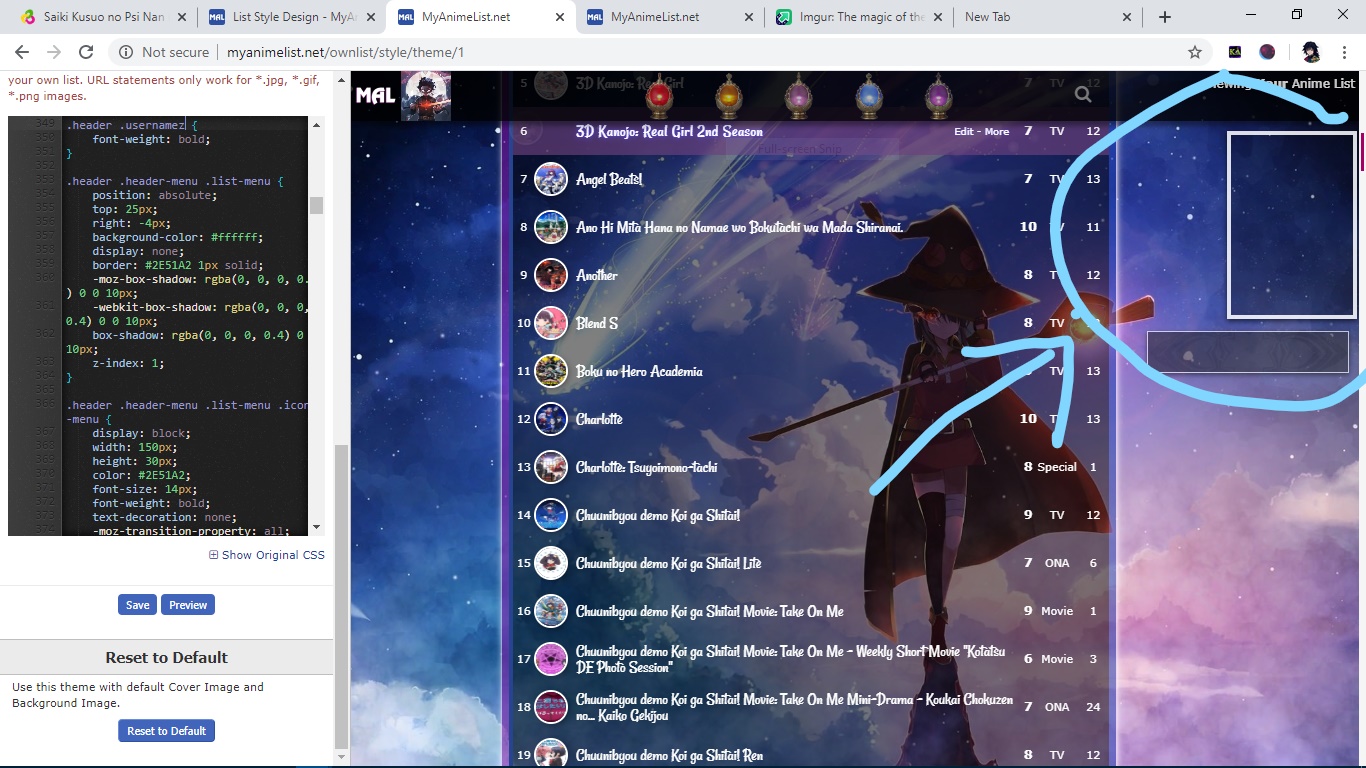 |
 |
May 31, 2020 1:05 AM
#554
| join this club and ask your problems there https://myanimelist.net/clubs.php?cid=19736 |
May 31, 2020 8:47 AM
#555

| yep looks like you've given chuunibyou demo koi ga shitai a nine when it should actually be a four hope that helps |
May 31, 2020 9:22 AM
#556

| Dammit, that's a first-world problem. There are more urgent matters that I have to think about like kids dying from hunger, people living in poverty, etc. |
| "You misunderstood from the very beginning. You just believed what you wanted to believe." Rei Ayanami |
Jun 3, 2020 12:34 PM
#557

| The thread Help me has been merged with this one because both share the same topic. |
 |
Jun 3, 2020 1:15 PM
#558

You're no longer using that layout and you didn't post the code so I can't fix it But the solution is probably here https://myanimelist.net/forum/?topicid=439897 see under How to fix missing or blurry preview pictures (covers, thumbnails, etc) |
 |
Jun 3, 2020 8:40 PM
#559
| Thanks for your help, but I have decided not to use that layout. |
|
Jun 4, 2020 7:31 AM
#560
| I'm gonna try it out. Thanks!You should try an accounting homework solver as well. |
Bruno_messJul 6, 2020 2:56 AM
Jul 19, 2020 5:15 PM
#561
ahegaobih said: That list design was made for modern lists. You currently have the classic list enabled, so it won't display right. To switch to modern, go to your list style page and click the "modern" toggle at the top left and save your changes.hello i am currently editing a pre-made list but the pre-made list is not working, can anyone help me to fix the coding so that it doesnt show up blank?  Then, open your active list style (the highlighted one) and paste your CSS into the "Custom CSS" box on that page and save the changes. There's a full tutorial on switching themes here if you need it: Link. |
Jun 1, 2021 4:43 PM
#562
| I need help. I messed with some setting before I went to bed. I wanted to change the color but was not satisfied that there was no purple option. I then went to old design clicked on the 2nd option and messed with the #FFFFFF stuff thinking it would change the color. It did but it turn my list into the old design with not pictures. I created a reddit post about it here. https://www.reddit.com/r/MyAnimeList/comments/npbc7j/i_messed_up_wanted_to_change_the_color_but_ended/?utm_medium=android_app&utm_source=share One other thing I did was save my original design and once i realized this my sleep deprived ass thought it was a good idea to resave thinking it would fix its self. Thank you |
Jun 2, 2021 5:49 PM
#563
A-Dog said: I need help. I messed with some setting before I went to bed. I wanted to change the color but was not satisfied that there was no purple option. I then went to old design clicked on the 2nd option and messed with the #FFFFFF stuff thinking it would change the color. It did but it turn my list into the old design with not pictures. I created a reddit post about it here. https://www.reddit.com/r/MyAnimeList/comments/npbc7j/i_messed_up_wanted_to_change_the_color_but_ended/?utm_medium=android_app&utm_source=share One other thing I did was save my original design and once i realized this my sleep deprived ass thought it was a good idea to resave thinking it would fix its self. Thank you You're on classic template right now, go here: https://myanimelist.net/ownlist/style click Modern under Switch Template, save with the blue button at the bottom (you have to save it to change it). You can choose the default layout you want to use on that page and save again. Get a custom template from here and change it to the purple you want. You apply the custom template to your default layout. https://myanimelist.net/forum/?topicid=1501171 |
|
Jun 4, 2021 8:45 AM
#564
I have 0 coding experience, and I've been trying to follow these tutorials and pre-made backgrounds, whilst inserting my own background but it just doesn't seem to work. I haven't invested any time into learning the coding or anything, but if anyone is generous enough to offer some help it'd be greatly appreciated. I'm trying to add the image as a scrolling background, with no cover image, but the black background behind the list itself is blocking it and the image always zooms in automatically, regardless of any resolution changes I make to it. This is the image: |
Jun 4, 2021 9:36 AM
#565
| I would just use one of these https://myanimelist.net/forum/?topicid=1501171 Set the wallpaper with the code as in these videos or text tutorial https://myanimelist.net/forum/?topicid=1499059#msg45620833 And remove the cover image with this https://myanimelist.net/forum/?topicid=1499059#msg45620839 |
|
Jun 4, 2021 10:45 AM
#566
Shishio-kun said: I would just use one of these https://myanimelist.net/forum/?topicid=1501171 Set the wallpaper with the code as in these videos or text tutorial https://myanimelist.net/forum/?topicid=1499059#msg45620833 And remove the cover image with this https://myanimelist.net/forum/?topicid=1499059#msg45620839 Thanks, I think I get the general idea now edit: One more thing, is it possible to make it work as a scrolling background now? I read the stuff you posted, but I still can't really grasp the concept of scrolling backgrounds. If there's a more concise method for changing backgrounds to work as scrolling ones, it would help, because atm my background's size and shape is more suited for a scrolling background. It'd be appreciated if you took a look at my list and told me what to change. |
removed-userJun 4, 2021 10:49 AM
Jun 4, 2021 10:57 AM
#567
| then you'd add something like body{ background-attachment: scroll !important; background-size: contain; } and background-repeat: no-repeat; would keep it from repeating I think this would look best though and fit it vertically without the scrolling and repeating body{ background-size: contain; background-repeat: no-repeat; } |
|
Jun 4, 2021 10:59 AM
#568
Thanks, but another problem has come up lmfao. There's borders around it now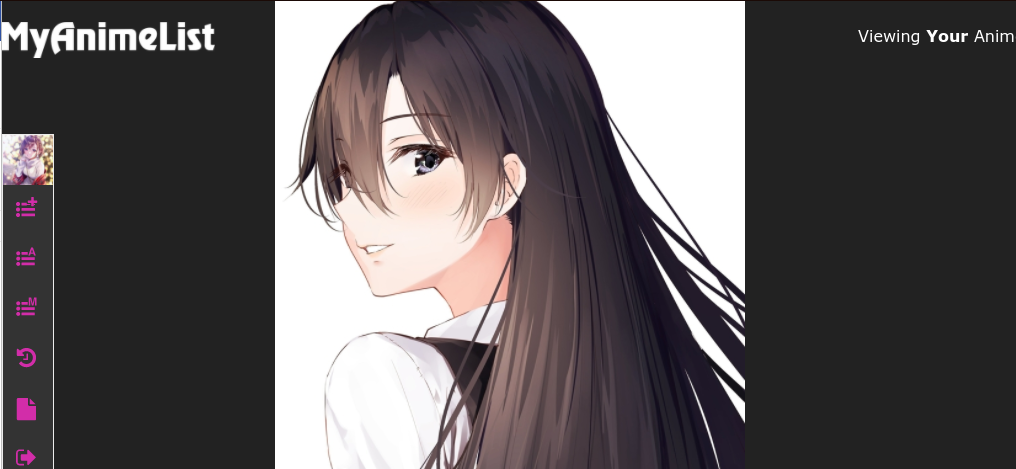 |
removed-userJun 4, 2021 11:02 AM
Jun 4, 2021 11:35 AM
#569
background-size: cover; or background-color: white !important; |
|
Jun 4, 2021 1:51 PM
#570
| Thanks for the help man, much appreciated. The background-size: cover; didn't exactly work, so I just set the background as magenta instead. It still does the job in terms of the list colour scheme anyway, so it doesn't really matter much. |
Jun 26, 2021 6:16 AM
#571

| Hello all. I haven't logged in like in three years and one of the reasons I came back is because I was cringing over how broken whatever BBcode was in my list now is. Problems: 1. Anime icons aren't displaying again. Yes I still know how to use BBcode, in text. But I completely forgot how to do the technical stuff for anime lists. That being said, anime icons were always a pain even when I knew how to do them. If someone can give me whatever new line of code or website link I need to fix my list and where to paste it in that wall of code that would be appreciated. 2. The icons for, I think, the home button and the like, in the upper right hand corner of my list are gone. I'm guessing wherever the images were being hosted expired on them. Uhhhh if someone could give me a working link of basic blue icons for the same things and tell me where to paste it, that would be appreciated. I'm not planning on doing heavy edits so anything that goes with the theme would work. Thanks for the help |
   I envy your delusion; I wish I could live in it  |
Jun 26, 2021 6:53 AM
#572


Jun 26, 2021 7:26 AM
#573
Protaku said: Hello all. I haven't logged in like in three years and one of the reasons I came back is because I was cringing over how broken whatever BBcode was in my list now is. Problems: 1. Anime icons aren't displaying again. Yes I still know how to use BBcode, in text. But I completely forgot how to do the technical stuff for anime lists. That being said, anime icons were always a pain even when I knew how to do them. If someone can give me whatever new line of code or website link I need to fix my list and where to paste it in that wall of code that would be appreciated. 2. The icons for, I think, the home button and the like, in the upper right hand corner of my list are gone. I'm guessing wherever the images were being hosted expired on them. Uhhhh if someone could give me a working link of basic blue icons for the same things and tell me where to paste it, that would be appreciated. I'm not planning on doing heavy edits so anything that goes with the theme would work. Thanks for the help answered here https://myanimelist.net/forum/?topicid=1933602 |
|
Jun 27, 2021 12:20 AM
#574
Shishio-kun said: Protaku said: Hello all. I haven't logged in like in three years and one of the reasons I came back is because I was cringing over how broken whatever BBcode was in my list now is. Problems: 1. Anime icons aren't displaying again. Yes I still know how to use BBcode, in text. But I completely forgot how to do the technical stuff for anime lists. That being said, anime icons were always a pain even when I knew how to do them. If someone can give me whatever new line of code or website link I need to fix my list and where to paste it in that wall of code that would be appreciated. 2. The icons for, I think, the home button and the like, in the upper right hand corner of my list are gone. I'm guessing wherever the images were being hosted expired on them. Uhhhh if someone could give me a working link of basic blue icons for the same things and tell me where to paste it, that would be appreciated. I'm not planning on doing heavy edits so anything that goes with the theme would work. Thanks for the help answered here https://myanimelist.net/forum/?topicid=1933602 Oh hey thanks for the advice, after a bit of trial and error it seems to be patched up now. Also, I remember your guides and advice helped me out a long time ago too when I first built my current list design from almost scratch, so I'm stubborn about using it forever xD I can only do so much now anyway… Thanks for still being around and helping out us simple folks even all these years later ;__; |
I envy your delusion; I wish I could live in it |
Jun 27, 2021 11:36 PM
#575
| That's the thing, when I do the first step where is says modern styles it still show the old one. The top and bottom do. I click on one of the modern ones and it's just the older one. I may have messed with the code or something somehow but I don't see how I could have done that. |
Jun 28, 2021 8:06 AM
#576
A-Dog said: That's the thing, when I do the first step where is says modern styles it still show the old one. The top and bottom do. I click on one of the modern ones and it's just the older one. I may have messed with the code or something somehow but I don't see how I could have done that. This is how your list looks now, you're still not seeing this? 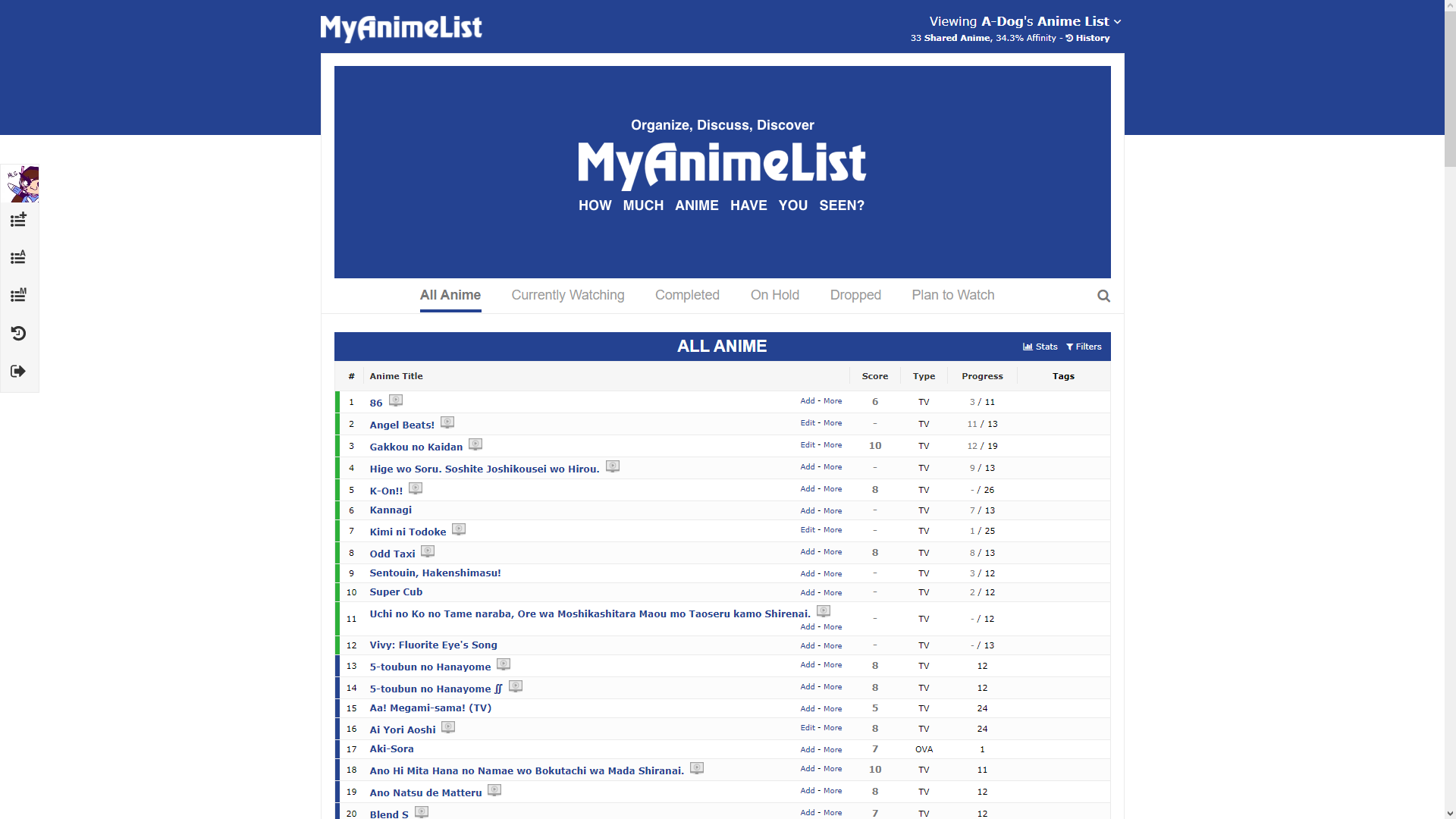 |
|
Jun 28, 2021 9:44 PM
#577
| Thats how it looks. I want it to look like the more modern one like when you first make an account. |
Jul 4, 2021 4:21 PM
#578

| @Shishio-kun hello how are you a pleasure to greet you. look is to see if you can advise me with this: https://myanimelist.net/animelist/RadioactiveGhost?status=7 I discovered this person and I saw that he has a custom cursor by category, how do I do that? and I read in one of your forum that one can delete part of the CCS and you can continue working in the case of Blink that can be deleted? I have my CCS that I can't add anything else without having to sacrifice some of the MOD's that I put in. sorry that I contacted you here is that I tried to send a message to private but could not |
Jul 5, 2021 2:19 PM
#579
EnderVsqz626 said: @Shishio-kun hello how are you a pleasure to greet you. look is to see if you can advise me with this: https://myanimelist.net/animelist/RadioactiveGhost?status=7 I discovered this person and I saw that he has a custom cursor by category, how do I do that? and I read in one of your forum that one can delete part of the CCS and you can continue working in the case of Blink that can be deleted? I have my CCS that I can't add anything else without having to sacrifice some of the MOD's that I put in. sorry that I contacted you here is that I tried to send a message to private but could not I don't see their custom cursor changing but they tried to do a different one on each page with: body[data-query*='"status":3'] * { cursor: url(https://image.myanimelist.net/ui/5LYzTBVoS196gvYvw3zjwOQhWVFdtTvGM92MfnPPR_k), auto !important; } That's for On-hold. You paste the code again and change the number after status for each category page (Current is 1, Complete is 2, etc). custom cursors: https://myanimelist.net/forum/?topicid=1903808 You can look at their code with Inspect Element in Firefox, I have a tutorial on it in my group if you search the CSS tutorials Every layout is different so I can't tell you, but don't remove codes for a layout unless you're told to. I don't get your notifications or contact btw, I have to look at the topic manually. The best way to contact is in my group which was linked on my profile page |
|
Jul 5, 2021 2:22 PM
#580
A-Dog said: Thats how it looks. I want it to look like the more modern one like when you first make an account. If you're seeing that, then that is the default modern theme your list is using now. Do you have a screenshot of what you want your layout to look like? Maybe you should mess with the themes here to find what modern theme colors you want https://myanimelist.net/ownlist/style Or maybe you're trying to turn the cover images back on, check the Images box here and save with Submit https://myanimelist.net/editprofile.php?go=listpreferences |
Shishio-kunJul 5, 2021 7:19 PM
|
Jul 6, 2021 8:07 AM
#581
Shishio-kun said: EnderVsqz626 said: @Shishio-kun hello how are you a pleasure to greet you. look is to see if you can advise me with this: https://myanimelist.net/animelist/RadioactiveGhost?status=7 I discovered this person and I saw that he has a custom cursor by category, how do I do that? and I read in one of your forum that one can delete part of the CCS and you can continue working in the case of Blink that can be deleted? I have my CCS that I can't add anything else without having to sacrifice some of the MOD's that I put in. sorry that I contacted you here is that I tried to send a message to private but could not I don't see their custom cursor changing but they tried to do a different one on each page with: body[data-query*='"status":3'] * { cursor: url(https://image.myanimelist.net/ui/5LYzTBVoS196gvYvw3zjwOQhWVFdtTvGM92MfnPPR_k), auto !important; } That's for On-hold. You paste the code again and change the number after status for each category page (Current is 1, Complete is 2, etc). custom cursors: https://myanimelist.net/forum/?topicid=1903808 You can look at their code with Inspect Element in Firefox, I have a tutorial on it in my group if you search the CSS tutorials Every layout is different so I can't tell you, but don't remove codes for a layout unless you're told to. I don't get your notifications or contact btw, I have to look at the topic manually. The best way to contact is in my group which was linked on my profile page Thanks is just what I was looking for. next time I contact you where your club. I will try to make a custom cursor for each category that I have in my personal list. Thanks |
Oct 2, 2021 9:36 AM
#582
| How to import the anime list from another application? If yes how? |
Feb 16, 2022 11:52 PM
#583
| Hello, I've been working on my list theme and decided to use a gif, upon fitting it to the screen it becomes blurry so I decided to blur it as a whole. I tried using filter: blur(8px); webkit-filter: blur(8px); but it blurs the whole page for me so i was wondering how I would go about just blurring the background. this is the page I referenced when attempting to do it https://www.w3schools.com/howto/howto_css_blurred_background.asp |
Sep 10, 2022 2:58 AM
#584

| I am using the classic list but can't upload a new wallpaper even though I am using my list style, MAL is saying that the wallpaper has been successfully uploaded but I see the same wallpaper any help would be cool |
    |
Sep 12, 2022 12:36 PM
#585
Need help, stats and filter button bugged. I used a template so I have no idea what's wrong.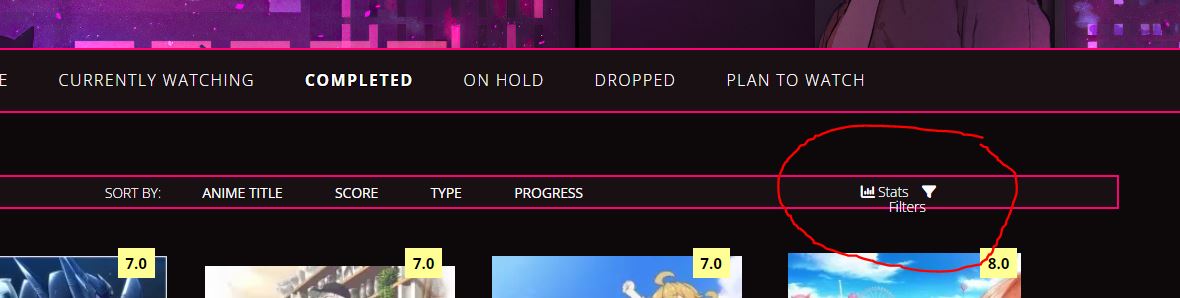 Thanks in advance. Edit: here's the link to the template post: https://myanimelist.net/forum/?topicid=1927876 |
FulkrySep 12, 2022 12:39 PM
Sep 12, 2022 5:05 PM
#586

| @Fulkry you should be posting in that newsletter thread for help instead of some random thread from 2009 |
   My Userscripts - Themes - Userstyles - Extensions (Chrome/Firefox) [API CSS] MAL-Scraper-API Cover/CSS Generator |
Sep 12, 2022 8:52 PM
#587
Fulkry said: Need help, stats and filter button bugged. I used a template so I have no idea what's wrong. https://i.ibb.co/P57DTCT/this.jpg https://pastebin.com/LGqSHcPZ It's a simple fix, probably a simple browser difference from the designer. Add this to the bottom of your CSS: /* fix filter button text position */
.stats { white-space: nowrap; } |
Sep 13, 2022 1:16 AM
#588
Valerio_Lyndon said: Fulkry said: Need help, stats and filter button bugged. I used a template so I have no idea what's wrong. https://i.ibb.co/P57DTCT/this.jpg https://pastebin.com/LGqSHcPZ It's a simple fix, probably a simple browser difference from the designer. Add this to the bottom of your CSS: /* fix filter button text position */
.stats { white-space: nowrap; }Ohhh It's working perfectly, thanks a lot! |
Nov 2, 2022 10:27 PM
#589
| I can't find the topic that had how to add the snow effect (among other similar effects) to an anime list. And there was a Gungrave anime list theme I found that I can't find again. Does anyone know where those might be? They had a lot more stuff on them but I forgot to bookmark the pages. |
Nov 2, 2022 11:24 PM
#590
Gamer418 said: I can't find the topic that had how to add the snow effect (among other similar effects) to an anime list. And there was a Gungrave anime list theme I found that I can't find again. Does anyone know where those might be? They had a lot more stuff on them but I forgot to bookmark the pages. Snow on the bottom here https://myanimelist.net/forum/?topicid=1499059#msg63378297 The Gungrave layout, maybe, at the bottom https://myanimelist.net/forum/?topicid=1928424 |
|
Nov 3, 2022 2:10 PM
#591
Shishio-kun said: Gamer418 said: I can't find the topic that had how to add the snow effect (among other similar effects) to an anime list. And there was a Gungrave anime list theme I found that I can't find again. Does anyone know where those might be? They had a lot more stuff on them but I forgot to bookmark the pages. Snow on the bottom here https://myanimelist.net/forum/?topicid=1499059#msg63378297 The Gungrave layout, maybe, at the bottom https://myanimelist.net/forum/?topicid=1928424 Thanks a ton! I appreciate it. ^^ |
May 29, 2023 11:46 PM
#592
| When I add a "storage" option to something in my anime list, MAL asks me to input how many discs I own, and it displays it under the storage column as "Blu-ray 4.0" if I put 4 discs. Leaving the numeric field blank just gives me "Blu-ray 0.0." But I would much rather it just say "Blu-ray." Is there a way to do this in the CSS? |
May 30, 2023 3:04 PM
#593
Bocazon said: When I add a "storage" option to something in my anime list, MAL asks me to input how many discs I own, and it displays it under the storage column as "Blu-ray 4.0" if I put 4 discs. Leaving the numeric field blank just gives me "Blu-ray 0.0." But I would much rather it just say "Blu-ray." Is there a way to do this in the CSS? I think there should be a way with using the anime title CSS to create some custom text over the storage box. It's an old but reliable trick. There might be other ways but which anime do you want to add "Blu-ray" too? I can write the code for it and then you will be able to adjust it later for each new anime you want to add unique storage text too btw list and profile pic looking great! |
|
May 30, 2023 4:09 PM
#594
Shishio-kun said: Thank you.Bocazon said: When I add a "storage" option to something in my anime list, MAL asks me to input how many discs I own, and it displays it under the storage column as "Blu-ray 4.0" if I put 4 discs. Leaving the numeric field blank just gives me "Blu-ray 0.0." But I would much rather it just say "Blu-ray." Is there a way to do this in the CSS? I think there should be a way with using the anime title CSS to create some custom text over the storage box. It's an old but reliable trick. There might be other ways but which anime do you want to add "Blu-ray" too? I can write the code for it and then you will be able to adjust it later for each new anime you want to add unique storage text too btw list and profile pic looking great! I would want "Blu-ray" on the following: Code Geass R1 Code Geass R2 Cowboy Bebop Neon Genesis Evangelion Neon Genesis Evangelion: Death & Rebirth The End of Evangelion Eureka Seven Perfect Blue Legend of the Galactic Heroes Legend of the Galactic Heroes: My Conquest is the Sea of Stars Legend of the Galactic Heroes: Golden Wings Legend of the Galactic Heroes: Overture to a New War Legend of the Galactic Heroes: Gaiden 1998 Legend of the Galactic Heroes: Gaiden 1999 Haruhi Suzumiya 2006 Haruhi Suzumiya 2009 Dissapearance of Haruhi Suzumiya Clannad Clannad After Story ef: a tale of memories. ef: a tale of melodies. Tengen Toppa Gurren Lagann Gurren Lagann Movie 1 - Gurren-hen Gurren Lagann Movie 2 - Lagann-hen Bakemonogatari Angel Beats! Angel Beats! Specials Steins;Gate Steins;Gate: Egoistic Poriomania Fullmetal Alchemist: Brotherhood Puella Magi Madoka Magica Puella Magi Madoka Magica Move 1: Beginnings Puella Magi Madoka Magica Movie 2: Eternal Puella Magi Madoka Magica Movie 3: Rebellion Kill la Kill Kill la Kill Specials Attack on Titan Season 1 Attack on Titan Season 2 Attack on Titan Season 3 Part 1 Attack on Titan Season 3 Part 2 Attack on Titan: The Final Season Part 1 Attack on Titan: The Final Season Part 2 Made in Abyss Season 1 Mushoku Tensei Season 1 Part 1 Mushoku Tensei Season 1 Part 2 Mushoku Tensei: Eris the Goblin Slayer And "DVD" on these: The Pet Girl of Sakurasou Fate/Kaleid Liner Prisma Illya 2wei |
May 30, 2023 6:00 PM
#595
Bocazon said: Shishio-kun said: Thank you.Bocazon said: When I add a "storage" option to something in my anime list, MAL asks me to input how many discs I own, and it displays it under the storage column as "Blu-ray 4.0" if I put 4 discs. Leaving the numeric field blank just gives me "Blu-ray 0.0." But I would much rather it just say "Blu-ray." Is there a way to do this in the CSS? I think there should be a way with using the anime title CSS to create some custom text over the storage box. It's an old but reliable trick. There might be other ways but which anime do you want to add "Blu-ray" too? I can write the code for it and then you will be able to adjust it later for each new anime you want to add unique storage text too btw list and profile pic looking great! I would want "Blu-ray" on the following: Code Geass R1 Code Geass R2 Cowboy Bebop Neon Genesis Evangelion Neon Genesis Evangelion: Death & Rebirth The End of Evangelion Eureka Seven Perfect Blue Legend of the Galactic Heroes Legend of the Galactic Heroes: My Conquest is the Sea of Stars Legend of the Galactic Heroes: Golden Wings Legend of the Galactic Heroes: Overture to a New War Legend of the Galactic Heroes: Gaiden 1998 Legend of the Galactic Heroes: Gaiden 1999 Haruhi Suzumiya 2006 Haruhi Suzumiya 2009 Dissapearance of Haruhi Suzumiya Clannad Clannad After Story ef: a tale of memories. ef: a tale of melodies. Tengen Toppa Gurren Lagann Gurren Lagann Movie 1 - Gurren-hen Gurren Lagann Movie 2 - Lagann-hen Bakemonogatari Angel Beats! Angel Beats! Specials Steins;Gate Steins;Gate: Egoistic Poriomania Fullmetal Alchemist: Brotherhood Puella Magi Madoka Magica Puella Magi Madoka Magica Move 1: Beginnings Puella Magi Madoka Magica Movie 2: Eternal Puella Magi Madoka Magica Movie 3: Rebellion Kill la Kill Kill la Kill Specials Attack on Titan Season 1 Attack on Titan Season 2 Attack on Titan Season 3 Part 1 Attack on Titan Season 3 Part 2 Attack on Titan: The Final Season Part 1 Attack on Titan: The Final Season Part 2 Made in Abyss Season 1 Mushoku Tensei Season 1 Part 1 Mushoku Tensei Season 1 Part 2 Mushoku Tensei: Eris the Goblin Slayer And "DVD" on these: The Pet Girl of Sakurasou Fate/Kaleid Liner Prisma Illya 2wei The easiest way I can think of is this- first you gotta know that for each anime they have their own # and title in the address bar when you go to the page, like Cowboy Bebop is anime #1 https://myanimelist.net/anime/1/Cowboy_Bebop The fate anime you want DVD on is #20509 https://myanimelist.net/anime/20509/Fate_kaleid_liner_Prisma%E2%98%86Illya_2wei So with that in mind you can use codes like this to add custom text. It selects the anime's picture (.data.image) according to its number and part of its title (see in the quotations after a[href*=). Then the custom text is edited after content: and the text is repositioned with margin-top and left
.data.image a[href*="/1/Cowboy"]:before{
color: #CCCCCC !important;
content: "Blu-ray";
position: absolute !important;
margin-top: 25px !important;
left: 980px;
height: 20px;
width:50px;
}


.data.image a[href*="20509/Fate"]:before{
color: #CCCCCC !important;
content: "DVD";
position: absolute !important;
margin-top: 25px !important;
left: 980px;
height: 20px;
width:50px;
}
You have to do with this each individual anime because I was looking through all the titles and I think this would actually be the best way. So to add Eureka 7 and give it a custom text for blu-ray, we find its number on its address page https://myanimelist.net/anime/237/Koukyoushihen_Eureka_Seven We take the Cowboy Bebop code with blu-ray and copy it .data.image a[href*="/1/Cowboy"]:before{
color: #CCCCCC !important;
content: "Blu-ray";
position: absolute !important;
margin-top: 25px !important;
left: 980px;
height: 20px;
width:50px;
}then change the stuff in quotes after a[href*= /1/Cowboy and replace it with Eureka Sevens number and first word in its title /237/Koukyoushihen .data.image a[href*="/237/Koukyoushihen"]:before{
color: #CCCCCC !important;
content: "Blu-ray";
position: absolute !important;
margin-top: 25px !important;
left: 980px;
height: 20px;
width:50px;
}
You can also simply change it to just the number with full title, or just the number, or even a random word from the title, if for whatever reason the title isn't possible to use, or if it has weird characters (special characters cause issues with this kinda thing). The code is pretty flexible but upper/lowercase matches are needed. And if you are using only the anime # put the number in slashes, like this:
.data.image a[href*="/237/"]:before{
color: #CCCCCC !important;
content: "Blu-ray";
position: absolute !important;
margin-top: 25px !important;
left: 980px;
height: 20px;
width:50px;
}
Although I definitely prefer to use the number/title method though since it's easier to find whats being customized in your CSS later this way. Might be an easier way and sort of better method I can think of doesn't seem to be working for some reason so I'm probably doing that one wrong but this works just as well lol. |
Shishio-kunMay 30, 2023 6:14 PM
|
May 30, 2023 10:49 PM
#596
| @Shishio-kun Thanks. This was really helpful. Unrelated to this specifically, but I checked out your topic you linked for marking individual anime rows, and I have two additional questions: 1. Is it possible to mark anime based on a tag I might put on multiple anime, rather than marking the image referances individually? 2. I tried to put the glowing effect on some anime (Code Geass R1, Code Geass R2, and Legend of the Galactic Heroes) but it puts the halo in the storage row and overwrites the Blu-ray tags instead of putting it on the image. Is there a way to fix this, or will the effect simply not work with the way my list is designed? |
May 30, 2023 11:32 PM
#597
| @Bocazon 1) yes the tags have their own Href selector you can edit and add stuff to. Depends on the tag text .list-table .list-table-data .data a[href*="Zero"]{ color: red !important; } 2) there's many conflicting codes at this point on your list and something added earlier is moving the glow. So you need to use something like a left or margin left code to reposition that .data.image a[href*="/820/"]:before { content: ""; background-color: transparent; opacity: 1; position:absolute; display: block; margin-left: -916px; height: 70px; width: 50px; box-shadow: 0px 0px 21px 4px rgba(255,217,0,1); } Or adjust whatever earlier code is targeting or affecting the same spot |
|
May 31, 2023 1:01 AM
#598
| @Shishio-kun I was able to get my hearts working based on the tags just fine, but I can't find a way for the glowing element to work with the shadow to the correct alignment, nor how to do it without it messing up the storage column somehow. Does the halo effect exist as a .png somewhere? If it does, I could just do the same thing I did for the hearts but with a different alignment and different tag. |
May 31, 2023 10:32 AM
#599
| @Bocazon That glow was CSS generated not an image I ever had. I'm a little confused about what you're trying to do, are you trying to make every row where you have a green heart also have a glowing picture? For that I think you could use the after code from the image and then it doesnt seem to affect the heart or the storage info. This is for kill la kill .data.image a[href*="/18679/"]:after {
content: "";
background-color: transparent;
opacity: 1;
position:absolute;
display: block;
margin-left: 0px;
margin-top: -70px;
height: 70px;
width: 50px;
box-shadow: 0px 0px 21px 4px rgba(255,217,0,1);
} |
Shishio-kunMay 31, 2023 11:56 AM
|
May 31, 2023 1:02 PM
#600
| @Shishio-kun No, I just wanted it on Code Geass and Galactic Heroes. I also put it on some manga. Anyways, using :after worked perfectly. I also figured out that you can seperate the .data clauses with commas in order to not have to rewrite the same code for items im putting the same effect on. Thanks for everything. I've also been using your guides for awhile now; you're quite the helpful person when it comes to this stuff. |
More topics from this board
» Have you ever used a mechanical pencil for drawing?DesuMaiden - Dec 19 |
11 |
by jiv123
»»
2 hours ago |
|
» Did I go over the top with the stamps on my profile?vermerin - Dec 17 |
10 |
by Chipp_Dipp
»»
7 hours ago |
|
» 【 ART THREAD 】Let's share our art! ❤︎ ( 1 2 3 4 5 ... Last Page )mewmewforever - Aug 30, 2024 |
275 |
by waferish
»»
12 hours ago |
|
» I made a 'Cultured' higher or lower gameDuxAlbion - Yesterday |
1 |
by Retro8bit
»»
Yesterday, 5:07 PM |
|
» AI-Powered Anime Recommendations + Stats ( 1 2 )ameo___ - May 23, 2022 |
88 |
by therex55213
»»
Yesterday, 4:15 PM |