
New
Dec 22, 2018 6:34 PM
#1
| What is this? I edited Takana_no_Hana's layouts so they're easy to convert into custom anime themes! The video, text, and codes all make it simple as possible :D For example, I took Grid Style 1 and replaced the default pictures with One Piece pictures to build a One Piece layout in minutes (example below in spoiler and video). You can also use the default Kimi no Na wa or Seiren themes from here if you don't want to change pictures!  Youtube Link: https://youtu.be/cA0g4HkNLic Imgur Login: https://imgur.com/ Repair broken layouts: https://myanimelist.net/forum/?topicid=439897 Share your custom theme: https://myanimelist.net/forum/?topicid=318547 Ask for help: https://myanimelist.net/forum/?topicid=200323 More image sources: https://myanimelist.net/forum/?topicid=504129 How to change the pics to make a custom theme Click the link under the layout you want and install the layout. Use the video above, or follow the text instructions in the spoiler under each link to change the code and make your own custom theme! You'll have to find and download the pics you want to make your new theme with. Your choices! Share or donate your designs! We would love to see your remixes in this thread (or click here and share)! You can also donate the codes so we other users can try your theme out :D Grid Style 1 * 1 Wallpaper * 1 Banner * 6 Customized category buttons with their own pics * 1 Render on the right side (removable) * Custom Quote on top of the banner  Click here for the code Alternate link How to change pics 1. After installing the layout, go to the CSS edit box where you pasted the code. 2. Near the top of the code, find the uppercase text for the part you want to change. For example, to change the main background or a banner background, find MAIN BACKGROUND or BANNER BACKGROUND. 3. Underneath that text, there should be some codes with a parenthesis following background-image or something similar. Delete what's in the parenthesis. 4. Then upload the new background image you want for that part. Upload the picture to Imgur or a similar site and copy the direct link. It will look something like: http://i.imgur.com/VTrW1N1.jpg Paste it into the parenthesis. 5. Save with the button underneath the CSS edit box. The background image be changed. How to remove pics 1. After installing the layout, go to the CSS edit box where you pasted the code. 2. Near the top of the code, find the uppercase text for the part you want to change. For example, to remove the side character renders, search for SIDE CHARACTERS or RENDER. 3. Underneath that text, there should be some codes with a parenthesis following background-image or something similar. Delete what's in the parenthesis. 4. Save with the button underneath the CSS edit box. The pics should be transparent or blank now. How to change colors of the list's boxes containing anime/manga. 1. After installing the layout, go to the CSS edit box where you pasted the code. 2. Near the top of the code, find /* ANIME/MANGA CONTAINER SETTINGS */ 3. Under there, look for background color settings. You can change the colors after color: here. You can use a single color word like purple or transparent, or RGBA color settings. RGBA colors like rgba(255, 0, 0, .5) That's red with half opacity. Something like this can be generated here or Google "RGBA COLOR GENERATOR". http://www.hexcolortool.com btw the section for hover is what you see when pointing the cursor to the container. How to change the quote at the top. 1. After installing the layout, go to the CSS edit box where you pasted the code. 2. Near the top of the code, find /* BANNER QUOTE*/ 3. The quote's text is in quotations below. Change it to what you want. Leaving it blank will leave no quote. 4. Save. Grid Style 4 * 6 Wallpapers (one for each category page) * 6 Banners (one for each category page) * 6 Customized category buttons with their own pics * 2 Renders on the each side (removable) * Custom Quote on top of the banner  Click here for the code Alternate link How to change pics 1. After installing the layout, go to the CSS edit box where you pasted the code. 2. Near the top of the code, find the uppercase text for the part you want to change. For example, to change the main background or a banner background, find MAIN BACKGROUND or BANNER BACKGROUND. 3. Underneath that text, there should be some codes with a parenthesis following background-image or something similar. Delete what's in the parenthesis. 4. Then upload the new background image you want for that part. Upload the picture to Imgur or a similar site and copy the direct link. It will look something like: http://i.imgur.com/VTrW1N1.jpg Paste it into the parenthesis. 5. Save with the button underneath the CSS edit box. The background image be changed. How to remove pics 1. After installing the layout, go to the CSS edit box where you pasted the code. 2. Near the top of the code, find the uppercase text for the part you want to change. For example, to remove the side character renders, search for SIDE CHARACTERS or RENDER. 3. Underneath that text, there should be some codes with a parenthesis following background-image or something similar. Delete what's in the parenthesis. 4. Save with the button underneath the CSS edit box. The pics should be transparent or blank now. How to change colors of the list's boxes containing anime/manga. 1. After installing the layout, go to the CSS edit box where you pasted the code. 2. Near the top of the code, find /* ANIME/MANGA CONTAINER SETTINGS */ 3. Under there, look for background color settings. You can change the colors after color: here. You can use a single color word like purple or transparent, or RGBA color settings. RGBA colors like rgba(255, 0, 0, .5) That's red with half opacity. Something like this can be generated here or Google "RGBA COLOR GENERATOR". http://www.hexcolortool.com btw the section for hover is what you see when pointing the cursor to the container. How to change the quote at the top. 1. After installing the layout, go to the CSS edit box where you pasted the code. 2. Near the top of the code, find /* BANNER QUOTE*/ 3. The quote's text is in quotations below. Change it to what you want. Leaving it blank will leave no quote. 4. Save. Line Style Simple * 1 Wallpaper * Custom Quote on top of the banner * Custom table and row hover color * Big preview pic on row hover 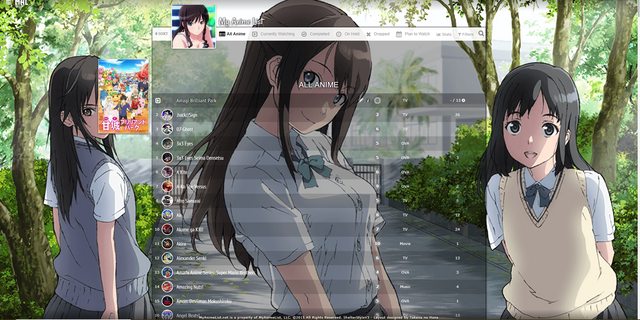 Click here for the code Alternate Link How to change pics 1. After installing the layout, go to the CSS edit box where you pasted the code. 2. Near the top of the code, find the uppercase text for the part you want to change. For example, to change the main background or a banner background, find MAIN BACKGROUND or BANNER BACKGROUND. 3. Underneath that text, there should be some codes with a parenthesis following background-image or something similar. Delete what's in the parenthesis. 4. Then upload the new background image you want for that part. Upload the picture to Imgur or a similar site and copy the direct link. It will look something like: http://i.imgur.com/VTrW1N1.jpg Paste it into the parenthesis. 5. Save with the button underneath the CSS edit box. The background image be changed. How to remove pics 1. After installing the layout, go to the CSS edit box where you pasted the code. 2. Near the top of the code, find the uppercase text for the part you want to change. For example, to remove the side character renders, search for SIDE CHARACTERS or RENDER. 3. Underneath that text, there should be some codes with a parenthesis following background-image or something similar. Delete what's in the parenthesis. 4. Save with the button underneath the CSS edit box. The pics should be transparent or blank now. How to change colors of the list's boxes containing anime/manga. 1. After installing the layout, go to the CSS edit box where you pasted the code. 2. Near the top of the code, find /* ANIME/MANGA CONTAINER SETTINGS */ 3. Under there, look for background color settings. You can change the colors after color: here. You can use a single color word like purple or transparent, or RGBA color settings. RGBA colors like rgba(255, 0, 0, .5) That's red with half opacity. Something like this can be generated here or Google "RGBA COLOR GENERATOR". http://www.hexcolortool.com btw the section for hover is what you see when pointing the cursor to the container. How to change the quote at the top. 1. After installing the layout, go to the CSS edit box where you pasted the code. 2. Near the top of the code, find /* BANNER QUOTE*/ 3. The quote's text is in quotations below. Change it to what you want. Leaving it blank will leave no quote. 4. Save. Line Style 5 * 6 Wallpapers (one for each category page) * 6 Banners (one for each category page) * Custom Quote on top of the banner * Custom table and row hover color * Big preview pic on row hover 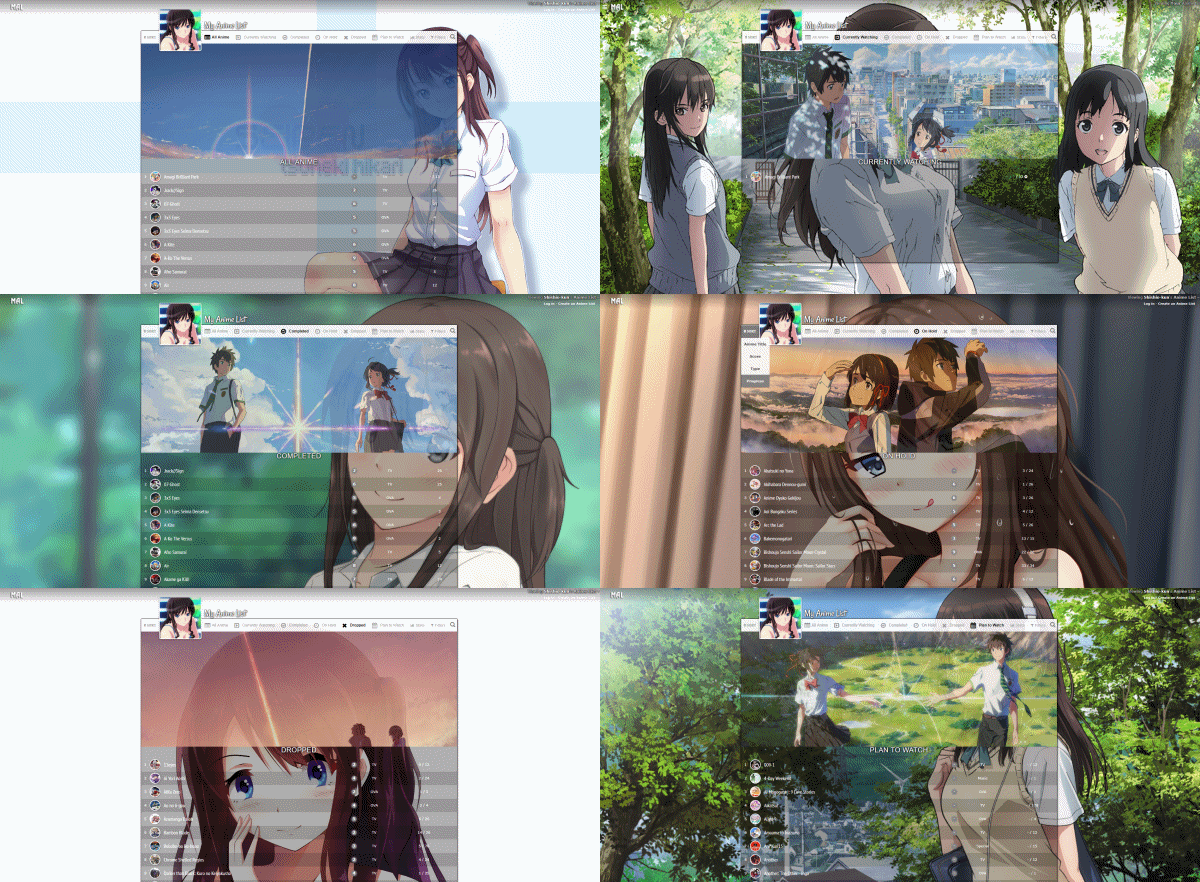 Click here for the code Alternate Link How to change pics 1. After installing the layout, go to the CSS edit box where you pasted the code. 2. Near the top of the code, find the uppercase text for the part you want to change. For example, to change the main background or a banner background, find MAIN BACKGROUND or BANNER BACKGROUND. 3. Underneath that text, there should be some codes with a parenthesis following background-image or something similar. Delete what's in the parenthesis. 4. Then upload the new background image you want for that part. Upload the picture to Imgur or a similar site and copy the direct link. It will look something like: http://i.imgur.com/VTrW1N1.jpg Paste it into the parenthesis. 5. Save with the button underneath the CSS edit box. The background image be changed. How to remove pics 1. After installing the layout, go to the CSS edit box where you pasted the code. 2. Near the top of the code, find the uppercase text for the part you want to change. For example, to remove the side character renders, search for SIDE CHARACTERS or RENDER. 3. Underneath that text, there should be some codes with a parenthesis following background-image or something similar. Delete what's in the parenthesis. 4. Save with the button underneath the CSS edit box. The pics should be transparent or blank now. How to change colors of the list's boxes containing anime/manga. 1. After installing the layout, go to the CSS edit box where you pasted the code. 2. Near the top of the code, find /* ANIME/MANGA CONTAINER SETTINGS */ 3. Under there, look for background color settings. You can change the colors after color: here. You can use a single color word like purple or transparent, or RGBA color settings. RGBA colors like rgba(255, 0, 0, .5) That's red with half opacity. Something like this can be generated here or Google "RGBA COLOR GENERATOR". http://www.hexcolortool.com btw the section for hover is what you see when pointing the cursor to the container. How to change the quote at the top. 1. After installing the layout, go to the CSS edit box where you pasted the code. 2. Near the top of the code, find /* BANNER QUOTE*/ 3. The quote's text is in quotations below. Change it to what you want. Leaving it blank will leave no quote. 4. Save. Clarity Style 1 * 1 Wallpaper (turned off by default) * 1 Banner * 1 Banner Avatar * 1 Banner Character * 2 Side Renders (turned off by default) * Custom text on banner * Custom table colors * Big preview pic on row hover 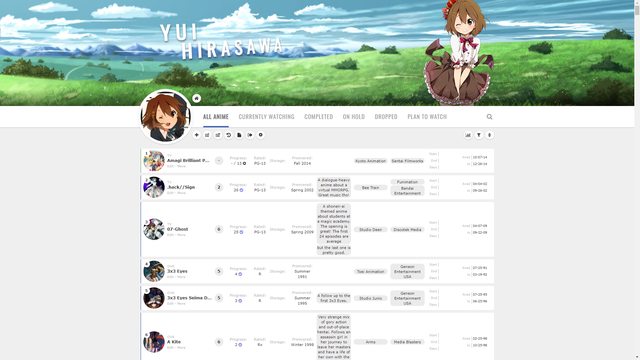 Source Code Alternative Link How to change pics 1. After installing the layout, go to the CSS edit box where you pasted the code. 2. Near the top of the code, find the uppercase text for the part you want to change. For example, to change the main background or a banner background, find MAIN BACKGROUND or BANNER BACKGROUND. 3. Underneath that text, there should be some codes with a parenthesis following background-image or something similar. Delete what's in the parenthesis. 4. Then upload the new background image you want for that part. Upload the picture to Imgur or a similar site and copy the direct link. It will look something like: http://i.imgur.com/VTrW1N1.jpg Paste it into the parenthesis. 5. Save with the button underneath the CSS edit box. The background image be changed. How to remove pics 1. After installing the layout, go to the CSS edit box where you pasted the code. 2. Near the top of the code, find the uppercase text for the part you want to change. For example, to remove the side character renders, search for SIDE CHARACTERS or RENDER. 3. Underneath that text, there should be some codes with a parenthesis following background-image or something similar. Delete what's in the parenthesis or add NONE. 4. Save with the button underneath the CSS edit box. The pics should be transparent or blank now. How to change colors of the list's boxes containing anime/manga. 1. After installing the layout, go to the CSS edit box where you pasted the code. 2. Near the top of the code, find /* TABLE COLORS*/ 3. Under there, look for background color settings. You can change the colors after color: here. You can use a single color word like purple or transparent, or RGBA color settings. RGBA colors like rgba(255, 0, 0, .5) That's red with half opacity. Something like this can be generated here or Google "RGBA COLOR GENERATOR". http://www.hexcolortool.com btw the section for hover is what you see when pointing the cursor to the container. How to change the quote at the top. 1. After installing the layout, go to the CSS edit box where you pasted the code. 2. Near the top of the code, find /* BANNER TEXT*/ 3. The quote's text is in quotations below. Change it to what you want. Leaving it blank will leave no quote. 4. Save. Clarity Style 2 * 1 Wallpaper (turned off by default) * 6 Banners (one for each category page) * 1 Banner Avatar * 6 Banner Characters (one for each category page) * 2 Side Renders (turned off by default) * Custom text on banner * Custom table colors * Big preview pic on row hover 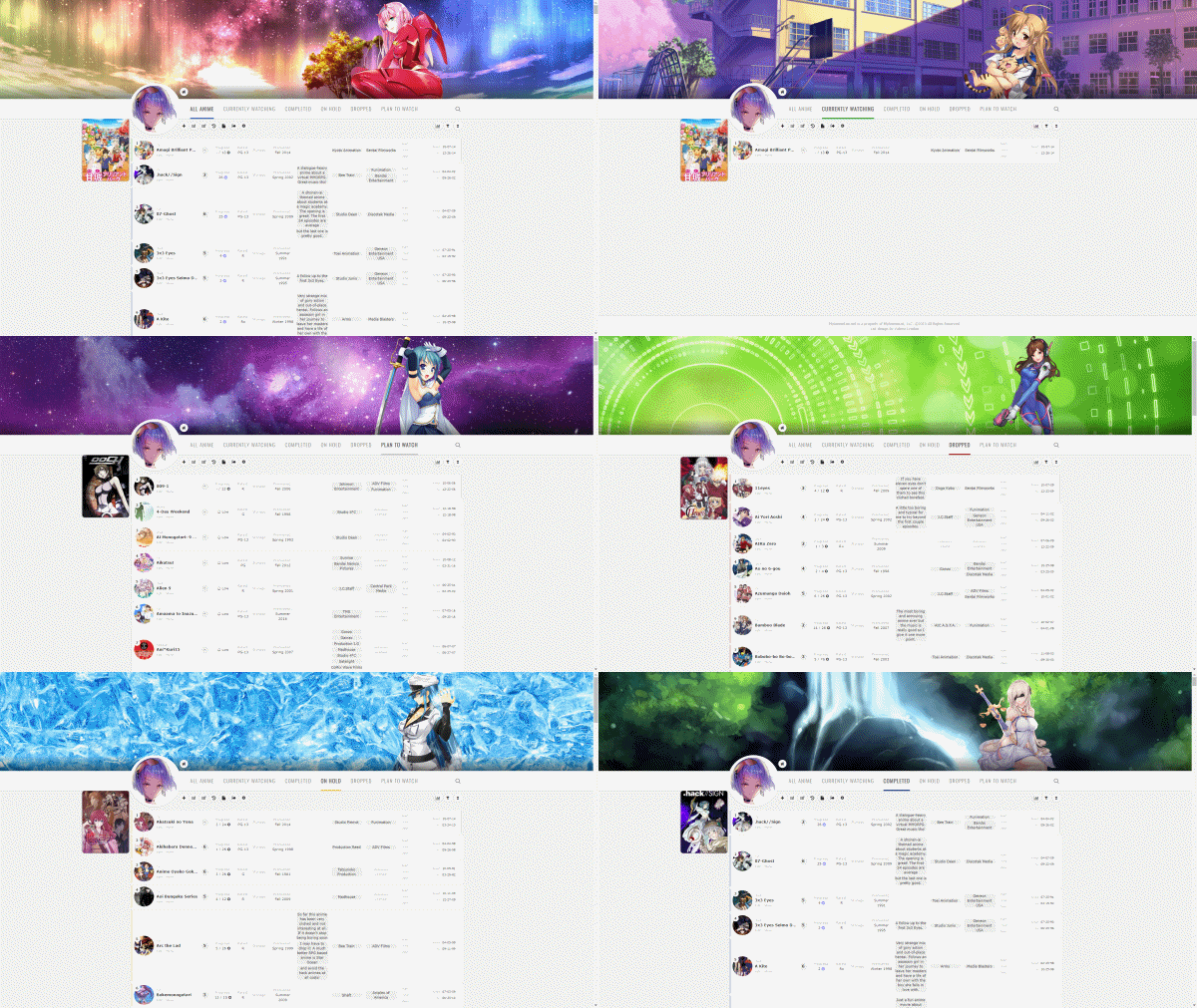 Source Code Alternative Link How to change pics 1. After installing the layout, go to the CSS edit box where you pasted the code. 2. Near the top of the code, find the uppercase text for the part you want to change. For example, to change the main background or a banner background, find MAIN BACKGROUND or BANNER BACKGROUND. 3. Underneath that text, there should be some codes with a parenthesis following background-image or something similar. Delete what's in the parenthesis. 4. Then upload the new background image you want for that part. Upload the picture to Imgur or a similar site and copy the direct link. It will look something like: http://i.imgur.com/VTrW1N1.jpg Paste it into the parenthesis. 5. Save with the button underneath the CSS edit box. The background image be changed. How to remove pics 1. After installing the layout, go to the CSS edit box where you pasted the code. 2. Near the top of the code, find the uppercase text for the part you want to change. For example, to remove the side character renders, search for SIDE CHARACTERS or RENDER. 3. Underneath that text, there should be some codes with a parenthesis following background-image or something similar. Delete what's in the parenthesis or add NONE. 4. Save with the button underneath the CSS edit box. The pics should be transparent or blank now. How to change colors of the list's boxes containing anime/manga. 1. After installing the layout, go to the CSS edit box where you pasted the code. 2. Near the top of the code, find /* TABLE COLORS*/ 3. Under there, look for background color settings. You can change the colors after color: here. You can use a single color word like purple or transparent, or RGBA color settings. RGBA colors like rgba(255, 0, 0, .5) That's red with half opacity. Something like this can be generated here or Google "RGBA COLOR GENERATOR". http://www.hexcolortool.com btw the section for hover is what you see when pointing the cursor to the container. How to change the quote at the top. 1. After installing the layout, go to the CSS edit box where you pasted the code. 2. Near the top of the code, find /* BANNER TEXT*/ 3. The quote's text is in quotations below. Change it to what you want. Leaving it blank will leave no quote. 4. Save. More layouts of these types and extensions found here: https://myanimelist.net/forum/?topicid=1640096 Full List of Premade Layouts: http://myanimelist.net/forum/?topicid=1499058 |
Shishio-kunNov 17, 2019 8:15 PM
 |
Jan 10, 2019 9:20 PM
#2
| Added two new styles from Valerio_Lyndon: Clarity 1 and 2! They have cleaner lists and are more banner focused. |
|
Nov 17, 2019 5:50 PM
#3
| First of all thanks you very much for such an amaizing and simple way to hava a custom list. Well, i followed the video, and now i have this list i love: (Except for the middle banner, it's impossible to get a decent image of this anime man xD) https://ibb.co/HHY0Wd2 But there is a little problem, for more i search i dont see the way to replace the background in of the "Filter" menú https://ibb.co/BTtpkMr For more i check the code i don't see an url to replace that. Thanks in advance :-) P.D.: Used the "Grid Style 1" |
Nov 17, 2019 6:39 PM
#4
ThaReP said: First of all thanks you very much for such an amaizing and simple way to hava a custom list. Well, i followed the video, and now i have this list i love: (Except for the middle banner, it's impossible to get a decent image of this anime man xD) https://ibb.co/HHY0Wd2 But there is a little problem, for more i search i dont see the way to replace the background in of the "Filter" menú https://ibb.co/BTtpkMr For more i check the code i don't see an url to replace that. Thanks in advance :-) P.D.: Used the "Grid Style 1" Thanks! Advanced options should be the code you want. Just add your background link to the parenthesis and add this to the bottom of your code, it should work :D #advanced-options{ background-image: url() !important;} |
|
Nov 17, 2019 6:49 PM
#5
Shishio-kun said: Thanks! Advanced options should be the code you want. Just add your background link to the parenthesis and add this to the bottom of your code, it should work :D #advanced-options{ background-image: url() !important;} It works, thanks you very much, i add a note for myself in the code as you make with the rest of elements so i will not forgot where i have to replace it xDDD https://i.ibb.co/ft5SzPb/Screenshot-8.png (Just as test, tomorrow i have to find a better image for that) And just for be sure, in the Original i think that image have a % of transparency P.D.: Hope you like my modification of the list :-) |
Nov 17, 2019 7:06 PM
#6
ThaReP said: Shishio-kun said: Thanks! Advanced options should be the code you want. Just add your background link to the parenthesis and add this to the bottom of your code, it should work :D #advanced-options{ background-image: url() !important;} It works, thanks you very much, i add a note for myself in the code as you make with the rest of elements so i will not forgot where i have to replace it xDDD https://i.ibb.co/ft5SzPb/Screenshot-8.png (Just as test, tomorrow i have to find a better image for that) And just for be sure, in the Original i think that image have a % of transparency P.D.: Hope you like my modification of the list :-) yay! looks good :D |
|

Nov 18, 2019 10:22 AM
#8
Thanks again man, this is very helpful to have a beautiful list. |
More topics from this board
» I made a small tier-list generator app that pulls your completed anime!aelius_desu - 4 hours ago |
1 |
by huuko
»»
2 hours ago |
|
» MyAnimeList Helper (chrome extension) - hover anime stats in your MAL listelizsfic - Yesterday |
2 |
by elizsfic
»»
8 hours ago |
|
» Have you ever used a dip pen for drawing?DesuMaiden - Jan 4 |
3 |
by Retro8bit
»»
8 hours ago |
|
» Have you ever generated anime images with AI software?DesuMaiden - Jan 4 |
9 |
by KenaiPhoenix
»»
10 hours ago |
|
» your anime edits!!stoned_ape - Jan 5 |
1 |
by Retro8bit
»»
Yesterday, 12:10 AM |