
New
Jan 28, 2023 10:18 AM
#1

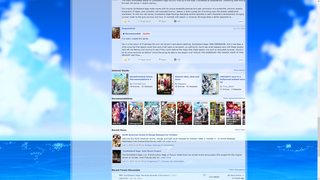
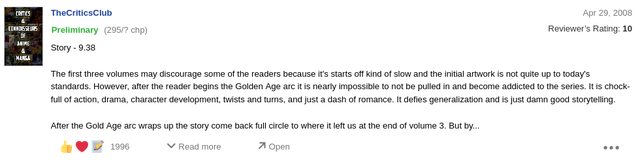
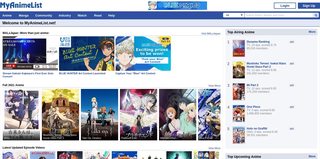
Improve and customize the MyAnimeList site with these themes! These themes use CSS to change the site outside of the lists and only you see the changes. Feel free to ask for help here or make requests if needed. See forum stickies for all the ways to customize and improve MyAnimeList. For list layout CSS, go to this page. How to use and customize these themes 1) Install the Stylus extension (links below). You can also look up and try the Stylish extension as an alternative. For Chrome/Opera: https://chrome.google.com/webstore/detail/stylus/clngdbkpkpeebahjckkjfobafhncgmne For Firefox: https://addons.mozilla.org/en-US/firefox/addon/styl-us/ 2) Click the install button on the theme's page and on its style page if needed. The theme should change MyAnimeList in some way. You can add more themes- most are compatible with each other. All Stylus themes: https://userstyles.world/search?q=myanimelist More themes: https://userstyles.org/styles/browse?search_terms=myanimelist Basics of customizing images https://youtu.be/YcHyfFdVUAk You'll need to upload the background to a site and insert the direct link url in the correct parenthesis I do in the video. Sites to upload images to: Imgur is best, but requires login to keep images long-term. Most other sites won't need a login. Use postimages or catbox for NSFW images. https://imgur.com/upload https://postimages.org/ https://imgbb.com/ https://imgbox.io/ https://catbox.moe/ example of a direct link url: https://imgur.com/sYkNVAI.jpg https://youtu.be/DsGUq0GtodI You'll need to upload the character render to a site and insert the direct link url in the correct parenthesis I do in the video. Character renders are also PNGs with transparent backgrounds. More on renders here. Sites to upload images to: Imgur is best, but requires login to keep images long-term. Most other sites won't need a login. Use postimages or catbox for NSFW images. https://imgur.com/upload https://postimages.org/ https://imgbb.com/ https://imgbox.io/ https://catbox.moe/ examples of direct link url: https://i.imgur.com/WLRuczW.png https://i.imgur.com/IdiA3Yi.png Custom background If you are using the Stylus, instructions to change the background are under "Description". If you are using the Stylish extension, those versions have options are their page when you install the theme to upload your own background image. Link: Link * Video guide  by Shishio-kun Custom characters on the sides If you are using the Stylus, instructions to change the characters are under "Description". If you are using the Stylish extension, those versions have options are their page when you install the theme to upload new character renders. Two custom characters Link: Link * Video guide  Randomized Characters (nearly 100 characters) Link: Link * Video guide For userstyles.org you have to manually set the random option before you install the theme. Random character preview 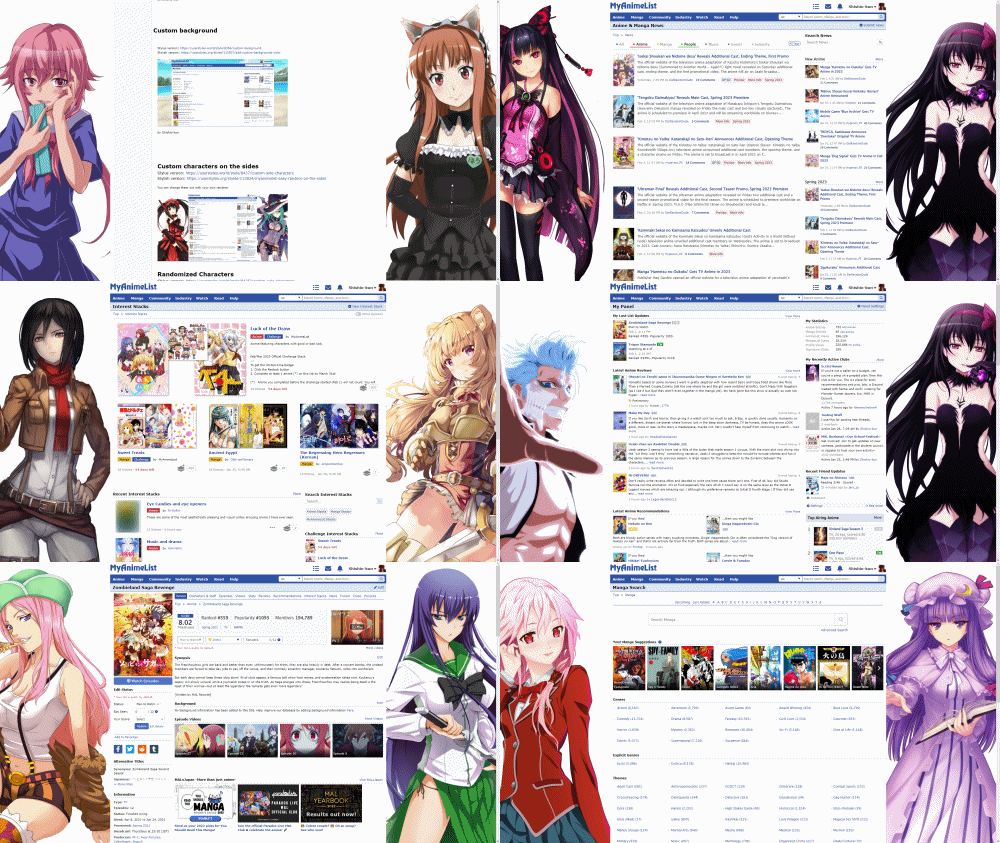 Darkened Side Characters Link: Link * Video guide Darkens the characters, for users with dark themes. You can still change them or set to random. Darkened character preview 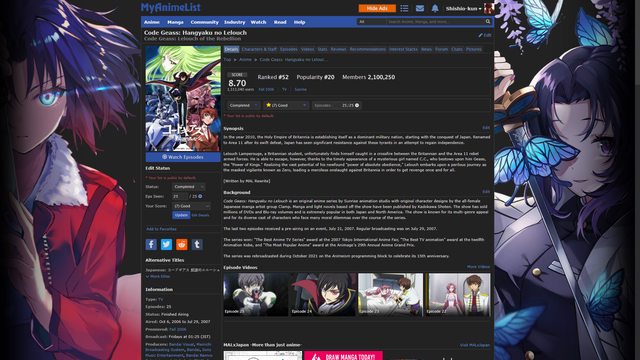 by Shishio-kun Add a custom banner easily Crayon theme For Stylus: Link An absolute favorite among the MAL community and the most amazing design here. Dark version available! Not compatible with MAL Sticky Menu or Add a Custom Banner themes. 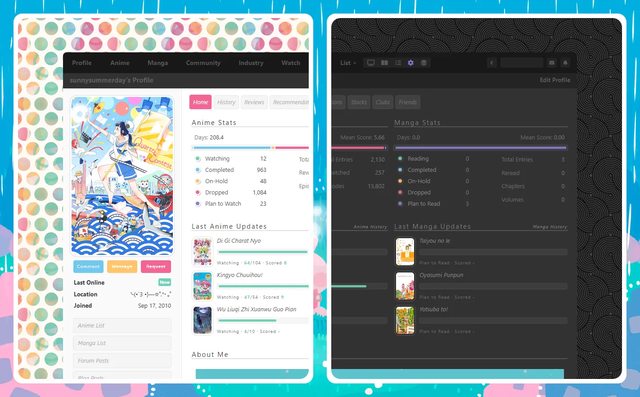 by SunnySummerDay (PajamaPop) Comfortable, Lightweight Dark Modes You only need to install one version depending on your preferences and what extension you use. Dark Theme for the entire site, excluding lists For Stylus:Link Dark Theme for the entire site, including lists For Stylus: Link Darkens the entire MyAnimeList site! 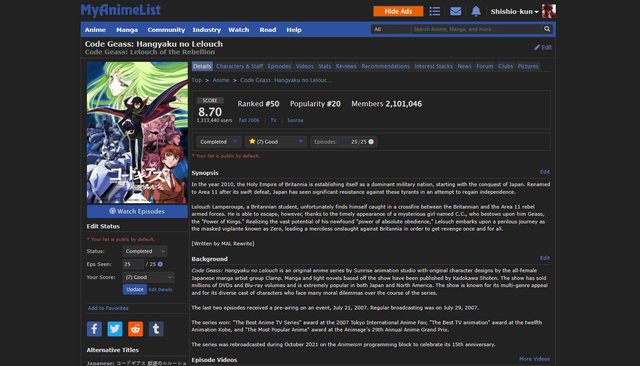 Alternate versions Easy-to-edit Dark Mode for the entire site, including lists For Stylus: Link The Easy-to-edit version is intended for developers and CSS designers who want to customize the colors or update it with new selectors. Lightweight Dark Modes by Shishio-kun Thanks to Valerio_Lyndon and ShaggyZE for help and donating codes in the start, and Dark Reader/Cicerakes for color inspiration. Darken other user's lists For Stylus: Link This is for users who already use a dark mode for the site, but also want to darken the blinding-white default list other users have. It also darkens your own, however there is an option to exclude your own list. 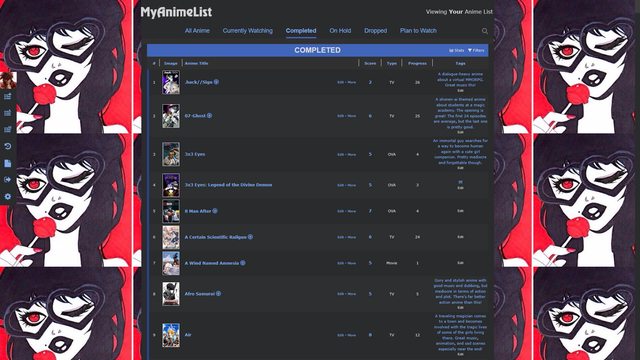 by Shishio-kun Translucent MyAnimeList Cleaner MyAnimeList Link: Link Remove Recaptcha, the footers, the hide ads button, and the streaming banners on top. 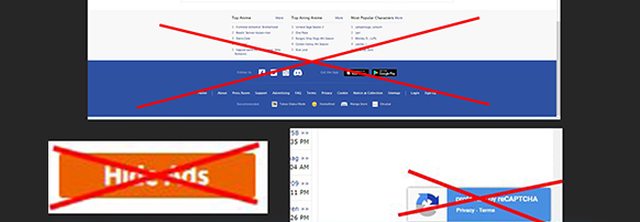 by Shishio-kun Show reviewers score again Fix Anime/Manga Info Hover MAL Sticky Menu Link: https://userstyles.world/style/8482/mal-sticky-menu The top menu will stay fixed as you scroll down, like in the example. Not compatible with Crayon or Add a Custom Banner themes.  by Lifeiscrazy Wide MyAnimeList Vertical Favorites (Original style) Stylus: Link 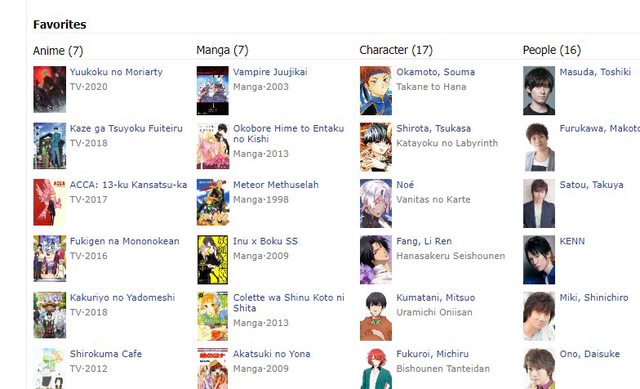 Vertical Favorites (Big style) Stylus: Link Vertical Favorites (Small/minimal) Vertical Favorites (Big/minimal) By Shishio-kun Backup and Legacy Codes https://userstyles.org/user-profile/290958 My userstyles.org codes, you can find older versions of the my themes on this site, including some alternates and unique themes not listed above. Just keep in mind this site has been hopelessly buggy for years and these themes haven't been updated recently. There's more! If you liked this content, here are similar pages to check out: MyAnimeList Extensions and Aps Extensions and aps with a variety of features. Tampermonkey scripts Add features and fixes with Javascript. Helpful Sites A collection of sites that work with Myanimelist, connect to it, or would interest MAL users in general. Requests for new themes? You can also make a request for a particular new feature or fix in this thread, and we'll see what we can do. |
Shishio-kunFeb 18, 2025 11:21 AM
 |
Reply Disabled for Non-Club Members
Feb 11, 2023 7:51 AM
#2
| @Shishio-kun is it possible to have "Darken other user's lists" style exclude our own list? or is that a more global one? Asking since my list already has a dark theme, so having this style enabled just removes the bg from certain parts of my list. That's a very neat style tho, I will keep it for when I need to check other people list. Just that I will have to remember to turn it on/off ^^; |

Feb 11, 2023 8:37 AM
#3
SheyCroix said: @Shishio-kun is it possible to have "Darken other user's lists" style exclude our own list? or is that a more global one? Asking since my list already has a dark theme, so having this style enabled just removes the bg from certain parts of my list. That's a very neat style tho, I will keep it for when I need to check other people list. Just that I will have to remember to turn it on/off ^^; Oh wow I never thought about that till now! Yes it can be done but I think you have to manually edit the CSS for that, I will update the theme later and notify you if I add it. Thanks for bringing this up I can add it to my new video for the Stylus stuff :D |
|
Feb 11, 2023 9:10 AM
#4
Feb 11, 2023 12:34 PM
#5
SheyCroix said: Anytime and yes, please let me know. I've updated the theme, you have insert your username into the moz document line at the top, replacing mine. Must have the exact capitalization. https://userstyles.world/style/8473/darken-lists-only |
|
Feb 11, 2023 1:12 PM
#6
| @lifeiscrazy thank you for adding your sticky menu theme to userstyles.world! https://userstyles.world/style/8482/mal-sticky-menu I've added it to the list above :D |
|
Feb 11, 2023 3:46 PM
#7
Shishio-kun said: I've updated the theme, you have insert your username into the moz document line at the top, replacing mine. Must have the exact capitalization. https://userstyles.world/style/8473/darken-lists-only Lovely, it works. Thanks a lot~ |
Feb 12, 2023 3:17 AM
#8
SheyCroix said: Shishio-kun said: I've updated the theme, you have insert your username into the moz document line at the top, replacing mine. Must have the exact capitalization. https://userstyles.world/style/8473/darken-lists-only Lovely, it works. Thanks a lot~ It works, awesome! :D this new style of stickies is off to a good start, more to come |
|
Mar 3, 2023 7:47 AM
#9

| Sticky menu is very awesome nice! ✌🏻👍🏻 @ Shishio-kun |
 Anime-Planet.com - anime | manga | watch anime online |
Mar 3, 2023 8:24 AM
#10
Yes it is super useful and by @Lifeiscrazy |
|
Jun 25, 2023 2:26 PM
#11
| @PrincessPorcupin I've updated this sticky; I added some video examples on changing images with Stylus which I recommend switching to if you haven't. Also, I'd recommend using the userstyles.world themes (linked in the OP) instead of the userstyles.org site which breaks constantly (almost 10 years now) Basics of customizing images https://youtu.be/YcHyfFdVUAk You'll need to upload the background to a site and insert the direct link url in the correct parenthesis I do in the video. Sites to upload images to: https://imgbb.com/ https://postimages.org/ https://imgbox.io/ https://catbox.moe/ example of a direct link url: https://imgur.com/sYkNVAI.jpg https://youtu.be/DsGUq0GtodI You'll need to upload the character render to a site and insert the direct link url in the correct parenthesis I do in the video. Character renders are also PNGs with transparent backgrounds. More on renders here. Sites to upload images to: https://imgbb.com/ https://postimages.org/ https://imgbox.io/ https://catbox.moe/ examples of direct link url: https://i.imgur.com/WLRuczW.png https://i.imgur.com/IdiA3Yi.png |
|
Jun 25, 2023 2:33 PM
#12
| Links to a couple new themes also added, although these only fix MAL issues to set them back to normal. |
|
Jun 29, 2023 4:29 AM
#13

Shishio-kun said: Got it to work now, thank you!@PrincessPorcupin I've updated this sticky; I added some video examples on changing images with Stylus which I recommend switching to if you haven't. Also, I'd recommend using the userstyles.world themes (linked in the OP) instead of the userstyles.org site which breaks constantly (almost 10 years now) Basics of customizing images https://youtu.be/YcHyfFdVUAk You'll need to upload the background to a site and insert the direct link url in the correct parenthesis I do in the video. Sites to upload images to: https://imgbb.com/ https://postimages.org/ https://imgbox.io/ https://catbox.moe/ example of a direct link url: https://imgur.com/sYkNVAI.jpg https://youtu.be/DsGUq0GtodI You'll need to upload the character render to a site and insert the direct link url in the correct parenthesis I do in the video. Character renders are also PNGs with transparent backgrounds. More on renders here. Sites to upload images to: https://imgbb.com/ https://postimages.org/ https://imgbox.io/ https://catbox.moe/ examples of direct link url: https://i.imgur.com/WLRuczW.png https://i.imgur.com/IdiA3Yi.png |
 |
Jun 30, 2023 11:50 AM
#14
PrincessPorcupin said: Shishio-kun said: Got it to work now, thank you!@PrincessPorcupin I've updated this sticky; I added some video examples on changing images with Stylus which I recommend switching to if you haven't. Also, I'd recommend using the userstyles.world themes (linked in the OP) instead of the userstyles.org site which breaks constantly (almost 10 years now) Basics of customizing images https://youtu.be/YcHyfFdVUAk You'll need to upload the background to a site and insert the direct link url in the correct parenthesis I do in the video. Sites to upload images to: https://imgbb.com/ https://postimages.org/ https://imgbox.io/ https://catbox.moe/ example of a direct link url: https://imgur.com/sYkNVAI.jpg https://youtu.be/DsGUq0GtodI You'll need to upload the character render to a site and insert the direct link url in the correct parenthesis I do in the video. Character renders are also PNGs with transparent backgrounds. More on renders here. Sites to upload images to: https://imgbb.com/ https://postimages.org/ https://imgbox.io/ https://catbox.moe/ examples of direct link url: https://i.imgur.com/WLRuczW.png https://i.imgur.com/IdiA3Yi.png Awesome :D |
|
Sep 21, 2024 1:29 PM
#15
| @Shishio-kun sorry to bother but the custom background thing in Stylus is not working I have tried reinstalling it and it works at first, but the moment I refresh the page the background disapears |
  |
Sep 21, 2024 5:49 PM
#16
Fixing it, just testing things  |
|
Sep 21, 2024 9:38 PM
#17
Reply to is_peque
@Shishio-kun
sorry to bother but the custom background thing in Stylus is not working
I have tried reinstalling it and it works at first, but the moment I refresh the page the background disapears
sorry to bother but the custom background thing in Stylus is not working
I have tried reinstalling it and it works at first, but the moment I refresh the page the background disapears
| @is_peque The newest version of this should work, I've tested it out. |
|
Sep 22, 2024 9:50 AM
#18
Thanks! :) I have also noticed there's an orphan [size=125] (in Custom background) and a broken image (in Custom characters on the sides)   |
|
Sep 22, 2024 5:38 PM
#19
Reply to is_peque
Thanks! :)
I have also noticed there's an orphan [size=125] (in Custom background) and a broken image (in Custom characters on the sides)
| @is_peque yeah there's a million other things to fix this past year, I dont think I can fix it all tbh lol. |
|
Sep 23, 2024 12:11 AM
#20
Shishio-kun said: @is_peque yeah there's a million other things to fix this past year, I dont think I can fix it all tbh lol. don't worry, I just said it in case you didn´t know. The important thing is the links working and that stuff. Thank you for your work :) |
|
Sep 28, 2024 7:54 AM
#21
| OK, I've repaired all the userstyles.world themes which I could see were broken! They are working on page refresh for me and broken images were replaced, they simply need to be reinstalled :D |
|
Feb 18, 2025 4:30 AM
#22

| So I tried and none work for me. I tried also for Chrome, but I do not get the extension need it for it. I watched the video also. All I get is the code for it, but I cannot do anything with it. |
 |
Feb 18, 2025 4:41 AM
#23
Reply to NightmareTala
So I tried and none work for me. I tried also for Chrome, but I do not get the extension need it for it. I watched the video also. All I get is the code for it, but I cannot do anything with it.
| @NightmareTala NightmareTala said: but I do not get the extension need it for it You need to install the extension for it, Stylus, to use these, first before anything else These also work perfectly fine for me, so the problem may be on your end or you missed a step. After installing Stylus for your browser, when you install a theme from a page like this https://userstyles.world/style/8356/custom-background make sure you also click the Install Style button on the left side of the code page. If you're still having problems, answer: What browser were you trying this for, before you tried for Chrome Which theme exactly did you want to use first (also link it's page, please) |
|
Feb 18, 2025 4:48 AM
#24
Reply to Shishio-kun
@NightmareTala
You need to install the extension for it, Stylus, to use these, first before anything else
These also work perfectly fine for me, so the problem may be on your end or you missed a step. After installing Stylus for your browser, when you install a theme from a page like this
https://userstyles.world/style/8356/custom-background
make sure you also click the Install Style button on the left side of the code page.
If you're still having problems, answer:
What browser were you trying this for, before you tried for Chrome
Which theme exactly did you want to use first (also link it's page, please)
NightmareTala said:
but I do not get the extension need it for it
but I do not get the extension need it for it
You need to install the extension for it, Stylus, to use these, first before anything else
These also work perfectly fine for me, so the problem may be on your end or you missed a step. After installing Stylus for your browser, when you install a theme from a page like this
https://userstyles.world/style/8356/custom-background
make sure you also click the Install Style button on the left side of the code page.
If you're still having problems, answer:
What browser were you trying this for, before you tried for Chrome
Which theme exactly did you want to use first (also link it's page, please)
| @Shishio-kun I see, I didn't got the part I need the Stylus extension. I had to look it up myself as the link didn't do it for me. I got it now on firefox and chrome. Sorry for the inconvenience, that I didn't see that, I thought it was called something else. Thank you like always for answering my questions. I love everyone layouts and this club. |
| |
Feb 19, 2025 5:32 AM
#25
| @NightmareTala no problem, anytime 🙏 |
|
Mar 11, 2025 8:39 PM
#26
| Leaving this here to possibly add/update later (add covers to the anime search pages via Stylus)
@import "https://shishiohub.github.io/Covers/searchcovers.css";

#content > div > table > tbody > tr:hover .hoverinfo_trigger::after{
content: "";
display: block !important;
width: 350px;
height: 600px;
position: fixed;
top: 320px;
left: 50px;
background-position: center !important;
background-repeat: no-repeat !important;
background-size: contain !important;
opacity: 1;
}

#content > div > table > tbody > tr .hoverinfo_trigger::after{
opacity: 0;
}
how to use Install Stylus https://chromewebstore.google.com/detail/stylus/clngdbkpkpeebahjckkjfobafhncgmne Go to anime search, click Stylus write theme for Anime, paste in the code, done how to update I meant this for users who want to update it themselves, but you can ask me to update it when the newer anime are missing. I usually update stuff within the week once I see it here. Fuck' do I gotta be? To update it on your own (fairly easy) go to https://malscraper.azurewebsites.net/covers click blue submit button open file downloaded in Notepad+ https://notepad-plus-plus.org/downloads/ go to Search tab, click Replace Now replace #more with a#sarea also replace { with .hoverinfo_trigger::after{ and finally replace .jpg with l.jpg Paste the new code into your Stylus extension after the other codes. You can delete the import if you want since you've replaced the import now. You can also paste your new code to an all new theme, and simply add the #content > div > table > tbody > tr:hover .hoverinfo_trigger::after{
content: "";
display: block !important;
width: 350px;
height: 600px;
position: fixed;
top: 320px;
left: 50px;
background-position: center !important;
background-repeat: no-repeat !important;
background-size: contain !important;
opacity: 1;
}
#content > div > table > tbody > tr .hoverinfo_trigger::after{
opacity: 0;
}to the top |
Shishio-kunMar 11, 2025 9:14 PM
|
Apr 27, 2025 9:27 AM
#27

| @Shishio-kun Translucent MyAnimeList seems broken. Leaves all non-transparent stock aside from making main top tab invisible derp. Hover do not work at all. |
keroroslayerApr 27, 2025 9:39 AM
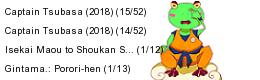 |
Apr 27, 2025 9:42 AM
#28
Reply to keroroslayer
@Shishio-kun Translucent MyAnimeList seems broken. Leaves all non-transparent stock aside from making main top tab invisible derp.
Hover do not work at all.
Hover do not work at all.
@keroroslayer I only see new reply buttons need an update but everything else looks transparent, nothing broken.  It's not meant to be used with dark theme (I made this in like 2015) and it needs a good background, that might be your problem. no idea what you mean by Leaves all non-transparent stock aside For future problems try to give a screenshot and circling what you mean. I'll make some updates to it tho to make the reply buttons clearer as well as some menus that could be solid rather than transparent |
|
Apr 27, 2025 9:55 AM
#29
Reply to Shishio-kun
@keroroslayer I only see new reply buttons need an update but everything else looks transparent, nothing broken.
It's not meant to be used with dark theme (I made this in like 2015) and it needs a good background, that might be your problem.
no idea what you mean by
For future problems try to give a screenshot and circling what you mean. I'll make some updates to it tho to make the reply buttons clearer as well as some menus that could be solid rather than transparent
It's not meant to be used with dark theme (I made this in like 2015) and it needs a good background, that might be your problem.
no idea what you mean by
Leaves all non-transparent stock aside
For future problems try to give a screenshot and circling what you mean. I'll make some updates to it tho to make the reply buttons clearer as well as some menus that could be solid rather than transparent
| @Shishio-kun using stock white theme https://postimg.cc/dDDzhLWx for some reason every image i try to up is broken kek. |
keroroslayerApr 27, 2025 10:07 AM
| |
Apr 27, 2025 10:02 AM
#30
Reply to keroroslayer
@Shishio-kun using stock white theme https://postimg.cc/dDDzhLWx for some reason every image i try to up is broken kek.
| @keroroslayer I don't see the problem besides you not using a wallpaper as I did? You need to use the background theme with it that's what the transparent theme is for. Upload the background to a reliable site, imgbb, postimage, etc |
|
Apr 27, 2025 10:07 AM
#31
Reply to Shishio-kun
@keroroslayer
I don't see the problem besides you not using a wallpaper as I did? You need to use the background theme with it that's what the transparent theme is for. Upload the background to a reliable site, imgbb, postimage, etc
I don't see the problem besides you not using a wallpaper as I did? You need to use the background theme with it that's what the transparent theme is for. Upload the background to a reliable site, imgbb, postimage, etc
| @Shishio-kun thx my bad. i don't want any wallpaper so...gonna turn it off. Hoped it would work on stock too. Make white transparentish. btw. what about hover ? |
| |
Apr 27, 2025 10:20 AM
#32
Reply to keroroslayer
@Shishio-kun thx my bad. i don't want any wallpaper so...gonna turn it off. Hoped it would work on stock too. Make white transparentish.
btw. what about hover ?
btw. what about hover ?
| @keroroslayer ??? There's a million hovers on MAL pages, not sure what you're referring to (text, menu, etc) but I'm updating the theme's hover menus on the topbar |
|
Apr 27, 2025 10:28 AM
#33
Reply to Shishio-kun
@keroroslayer
??? There's a million hovers on MAL pages, not sure what you're referring to (text, menu, etc) but I'm updating the theme's hover menus on the topbar
??? There's a million hovers on MAL pages, not sure what you're referring to (text, menu, etc) but I'm updating the theme's hover menus on the topbar
@Shishio-kun 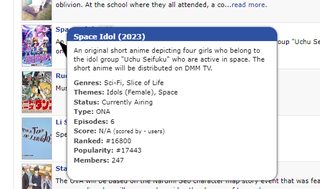 |
| |
Apr 27, 2025 10:34 AM
#34
Reply to keroroslayer
| @keroroslayer Not broken on my end in any theme including transparent (updated just now). It's not broken in your screenshot either, and you said you aren't using the transparent anyways- so I'm not sure what broken hover you're referring to. |
|
Apr 30, 2025 9:24 AM
#35
Reply to Shishio-kun
@keroroslayer
Not broken on my end in any theme including transparent (updated just now). It's not broken in your screenshot either, and you said you aren't using the transparent anyways- so I'm not sure what broken hover you're referring to.
Not broken on my end in any theme including transparent (updated just now). It's not broken in your screenshot either, and you said you aren't using the transparent anyways- so I'm not sure what broken hover you're referring to.
| @Shishio-kun transparent fixed on stock theme thx. As for hover , nth shows for me when i point at anime picture from search result still...am i doing sth wrong huh. |
keroroslayerApr 30, 2025 9:38 AM
| |
Apr 30, 2025 12:46 PM
#36
Reply to keroroslayer
@Shishio-kun transparent fixed on stock theme thx.
As for hover , nth shows for me when i point at anime picture from search result still...am i doing sth wrong huh.
As for hover , nth shows for me when i point at anime picture from search result still...am i doing sth wrong huh.
| @keroroslayer OK np, it's been updated on the userstyles.world site to address this 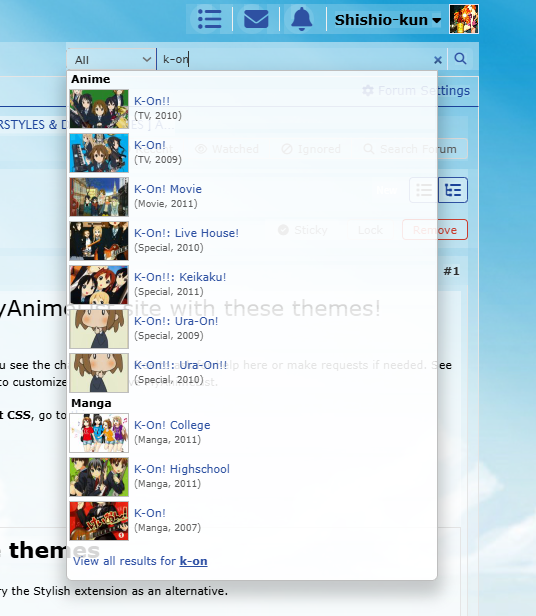 |
|
May 1, 2025 8:47 AM
#37
Reply to Shishio-kun
| @Shishio-kun i don't understand. i ment that hover tooltip does nth when pointing at picture as in your description: see nth ---> 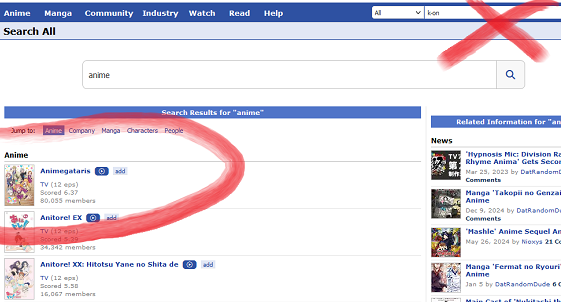 btw. i had purple notification number now it's somehow back itself to red and blue after reading : ( |
keroroslayerMay 1, 2025 1:09 PM
| |
May 1, 2025 9:52 AM
#38
Reply to keroroslayer
@Shishio-kun i don't understand. i ment that hover tooltip does nth when pointing at picture as in your description:
see nth --->
btw. i had purple notification number now it's somehow back itself to red and blue after reading : (
see nth --->
btw. i had purple notification number now it's somehow back itself to red and blue after reading : (
| @keroroslayer The notification color changed back to normal because the easter event is over I can see the preview nth in the link. But I dont have this problem with the transparent theme and I don't see it at all. I think it might be with another extension or theme you have, or maybe it's your browser? Can be hard to hunt down why. What page exactly was that on? |
|
May 1, 2025 1:53 PM
#39
Reply to Shishio-kun
@keroroslayer
The notification color changed back to normal because the easter event is over
I can see the preview nth in the link. But I dont have this problem with the transparent theme and I don't see it at all. I think it might be with another extension or theme you have, or maybe it's your browser? Can be hard to hunt down why. What page exactly was that on?
The notification color changed back to normal because the easter event is over
I can see the preview nth in the link. But I dont have this problem with the transparent theme and I don't see it at all. I think it might be with another extension or theme you have, or maybe it's your browser? Can be hard to hunt down why. What page exactly was that on?
| @Shishio-kun turned out pictures link must end either with .png or .jpg , so after one upload the file somewhere - instead of generated link , he must right click on picture & copy the url. as you can see above it's working now just fine. Huh , so the notification icon color can't be changed ? Transparent theme works just fine , am talking about the anime synopsis preview isn't showing when i hover on any of it from the search result: It only works for on the main page: 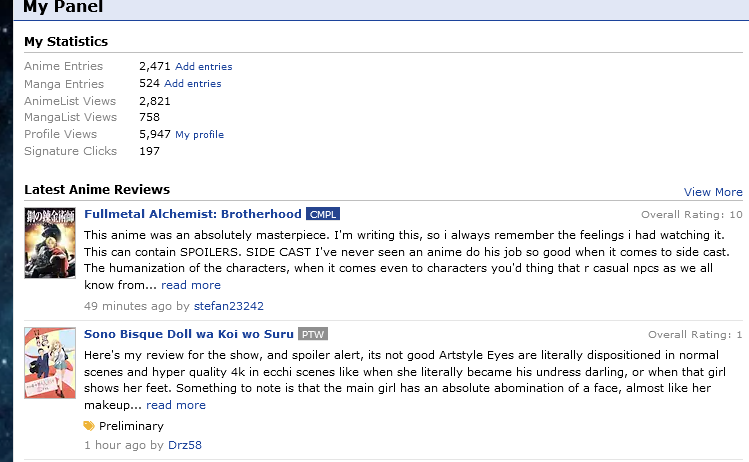 Your entry from the 1st post: 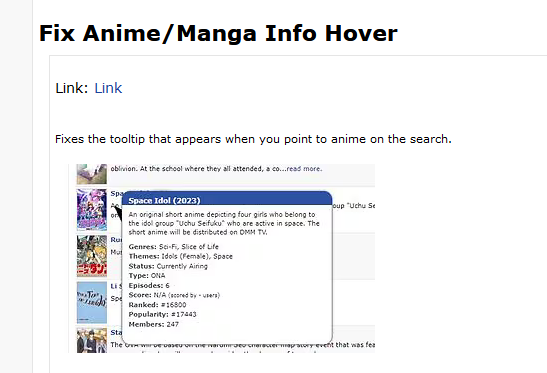 |
| |
May 1, 2025 2:59 PM
#40
| @keroroslayer OK I see you're talking about that theme. I don't remember what that theme does lol. I think it fixed an old problem with the tooltip that doesn't happen anymore. Why are you using it exactly? I don't see it doing anything different now and it's not breaking the tooltip when I do use it, even with the other themes combined. The notification colors can be changed, but there's many codes for that part; I gave you some that appear to be them in the other thread you're asking in. To test it out, I'd have to log onto an alt and send myself pings to see exactly how they're colored but I think the codes I gave you should work. If you can't get it I can look into it later |
|
May 2, 2025 9:49 AM
#41
Reply to Shishio-kun
@keroroslayer OK I see you're talking about that theme.
I don't remember what that theme does lol. I think it fixed an old problem with the tooltip that doesn't happen anymore.
Why are you using it exactly? I don't see it doing anything different now and it's not breaking the tooltip when I do use it, even with the other themes combined.
The notification colors can be changed, but there's many codes for that part; I gave you some that appear to be them in the other thread you're asking in. To test it out, I'd have to log onto an alt and send myself pings to see exactly how they're colored but I think the codes I gave you should work. If you can't get it I can look into it later
I don't remember what that theme does lol. I think it fixed an old problem with the tooltip that doesn't happen anymore.
Why are you using it exactly? I don't see it doing anything different now and it's not breaking the tooltip when I do use it, even with the other themes combined.
The notification colors can be changed, but there's many codes for that part; I gave you some that appear to be them in the other thread you're asking in. To test it out, I'd have to log onto an alt and send myself pings to see exactly how they're colored but I think the codes I gave you should work. If you can't get it I can look into it later
| @Shishio-kun i have stock mal theme , tried few browsers. on none when i point on anime pictures from search results i can't get the little cloud with anime synopsis - works only on main page with "latest anime reviews" SO I WANT IT FIXED TO WORK AS YOU DID HERE. Fix it , please. i just discovered , that , funny enough it works when i search for anime https://myanimelist.net/anime.php?q=gugb&cat=anime and manga https://myanimelist.net/manga.php?q=yaiba&cat=manga separately but not all https://myanimelist.net/search/all?q=jvhb&cat=all - it's enough for me so we can also close this issue , thx. thx for codes |
keroroslayerMay 2, 2025 10:39 AM
| |
May 2, 2025 12:29 PM
#42
Reply to keroroslayer
@Shishio-kun i have stock mal theme , tried few browsers. on none when i point on anime pictures from search results i can't get the little cloud with anime synopsis - works only on main page with "latest anime reviews" SO I WANT IT FIXED TO WORK AS YOU DID HERE. Fix it , please.
i just discovered , that , funny enough it works when i search for anime https://myanimelist.net/anime.php?q=gugb&cat=anime and manga https://myanimelist.net/manga.php?q=yaiba&cat=manga separately but not all https://myanimelist.net/search/all?q=jvhb&cat=all - it's enough for me so we can also close this issue , thx.
thx for codes
i just discovered , that , funny enough it works when i search for anime https://myanimelist.net/anime.php?q=gugb&cat=anime and manga https://myanimelist.net/manga.php?q=yaiba&cat=manga separately but not all https://myanimelist.net/search/all?q=jvhb&cat=all - it's enough for me so we can also close this issue , thx.
thx for codes
| @keroroslayer OK I see what you mean and I have the same problem! It doesn't work on this page for me either https://myanimelist.net/search/all?q=jvhb&cat=all |
|
May 3, 2025 7:52 AM
#43
Reply to Shishio-kun
@keroroslayer
OK I see what you mean and I have the same problem! It doesn't work on this page for me either
https://myanimelist.net/search/all?q=jvhb&cat=all
OK I see what you mean and I have the same problem! It doesn't work on this page for me either
https://myanimelist.net/search/all?q=jvhb&cat=all
| @Shishio-kun if only there was a way to report it lol. btw. i may be picky but if you hover on certain anime / manga the cloud appears BUT the only way to click into its full page is to click on its name within cloud not the title next to the picture too as usual heh. |
| |
May 3, 2025 10:26 AM
#44
Reply to keroroslayer
@Shishio-kun if only there was a way to report it lol.
btw. i may be picky but if you hover on certain anime / manga the cloud appears BUT the only way to click into its full page is to click on its name within cloud not the title next to the picture too as usual heh.
btw. i may be picky but if you hover on certain anime / manga the cloud appears BUT the only way to click into its full page is to click on its name within cloud not the title next to the picture too as usual heh.
| @keroroslayer That could be coded into a theme, but I don't see this problem |
|
May 3, 2025 12:37 PM
#45
Reply to Shishio-kun
@keroroslayer That could be coded into a theme, but I don't see this problem
| @Shishio-kun ye it isn't a problem per se , just a convenience tbh xd. i would rather want to be able to click it , rather than the one in cloud only heh but welp. |
| |
Reply Disabled for Non-Club Members
More topics from this board
Sticky: » [ LIST LAYOUTS ] All premade CSS layouts for listsShishio-kun - Feb 20, 2023 |
33 |
by Naitik7897
»»
Yesterday, 9:39 AM |
|
Sticky: » 💚 [REPAIR STICKY] Repair/speed up layouts + Request layout fixes ( 1 2 )Shishio-kun - Nov 17, 2023 |
54 |
by Shishio-kun
»»
Dec 22, 2025 2:46 PM |
|
» [CSS- MODERN] ⭐ Minimal Dashboard layout by 5cm ~ Compact and convenient! ( 1 2 3 )Shishio-kun - Sep 4, 2020 |
133 |
by Shishio-kun
»»
Dec 2, 2025 10:24 AM |
|
» ⭐Ready to be amazed? View the Bunkasai graphic and list design contest (VOTE YOUR FAVES!)Shishio-kun - Nov 22, 2025 |
3 |
by Shishio-kun
»»
Nov 28, 2025 9:02 PM |
|
Sticky: » [ BBCODE ] All 2023 BBcodes, Guides, and Templates ( 1 2 )Shishio-kun - Feb 16, 2023 |
65 |
by F124N
»»
Nov 11, 2025 1:31 AM |