




Forum Settings
Forums

Any way to add multiple watchs to the same anime?

New
Jul 28, 2025 11:35 AM
#1
Offline
Mar 2021
3
I watched many of the animes of my list multiple times (e.g. bocchi the rock 5 times :D) and I was wondering if is there any way to account this on my list. Checking the "rewatching" thing only changes the number of the episode, from what I saw, so idk if there is anything like that.
Jul 28, 2025 11:38 AM
#2

Offline
Jul 2013
14400
Why would you want to keep track of multiple viewings of an anime show?
I have approximately 1 terabyte of anime on my computer.
Jul 28, 2025 11:43 AM
#3
Offline
Mar 2021
3
Reply to DesuMaiden
Why would you want to keep track of multiple viewings of an anime show?
idk, i think it would be nice to have something like that.
Jul 28, 2025 12:18 PM
#4
Community Mod
Offline
Dec 2015
9657
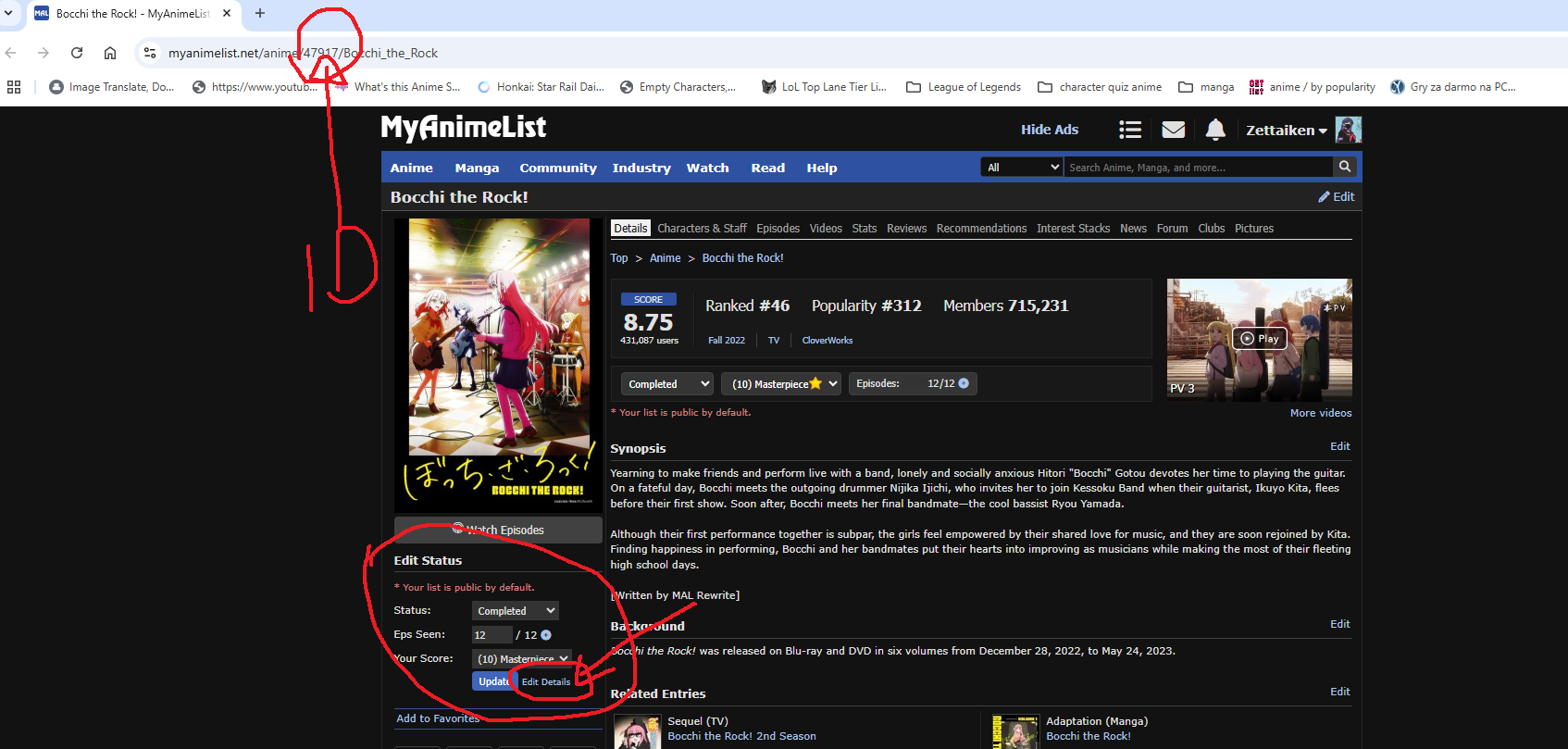
Here's the instruction how to do that, for example for Bocchi the Rock:

You enter this page -> https://myanimelist.net/anime/47917/Bocchi_the_Rock
On the left under the visual key you will see the text "Edit Status"
On the bottom you should see the blue button with the text "update" on the right side you should see "Edit Details" click on Edit Details.
After that you should be redirected here -> https://myanimelist.net/ownlist/anime/47917/edit [you can change the url here by putting the anime id number and do that way quicker for other titles -> Every anime page URL has a number, that's the ID]

And in the lower part you should see the "Total Times Re-watched Series" that's where you put the number 5 as you mentioned.

Editing -> I'll post here soon screenshots with drawings

ZettaikenJul 28, 2025 12:21 PM
Jul 28, 2025 1:47 PM
#5
Offline
Mar 2021
3
Reply to Zettaiken
Here's the instruction how to do that, for example for Bocchi the Rock:

You enter this page -> https://myanimelist.net/anime/47917/Bocchi_the_Rock
On the left under the visual key you will see the text "Edit Status"
On the bottom you should see the blue button with the text "update" on the right side you should see "Edit Details" click on Edit Details.
After that you should be redirected here -> https://myanimelist.net/ownlist/anime/47917/edit [you can change the url here by putting the anime id number and do that way quicker for other titles -> Every anime page URL has a number, that's the ID]

And in the lower part you should see the "Total Times Re-watched Series" that's where you put the number 5 as you mentioned.

Editing -> I'll post here soon screenshots with drawings

@Zettaiken tysm!!! works perfectly
Jul 28, 2025 6:53 PM
#6
Nostalgia Rules!

Offline
Jun 2008
16520
Hey I didn't even know we could do that, that was awesome! Something I didn't even know I needed in my life. O.O
Aug 21, 2025 12:38 PM
#7
Community Mod
Offline
Sep 2024
683
Topic moved to the correct board

More topics from this board

» Stop SES from adding awstrack.me to MAL emails

its_ryusuke - Jan 31

0 by its_ryusuke »»
Jan 31, 8:56 PM

» I want to remove a badge from my profile

SiljeTherese - Nov 29, 2024

10 by kim533 »»
Jan 31, 5:09 PM

» anime keeps switching back to 'watching' even though I keep putting it as 'complete'

CottonBones - Apr 15, 2020

20 by MistahBP4 »»
Jan 31, 10:43 AM

» what are interest stacks and signature clicks

iaminside42 - Jan 31

4 by iaminside42 »»
Jan 31, 8:20 AM

» how do i change my signature!

eternalworm2008 - Jan 31

2 by eternalworm2008 »»
Jan 31, 7:59 AM
It’s time to ditch the text file.
Keep track of your anime easily by creating your own list.
Sign Up Login